
Wiki con Collaborazione Studenti
Un fantastico team di studenti del nostro programma educativo ha realizzato questo wiki.
Problemi comuni del controller PS4
Diagnostica e risolvi i problemi più frequenti del tuo controller PS4 con queste guide passo passo alla soluzione problemi fai-da-te.
| 2 Soluzioni | Pulsanti del DualShock 4 bloccati |
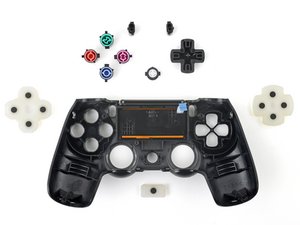 | I pulsanti del controller rimangono bloccati in posizione premuta. Le cause potenziali includono sporcizia e detriti negli interstizi dei pulsanti o pulsanti difettosi. Vedi tutte le cause e le soluzioni. |
| 6 Soluzioni | DualShock 4 non vibra |
 | Il controller non vibra. Le cause potenziali includono una batteria difettosa, motori di vibrazione difettosi, la funzione di vibrazione disattivata, un malfunzionamento generale del controller o una scarsa connettività wireless tra la PS4 e il controller. Vedi tutte le cause e le soluzioni. |
| 3 Soluzioni | DualShock 4 non si accende |
 | Il controller non si accende. Le cause potenziali includono una batteria scarica, un caricabatterie difettoso, una batteria difettosa o un malfunzionamento generale del controller. Vedi tutte le cause e le soluzioni. |
| 3 Soluzioni | Touchpad del DualShock 4 non funzionante |
 | Il touchpad non risponde. Le cause potenziali includono un touchpad difettoso, un gioco incompatibile, software non aggiornato o un problema generico del firmware. Vedi tutte le cause e le soluzioni. |
| 2 Soluzioni | Stick analogici del DualShock 4 bloccati |
 | Gli stick analogici rimangono bloccati quando vengono premuti e non tornano in posizione. Le cause potenziali includono sporcizia e detriti negli interstizi del joystick o un joystick rotto o piegato. Vedi tutte le cause e le soluzioni. |
| 4 Soluzioni | DualShock 4 batteria che non si carica |
 | Il controller non si carica e la luce sulla parte anteriore del controller non si accende. Le cause potenziali includono un malfunzionamento generale del firmware, una batteria difettosa, un cavo di ricarica difettoso o una porta di ricarica del controller difettosa. Vedi tutte le cause e le soluzioni. |
| 2 Soluzioni | DualShock 4 non si connette alla console |
 | Il controller è acceso e funzionante, ma non riesce a connettersi alla console. Le cause potenziali includono un malfunzionamento generale del firmware o un router Wi-Fi che limita la connettività. Vedi tutte le cause e le soluzioni. |
| 2 Soluzioni | DualShock 4 nessun suono |
 | Il controller non emette alcun audio dal suo sistema di altoparlanti. Le cause potenziali includono il volume del controller non abbastanza alto o un problema generico del firmware. Vedi tutte le cause e le soluzioni. |
Non hai trovato il tuo problema?
Consulta il forum Risposte per ulteriore assistenza nella soluzione problemi per il tuo caso specifico. Forse qualcuno ha già risolto lo stesso problema che stai riscontrando.
Un ringraziamento speciale a questi traduttori:
en it
100%


Questi traduttori ci stanno aiutando ad aggiustare il mondo! Vuoi partecipare?
Inizia a tradurre ›

159 Commenti
My command buttons on my DualShock4 do not respond, even after a manual reset. The controller can still turn on the PS4 though. Do I just need to replace the controller entirely, as I do not want to waste time to try and fix it myself.
mantronik - Rispondi Condividi
I learned that if your buttons are sticky, brush them with a slightly wet toothbrush. Let it sit for a couple of seconds then dry them.
John - Rispondi Condividi
A In Depth Guide to fixing DS4 Connection Issues.
1. Put your DS4 in pairing mode by holding PS button and share simultaneously. The light bar should begin to flash white.
2. Connect the DS4 to the device via Bluetooth on any of the following devices. ( PC, Android, PS3 )
3. Disconnect the DS4 from the paired Bluetooth device. Make sure you disconnect directly from the bluetooth device. Once disconnected locate a pin or a small narrow object and push into the reset hole on the rear of the DS4. Hold in place for 10 seconds.
4. Connect the USB cable to the DS4 and proceed to power on the PS4. Once the system has loaded to the login screen it will ask you to press the PlayStation Button. This will iniate pairing between the DS4 and PS4. The DS4 should now be fully operable.
Make sure to follow steps exactly for best results.
4wrd4evr - Rispondi Condividi
My ps4 controller makes à strange doubleclicking sound when i'm touching
The touchpad iT sounds like THE touchpad is à littlebit loose do you know how you change that
Ps sorry for THE bad english
Benjamin - Rispondi Condividi
when i open my ps4 the controller starts to flash (like it tries to connect with the ps4) but the it turns orange and does not connect eventually.
Elisavet Parra - Rispondi Condividi