Introduzione
Are you experiencing frequent audio static or the power draining faster than usual? If so, use this guide to help fix the batteries in your Anker Soundcore Space One headphones.
An electric battery is a source of electric power consisting of one or more electrochemical cells with external connections for powering electrical devices. A failing battery can cause your headphones to have reduced usage time, inconsistent performance when using it, and a significant decrease in playtime.
Before using this guide, make sure to check out the troubleshooting page about audio distortion. Sometimes, other issues in the device can have similar side effects to a malfunctioning battery.
This guide requires soldering. If you're unfamiliar with soldering, review the How to Solder and Desolder Connections guide and take appropriate precautions before beginning.
Cosa ti serve
-
-
-
Flip over the device so you can see the Soundcore symbol on the back two ear pieces.
 Chiedi a FixBot
-
-
-
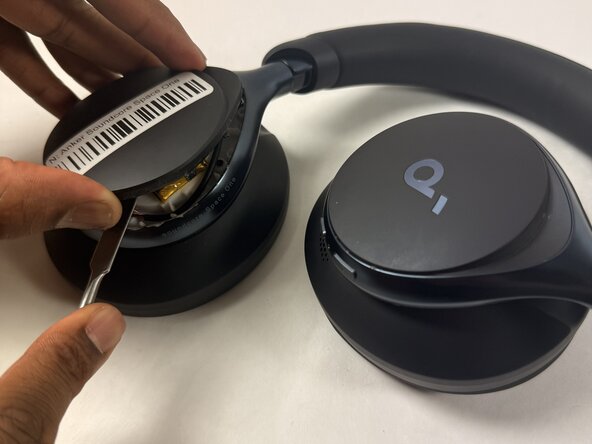
Take a strong spudger (metal or plastic) and carefully insert it into the lining between the two back ear pieces.
-
-
-
-
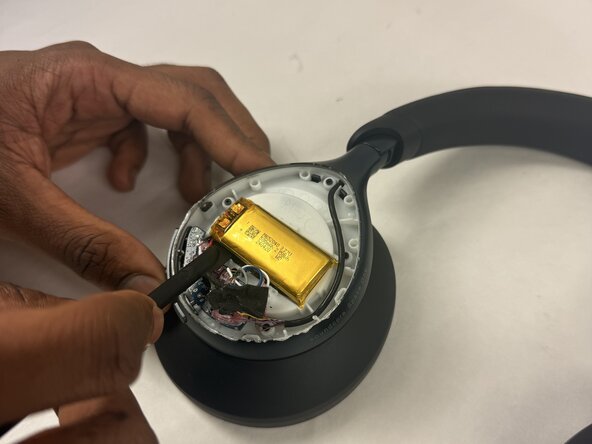
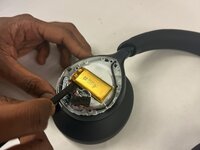
Carefully remove the cover to reveal the battery.
-
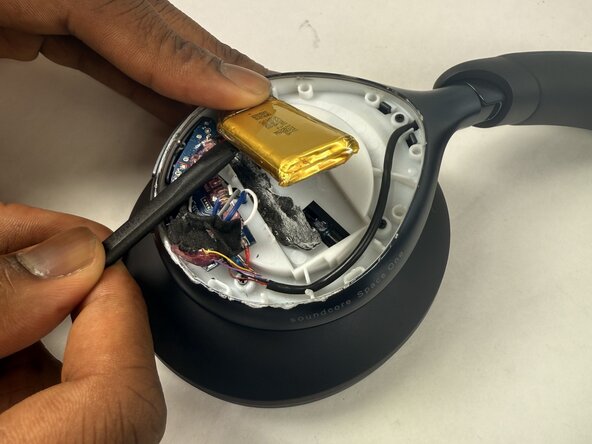
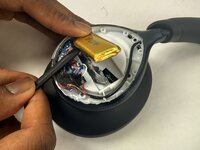
Take a spudger and carefully lift the battery from the interior components.
-
-






To reassemble your device, follow the above steps in reverse order.
For optimal performance, after completing this guide, calibrate your newly installed battery.
Take your e-waste to an R2 or e-Stewards certified recycler.
Repair didn’t go as planned? Try some basic troubleshooting or ask our Answers community for help.

Team

UMass Dartmouth, Team 2-3, Botvin Spring 2025 Membro di UMass Dartmouth, Team 2-3, Botvin Spring 2025
UMASSD-BOTVIN-S25S2G3
3 Membri
8 guide realizzate
