Salta al contenuto principale
Unisciti alla Community delle riparazioni - Crea un account

Fairphone 5 USB-C Port Replacement

Cosa ti serve

  1. Fairphone 5 USB-C Port Replacement, Prepare your phone for disassembly: passo 1, immagine 1 di 1
    • Unplug all cables and power down your phone.

    • Press the power and volume up buttons at the same time to bring up the shutdown menu.

    Chiedi a FixBot

    Aggiungi Commento

  2. Fairphone 5 USB-C Port Replacement, Pry up the back cover: passo 2, immagine 1 di 2 Fairphone 5 USB-C Port Replacement, Pry up the back cover: passo 2, immagine 2 di 2
    • Insert your fingernail, or a pry tool like a spudger, under the notch at the bottom right of the back cover.

    • Pry up the back cover to release the bottom right corner clips.

    Chiedi a FixBot

    Aggiungi Commento

  3. Fairphone 5 USB-C Port Replacement, Remove the back cover: passo 3, immagine 1 di 3 Fairphone 5 USB-C Port Replacement, Remove the back cover: passo 3, immagine 2 di 3 Fairphone 5 USB-C Port Replacement, Remove the back cover: passo 3, immagine 3 di 3
    • Grip the bottom right corner of the back cover with one hand and brace the phone frame with the other.

    • Lift the back cover away from the phone to release the clips around its perimeter.

    • Remove the back cover.

    • During reassembly, align the back cover over the phone and press along the perimeter until all clips snap back into place.

    Chiedi a FixBot

    Aggiungi Commento

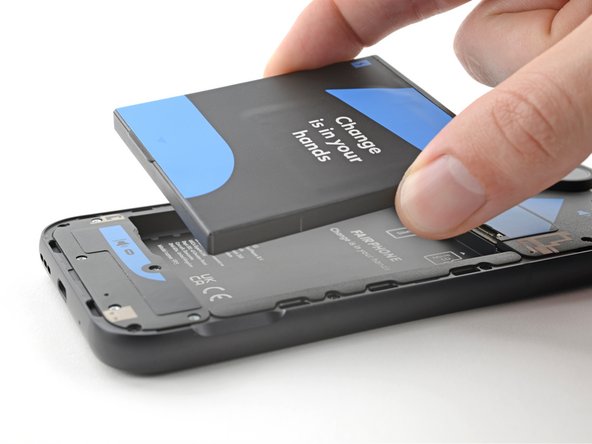
  4. Fairphone 5 USB-C Port Replacement, Remove the battery: passo 4, immagine 1 di 3 Fairphone 5 USB-C Port Replacement, Remove the battery: passo 4, immagine 2 di 3 Fairphone 5 USB-C Port Replacement, Remove the battery: passo 4, immagine 3 di 3
    • Use your fingernail, or a pry tool like a spudger, to lift the battery by its tab along the bottom edge.

    • Remove the battery.

    • During reassembly, slide the top edge of the battery into its recess in the frame before pressing the battery into place.

    Chiedi a FixBot

    Aggiungi Commento

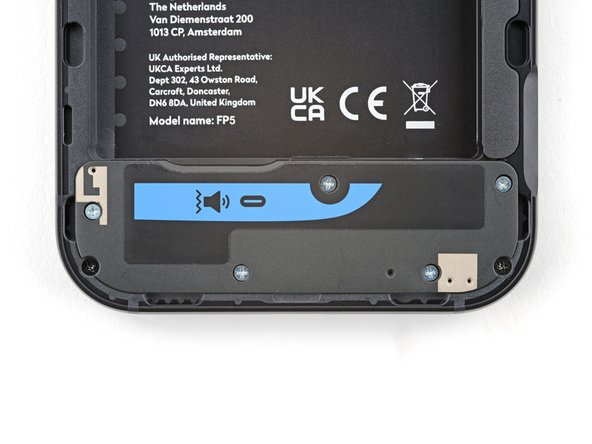
  5. Fairphone 5 USB-C Port Replacement, Unfasten the loudspeaker: passo 5, immagine 1 di 2 Fairphone 5 USB-C Port Replacement, Unfasten the loudspeaker: passo 5, immagine 2 di 2
    • Use a Phillips driver to remove the five 4.9 mm‑long screws securing the loudspeaker.

    Chiedi a FixBot

    Aggiungi Commento

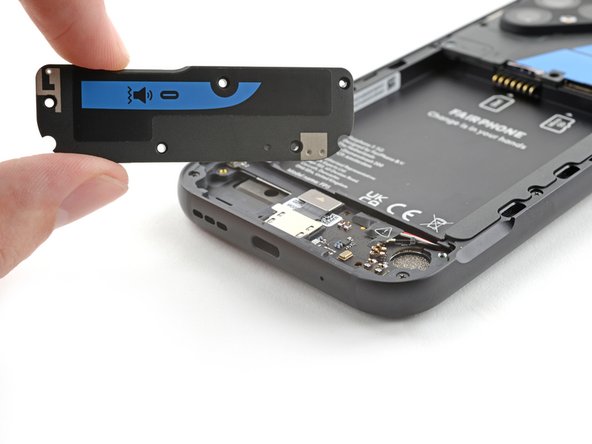
  6. Fairphone 5 USB-C Port Replacement, Remove the loudspeaker: passo 6, immagine 1 di 3 Fairphone 5 USB-C Port Replacement, Remove the loudspeaker: passo 6, immagine 2 di 3 Fairphone 5 USB-C Port Replacement, Remove the loudspeaker: passo 6, immagine 3 di 3
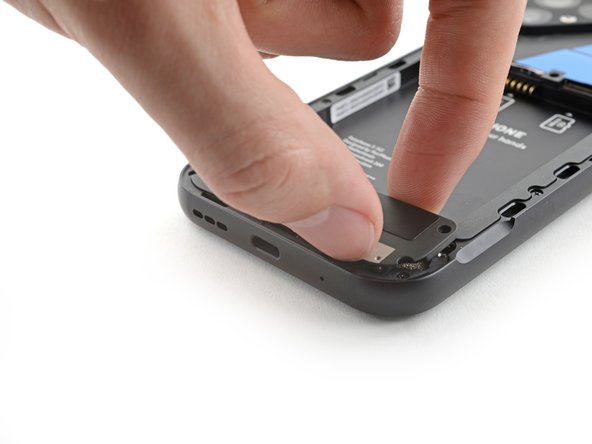
    • Insert your fingernail, or a pry tool like a spudger, under the notch at the bottom right corner of the loudspeaker.

    • Pry up the loudspeaker and pull it away from the bottom edge of the phone to separate it from the frame.

    • During reassembly, insert the bottom edge of the loudspeaker into its slot in the frame before pressing the loudspeaker into place.

    Chiedi a FixBot

    Aggiungi Commento

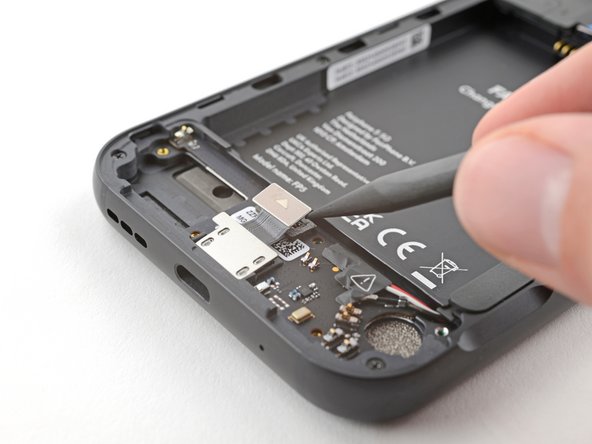
  7. Fairphone 5 USB-C Port Replacement, Disconnect the charging port: passo 7, immagine 1 di 2 Fairphone 5 USB-C Port Replacement, Disconnect the charging port: passo 7, immagine 2 di 2
    • Use the tip of a spudger to pry up and disconnect the charging port press connector.

    • To re-attach press connectors like this one, carefully align and press down on one side until it clicks into place, then repeat on the other side. Don't press down in the middle. If the connector is misaligned, the pins can bend and cause permanent damage.

    Chiedi a FixBot

    Aggiungi Commento

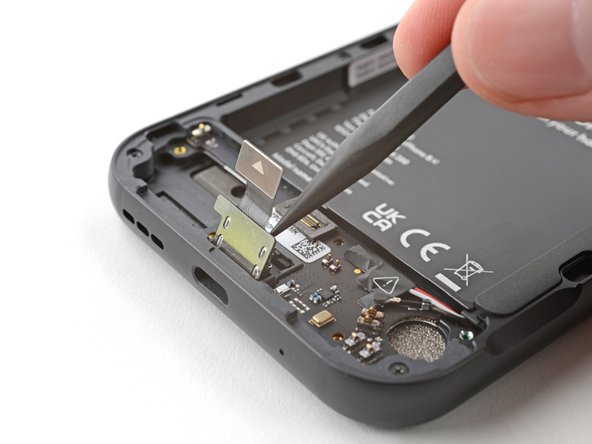
  8. Fairphone 5 USB-C Port Replacement, Remove the charging port: passo 8, immagine 1 di 3 Fairphone 5 USB-C Port Replacement, Remove the charging port: passo 8, immagine 2 di 3 Fairphone 5 USB-C Port Replacement, Remove the charging port: passo 8, immagine 3 di 3
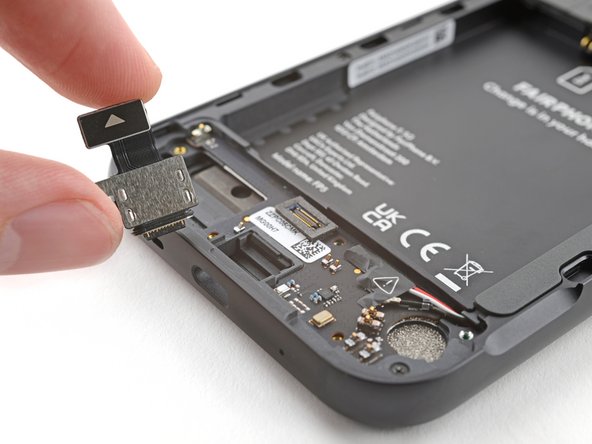
    • Insert the tip of a spudger under the metal plate at the head of the charging port.

    • Pry up to separate the charging port from its slot in the frame.

    • Remove the charging port.

    • During reassembly, insert the charging port at a downward angle into its slot before pressing it down flat.

    Chiedi a FixBot

    Aggiungi Commento

Conclusione

To reassemble your device, follow these instructions in reverse order.

Take your e-waste to an R2 or e-Stewards certified recycler.

Repair didn’t go as planned? Try some basic troubleshooting, or ask our Answers community for help.

Annulla: non ho completato questa guida.

Altre 7 persone hanno completato questa guida.

Alex Diaz-Kokaisl

Membro da: 01/16/22

239.265 Reputazione

1.171 guide realizzate

Team

iFixit Membro di iFixit

Staff

122 Membri

25.947 guide realizzate

1Commento della guida

Tutoriel très clair. La réparation se fait extrêmement simplement. Bravo à Fairphone pour cette conception, et à ifixit pour le tutoriel (et pour la recommandation des outils à acheter avec la pièce : important, parce que ce sont des dimensions assez spécifiques).

Guy B - Rispondi Condividi

Aggiungi Commento

Visualizza statistiche:

Ultime 24 ore: 11

Ultimi 7 giorni: 78

Ultimi 30 giorni: 341

Tutti i Tempi: 5,643