Salta al contenuto principale

iPhone 15 Pro Taptic Engine Replacement

Cosa ti serve

  1. iPhone 15 Pro Taptic Engine Replacement, Prepare your iPhone for disassembly: passo 1, immagine 1 di 2 iPhone 15 Pro Taptic Engine Replacement, Prepare your iPhone for disassembly: passo 1, immagine 2 di 2
    • Let your phone's battery drain below 25% before starting this repair—a charged lithium‑ion battery may catch fire if damaged.

    • Unplug all cables from your phone.

    • Hold the power and either volume button and slide to power off your phone.

  2. iPhone 15 Pro Taptic Engine Replacement, Tape over any cracks: passo 2, immagine 1 di 2 iPhone 15 Pro Taptic Engine Replacement, Tape over any cracks: passo 2, immagine 2 di 2
    • If your screen or back glass is cracked, lay overlapping strips of packing tape over the glass to protect yourself and make disassembly easier.

    • Make sure there's a smooth area near the bottom edge that's big enough for a suction cup to stick to.

  3. iPhone 15 Pro Taptic Engine Replacement, Mark your opening picks: passo 3, immagine 1 di 3 iPhone 15 Pro Taptic Engine Replacement, Mark your opening picks: passo 3, immagine 2 di 3 iPhone 15 Pro Taptic Engine Replacement, Mark your opening picks: passo 3, immagine 3 di 3
    • If inserted too far, an opening pick can damage your device. Follow this step to mark your pick and prevent damage.

    • Measure 3 mm from the tip and mark the opening pick with a permanent marker.

    • You can also mark the other corners of the pick with different measurements.

    • Alternatively, tape a coin to a pick 3 mm from the tip.

    • Apple sells an Adhesive Cutter tool for cutting the display adhesive safely in their Self Repair Store.

  4. iPhone 15 Pro Taptic Engine Replacement, Remove the pentalobe screws: passo 4, immagine 1 di 2 iPhone 15 Pro Taptic Engine Replacement, Remove the pentalobe screws: passo 4, immagine 2 di 2
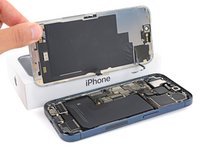
    • Use a P2 pentalobe screwdriver to remove the two 7 mm‑long screws on either side of the charging port.

  5. iPhone 15 Pro Taptic Engine Replacement, Heat the bottom edge: passo 5, immagine 1 di 1
    • Use a hair dryer or heat gun to heat the bottom edge of the screen until it's hot to the touch.

    • Be careful not to heat the phone hotter than this—the battery is susceptible to heat damage.

  6. iPhone 15 Pro Taptic Engine Replacement, Insert an opening pick: passo 6, immagine 1 di 3 iPhone 15 Pro Taptic Engine Replacement, Insert an opening pick: passo 6, immagine 2 di 3 iPhone 15 Pro Taptic Engine Replacement, Insert an opening pick: passo 6, immagine 3 di 3
    • Apply a suction handle to the bottom edge of the screen.

    • Pull up on the handle with a strong, steady force to create a gap between the screen and the frame.

    • Insert the tip of an opening pick into the gap.

  7. iPhone 15 Pro Taptic Engine Replacement, Screen information: passo 7, immagine 1 di 1
    • As you slice the adhesive securing the screen in the next steps, be careful of the following areas:

    • There are two delicate cables connecting the screen to the phone: one just above the action button, and the other near the middle of the left edge.

    • There are multiple spring contacts around the perimeter of the phone. Be extra careful not to insert your pick deeper than suggested in these locations to avoid bending the contacts.

  8. iPhone 15 Pro Taptic Engine Replacement, Separate the bottom edge adhesive: passo 8, immagine 1 di 3 iPhone 15 Pro Taptic Engine Replacement, Separate the bottom edge adhesive: passo 8, immagine 2 di 3 iPhone 15 Pro Taptic Engine Replacement, Separate the bottom edge adhesive: passo 8, immagine 3 di 3
    • Don't insert your opening pick deeper than 3 mm along the bottom edge.

    • Slide your pick back and forth along the bottom edge to separate the adhesive.

    • Leave your pick inserted in the bottom right corner to prevent the adhesive from re-sealing.

  9. iPhone 15 Pro Taptic Engine Replacement, Heat the right edge: passo 9, immagine 1 di 1
    • Heat the right edge of the screen until it's hot to the touch.

  10. iPhone 15 Pro Taptic Engine Replacement, Position the opening pick: passo 10, immagine 1 di 3 iPhone 15 Pro Taptic Engine Replacement, Position the opening pick: passo 10, immagine 2 di 3 iPhone 15 Pro Taptic Engine Replacement, Position the opening pick: passo 10, immagine 3 di 3
    • Don't insert your pick deeper than 5 mm along the right edge.

    • Slide your pick around the bottom right corner of the screen and toward the power button until you feel a hard stop at a clip securing the screen.

    • Rotate your pick so the flat edge is under the screen.

  11. iPhone 15 Pro Taptic Engine Replacement, Release the right clip: passo 11, immagine 1 di 3 iPhone 15 Pro Taptic Engine Replacement, Release the right clip: passo 11, immagine 2 di 3 iPhone 15 Pro Taptic Engine Replacement, Release the right clip: passo 11, immagine 3 di 3
    • Twist the pick to increase the gap between the screen and the frame until the right clip releases.

    • Insert a second opening pick to the right of the first pick.

  12. iPhone 15 Pro Taptic Engine Replacement, Separate the right edge adhesive: passo 12, immagine 1 di 3 iPhone 15 Pro Taptic Engine Replacement, Separate the right edge adhesive: passo 12, immagine 2 di 3 iPhone 15 Pro Taptic Engine Replacement, Separate the right edge adhesive: passo 12, immagine 3 di 3
    • Slide the first pick back to the bottom right corner of the screen.

    • Slide the second pick to the top right corner of the screen to separate the adhesive.

    • Leave these picks inserted to prevent the adhesive from resealing.

  13. iPhone 15 Pro Taptic Engine Replacement, Heat the top edge: passo 13, immagine 1 di 1
    • Heat the top edge of the screen until it's hot to the touch.

  14. iPhone 15 Pro Taptic Engine Replacement, Separate the top edge adhesive: passo 14, immagine 1 di 3 iPhone 15 Pro Taptic Engine Replacement, Separate the top edge adhesive: passo 14, immagine 2 di 3 iPhone 15 Pro Taptic Engine Replacement, Separate the top edge adhesive: passo 14, immagine 3 di 3
    • Don't insert your pick deeper than 3 mm along the top edge.

    • Slide your pick around the top right corner and along the top edge to release the two clips and adhesive securing it.

  15. iPhone 15 Pro Taptic Engine Replacement, Heat the left edge: passo 15, immagine 1 di 1
    • Heat the left edge of the screen until it's hot to the touch.

  16. iPhone 15 Pro Taptic Engine Replacement, Separate the left edge adhesive: passo 16, immagine 1 di 3 iPhone 15 Pro Taptic Engine Replacement, Separate the left edge adhesive: passo 16, immagine 2 di 3 iPhone 15 Pro Taptic Engine Replacement, Separate the left edge adhesive: passo 16, immagine 3 di 3
    • Don't insert your pick deeper than 2 mm along the left edge to avoid the two cables connecting the screen to the phone.

    • Rotate your pick around the top left corner of the screen.

    • Slide your pick to the bottom left corner of the screen to separate the adhesive.

  17. iPhone 15 Pro Taptic Engine Replacement, Prop up the screen: passo 17, immagine 1 di 3 iPhone 15 Pro Taptic Engine Replacement, Prop up the screen: passo 17, immagine 2 di 3 iPhone 15 Pro Taptic Engine Replacement, Prop up the screen: passo 17, immagine 3 di 3
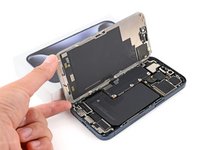
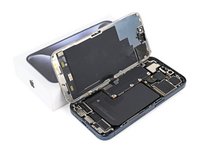
    • Place a small box or stack of books to the left of your phone so you can prop up the screen while disconnecting its cables.

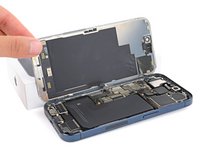
    • Swing up the right edge of the screen like the front cover of a book.

    • If the screen feels stuck, go back around the perimeter with an opening pick to separate any remaining adhesive.

    • Prop up the screen so you can access its cables without straining them.

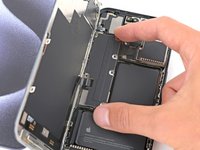
  18. iPhone 15 Pro Taptic Engine Replacement, Unfasten the logic board cover: passo 18, immagine 1 di 2 iPhone 15 Pro Taptic Engine Replacement, Unfasten the logic board cover: passo 18, immagine 2 di 2
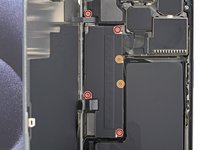
    • Use a Y000 screwdriver to remove the six screws securing the logic board cover:

    • Four 1.6 mm‑long screws

    • Two 1.3 mm‑long screws

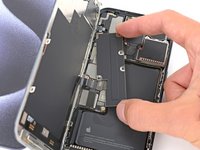
  19. iPhone 15 Pro Taptic Engine Replacement, Remove the logic board cover: passo 19, immagine 1 di 3 iPhone 15 Pro Taptic Engine Replacement, Remove the logic board cover: passo 19, immagine 2 di 3 iPhone 15 Pro Taptic Engine Replacement, Remove the logic board cover: passo 19, immagine 3 di 3
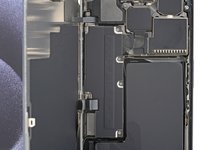
    • Rotate the bottom of the logic board cover counterclockwise and slide the top left corner out from under the ambient light sensor cable to remove it.

    • During reassembly, make sure the top left corner of the cover goes under the ambient light sensor cable.

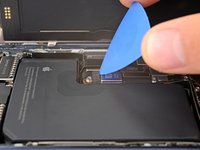
  20. iPhone 15 Pro Taptic Engine Replacement, Disconnect the battery: passo 20, immagine 1 di 3 iPhone 15 Pro Taptic Engine Replacement, Disconnect the battery: passo 20, immagine 2 di 3 iPhone 15 Pro Taptic Engine Replacement, Disconnect the battery: passo 20, immagine 3 di 3
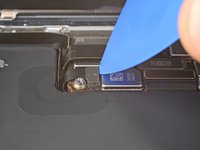
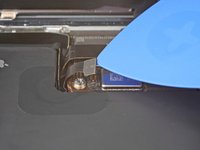
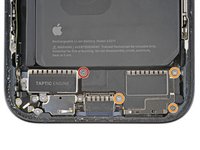
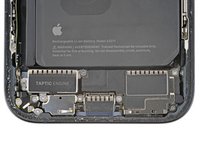
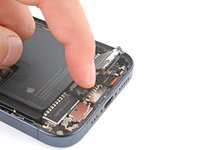
    • Use the tip of an opening pick to pry up and disconnect the battery press connector from the bottom right corner of the logic board.

    • To reconnect a press connector, align it over its socket and gently press down on one side until it clicks into place, then press down on the other side. Make sure it sits flat, as the insulating rubber around the sockets might prevent it from connecting fully.

  21. iPhone 15 Pro Taptic Engine Replacement, Disconnect the screen: passo 21, immagine 1 di 2 iPhone 15 Pro Taptic Engine Replacement, Disconnect the screen: passo 21, immagine 2 di 2
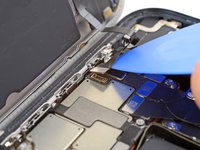
    • Use the tip of an opening pick to pry up and disconnect the screen cable from the center of the logic board.

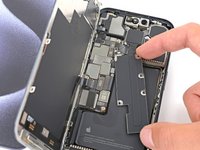
  22. iPhone 15 Pro Taptic Engine Replacement, Disconnect the ambient light sensor: passo 22, immagine 1 di 2 iPhone 15 Pro Taptic Engine Replacement, Disconnect the ambient light sensor: passo 22, immagine 2 di 2
    • Gently slide the tip of an opening pick under the ambient light sensor cable near the top left corner of the logic board.

    • Lift the cable to disconnect it.

  23. iPhone 15 Pro Taptic Engine Replacement, Remove the screen: passo 23, immagine 1 di 2 iPhone 15 Pro Taptic Engine Replacement, Remove the screen: passo 23, immagine 2 di 2
    • Remove the screen.

    • During reassembly, follow this guide to apply new adhesive and install your screen.

    • Be careful not to damage any of the spring contacts as you clean the frame.

  24. iPhone 15 Pro Taptic Engine Replacement, Unfasten the loudspeaker: passo 24, immagine 1 di 2 iPhone 15 Pro Taptic Engine Replacement, Unfasten the loudspeaker: passo 24, immagine 2 di 2
    • Use a Phillips #000 screwdriver to remove the four screws securing the loudspeaker:

    • One 2.7 mm‑long screw

    • Three 2 mm‑long screws

  25. iPhone 15 Pro Taptic Engine Replacement, Remove the loudspeaker: passo 25, immagine 1 di 3 iPhone 15 Pro Taptic Engine Replacement, Remove the loudspeaker: passo 25, immagine 2 di 3 iPhone 15 Pro Taptic Engine Replacement, Remove the loudspeaker: passo 25, immagine 3 di 3
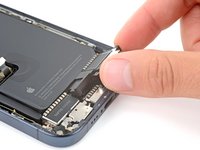
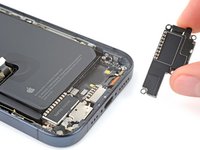
    • A plastic buffer is adhered to the top edges of the loudspeaker and Taptic Engine.

    • Lift the bottom edge of the loudspeaker until you can grab it with your fingers.

    • Peel the loudspeaker from the plastic buffer on its top edge and remove it.

  26. iPhone 15 Pro Taptic Engine Replacement, Disconnect the Taptic Engine: passo 26, immagine 1 di 2 iPhone 15 Pro Taptic Engine Replacement, Disconnect the Taptic Engine: passo 26, immagine 2 di 2
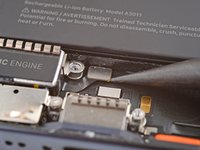
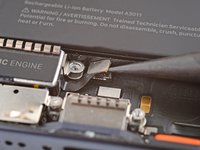
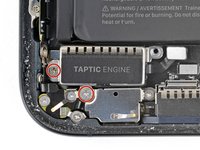
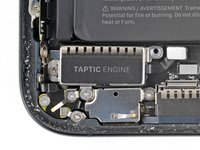
    • Use the point of a spudger to pry up and disconnect the Taptic Engine press connector.

  27. iPhone 15 Pro Taptic Engine Replacement, Unfasten the Taptic Engine: passo 27, immagine 1 di 2 iPhone 15 Pro Taptic Engine Replacement, Unfasten the Taptic Engine: passo 27, immagine 2 di 2
    • Use a Phillips #000 screwdriver to remove the two 2 mm‑long screws securing the Taptic Engine.

  28. iPhone 15 Pro Taptic Engine Replacement, Remove the Taptic Engine: passo 28, immagine 1 di 1
    • Remove the Taptic Engine.

  29. iPhone 15 Pro Taptic Engine Replacement, Transfer the plastic buffer: passo 29, immagine 1 di 3 iPhone 15 Pro Taptic Engine Replacement, Transfer the plastic buffer: passo 29, immagine 2 di 3 iPhone 15 Pro Taptic Engine Replacement, Transfer the plastic buffer: passo 29, immagine 3 di 3
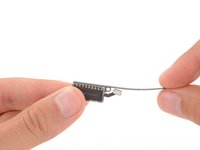
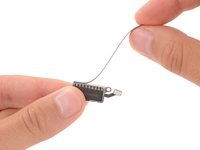
    • During reassembly, remove the plastic buffer that's adhered to the top edge of the Taptic Engine and transfer it to your replacement part.

Conclusione

To reassemble your iPhone, follow these instructions in reverse order.

Take your e-waste to an R2 or e-Stewards certified recycler.

Repair didn’t go as planned? Try some basic troubleshooting, or ask our Answers community for help.

Spencer Day

Membro da: 09/14/22

149.239 Reputazione

995 Guide realizzate

Team

iFixit Membro di iFixit

Staff

123 Membri

23.608 Guide realizzate

0Commenti sulla guida

Aggiungi Commento

Visualizza Statistiche:

Ultime 24 Ore: 8

Ultimi 7 Giorni: 43

Ultimi 30 Giorni: 202

Tutti i Tempi: 3,915