Salta al contenuto principale
Unisciti alla Community delle riparazioni - Crea un account

ASUS VivoBook S300CA-BBI5T01 Fan Replacement

Cosa ti serve

    1. ASUS VivoBook S300CA-BBI5T01 Fan Replacement, Fan: passo 1, immagine 1 di 1
      • Place the laptop upside down so that the bottom panel is facing upwards.

      Chiedi a FixBot

      Aggiungi Commento

    2. ASUS VivoBook S300CA-BBI5T01 Fan Replacement: passo 2, immagine 1 di 1
      • Unscrew the following 10 screws

      • Eight 5 mm Phillips head screws

      • Two 10 mm Phillips head screws

      Chiedi a FixBot

      Aggiungi Commento

    3. ASUS VivoBook S300CA-BBI5T01 Fan Replacement: passo 3, immagine 1 di 1
      • Carefully peel the panel off of the bottom of the laptop.

      Chiedi a FixBot

      Aggiungi Commento

    4. ASUS VivoBook S300CA-BBI5T01 Fan Replacement: passo 4, immagine 1 di 1
      • Remove the following 6 screws:

      • Two 5 mm screws holding the fan down.

      • Four 3 mm screws holding the heat sink down

      • Removing one of these screws voids the device's warranty.

      Chiedi a FixBot

      Aggiungi Commento

    5. ASUS VivoBook S300CA-BBI5T01 Fan Replacement: passo 5, immagine 1 di 1
      • Carefully disconnect the only sliding connector by using a plastic opening tool to pry the connector out.

      Chiedi a FixBot

      Aggiungi Commento

    6. ASUS VivoBook S300CA-BBI5T01 Fan Replacement: passo 6, immagine 1 di 1
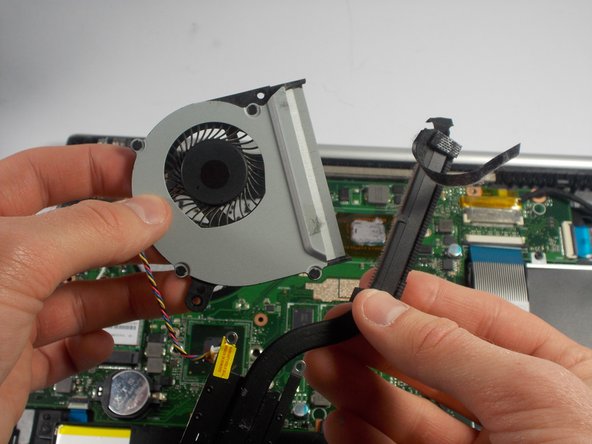
      • Remove the fan and heat sink by lifting it upwards.

      Chiedi a FixBot

      Aggiungi Commento

    7. ASUS VivoBook S300CA-BBI5T01 Fan Replacement: passo 7, immagine 1 di 2 ASUS VivoBook S300CA-BBI5T01 Fan Replacement: passo 7, immagine 2 di 2
      • Remove the tape holding the fan and heat sink together.

      • Before reassembly it is essential to clean off the old thermal paste from the processor and the heatsink and to apply new. How to apply thermal paste explains how.

      Chiedi a FixBot

      Aggiungi Commento

Conclusione

To reassemble your device, follow these instructions in reverse order.

Annulla: non ho completato questa guida.

Team

0Commenti sulla guida

Aggiungi Commento

Visualizza statistiche:

Ultime 24 ore: 0

Ultimi 7 giorni: 7

Ultimi 30 giorni: 28

Tutti i Tempi: 2,187