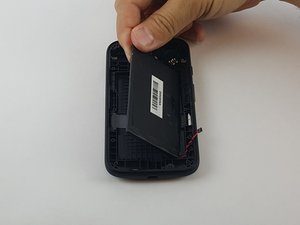
Altoparlante
Questa traduzione è stata generata automaticamente e non è stata ancora revisionata da una persona. Parli questa lingua? Rivedila.

|
1 Risposta Punteggio 3 |
Moto E is stuck in boot cycle |
|
1 Risposta Punteggio 0 |
My phone is not starting . just when I charge it a white light glows? |
|
1 Risposta Punteggio 2 |
How Do I Fix Moto E 2nd Gen LCD? Everything Else Works :/ |
|
1 Risposta Punteggio 1 |
Getting my stored info ex. Usernames and passwords switch to phone |
Questi sono alcuni strumenti di uso comune usati per lavorare su questo dispositivo. Potrebbe non essere necessario ogni strumento per ogni procedura.
(XT1505) Global, (XT1511) USA, (XT1524) Global, (XT1527) USA
Se vuoi diagnosticare se il tuo problema è legato al software o all'hardware—incluso il backup e il ripristino del tuo dispositivo—scarica l'app Software Fix.
Il Motorola Moto E è dotato di una potente fotocamera posteriore da 5 MP a 720p, un display da 4,5" a 245 ppi con un resistente pannello frontale in Corning Gorilla Glass 3. Il Moto E ha un processore Snapdragon 200 da 1,2 GHz e 1 GB di RAM, con una memoria interna di 8 GB. Viene fornito con Android 5.0 Lollipop preinstallato ed è abilitato al 4G LTE. Il Moto E presenta diversi problemi noti, come schermi incrinati, batterie difettose, fotocamere difettose, schede madre bruciate e controlli del volume che non rispondono.
Il Motorola Moto E 2nd Generation, conosciuto anche come XT1527 o XT1511, è stato progettato e prodotto dall'azienda Motorola e rilasciato nel febbraio 2015.
USFT-EYESTONE-S16S12G3
3 Membri
60 guide realizzate
Ultime 24 ore: 3
Ultimi 7 giorni: 14
Ultimi 30 giorni: 60
Tutti i Tempi: 37,696