Altoparlanti interni
Questa traduzione è stata generata automaticamente e non è stata ancora revisionata da una persona. Parli questa lingua? Rivedila.
Non ci sono domande. Sii il primo a porre una domanda!
Questi sono alcuni strumenti di uso comune usati per lavorare su questo dispositivo. Potrebbe non essere necessario ogni strumento per ogni procedura.
21E3, 21E4, 21EB, 21EC
Se riscontri difficoltà con il tuo ThinkPad E14 Gen 4 e hai bisogno di ulteriore assistenza, ecco alcune guide alla risoluzione dei problemi che puoi consultare:
Surriscaldamento Lenovo ThinkPad E14 Gen 4
Il Lenovo ThinkPad E14 Gen 4 non si carica
Il Lenovo ThinkPad E14 Gen 4 si blocca continuamente
Il Lenovo ThinkPad E14 Gen 4 presenta frequenti problemi audio
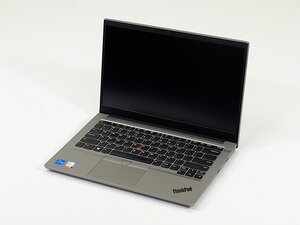
Il Lenovo ThinkPad E14 Gen 4 è un portatile da 14” economico rilasciato da Lenovo nel 2022. È stato lanciato come parte della variegata famiglia di portatili ThinkPad nella linea ThinkPad E (precedentemente Edge), pensata per un pubblico attento al budget e commercializzata verso le piccole e medie imprese. Questo dispositivo è stato rilasciato contemporaneamente a un modello da 15” più costoso, il ThinkPad E15 Gen 4. Non vi sono differenze degne di nota nelle prestazioni o nella potenza di calcolo tra i due modelli.
Il ThinkPad E14 Gen 4 misura 324,1 x 220,7 mm e ha un peso iniziale di circa 1,59-1,63 kg. Il telaio può essere realizzato in un mix di alluminio e plastica robusta o interamente in alluminio. Le caratteristiche integrate includono una webcam con otturatore per la privacy, un lettore impronte digitali e il dispositivo di puntamento TrackPoint. Questo modello utilizza un processore AMD Ryzen serie 5000 o Intel Core di dodicesima generazione. Il ThinkPad E14 Gen 4 non ha precedenti di richiami.
Questo modello è preceduto dal ThinkPad E14 Gen 3. Il Gen 4 offre una memoria maggiore rispetto al Gen 3, oltre a una fotocamera di qualità superiore, una CPU più potente e una struttura più leggera, ma ha un'autonomia della batteria media inferiore. Entrambi i modelli hanno un rapporto d'aspetto di 16:9. Il Gen 4 è seguito dal Gen 5, che offre una fotocamera di qualità superiore, uno schermo a risoluzione più elevata, touch screen, rapporto d'aspetto 16:10, una CPU più potente e una struttura più leggera.
Il ThinkPad E14 Gen 4 può essere distinto in diversi modi:
Sul retro del dispositivo dovrebbe essere presente un'etichetta stampata contenente il tipo/modello macchina completo e il numero di serie.
Prestazioni:
Schermo:
Connettori di ingresso/uscita (Porte):
Comunicazioni:
Batteria:
Generale:
Manuale utente Lenovo ThinkPad E14 Gen 4
Pagina prodotto Lenovo ThinkPad E14 Gen 4
Ultime 24 ore: 17
Ultimi 7 giorni: 53
Ultimi 30 giorni: 176
Tutti i Tempi: 3,689