I wanted to run a game on my computer tonight but my computer is not picking up my disc! I cant eject my disc because it wont show on my screen! please help urgently answer would be much appreciated !
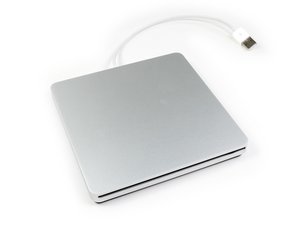
Try restarting the system and press the C key to get it to read the disk which it will fail and kick out. Otherwise you'll need to open up the drive to pull the disk out. Click on the drive image to the right it will lead you to the iFixIt guide on how to open the drive up.
Go under Finder, to the left of the Apple in the upper left hand corner to Preferences. Click on general > CDs DVDs, and iPods. See if the icons shows up on the desktop.
Two commands allow you to save the current text in Pico (for the novice) being edited. The CTRL-X and CTRL-O commands save the contents of the editor. The former command exits the editor after saving, while the latter command allows for continued editing after saving.
works on 10.8.5, should work from 10.6, works in 10.9.3, latest Maverics may 17 2014
So where should I type the code ??? I am really bad at it stuff and it is already a miracle that I have found where I have to type the code so please help !
Do the previous instructions not cause a problem with kext signing in the more recent versions of OS X e.g. 10.10.3 where Apple's restrictions mean that any unauthorised kernel edits are blocked and the system will inevitably fail to boot? i.e. is the 'hack' still current?
Sorry, last poster / anon but without this info it would be possible to follow these instructions and screw up the system for the sake of a Superdrive.
Scorri questo thread per trovare il posto appropriato per questo commento. Quindi, fai clic su "Allega commento a questo post" per spostarlo.
4 Commenti:
Yes! Good point. If you altered the file you will have an issue with Yosemite as kext files now need to be signed. Which is a good thing! Except when you hack the OS to make something work :-{
I have tested this command with Mac OS X.12 (Sierra), the latest Mac OS X so far. It works. Just edit the file and you should be able to use the drive :
I've tried modifying this file but system doesn't let me save with same name in Terminal. I've disabled System Integrity Protection (SIP) but I still can't save this file. Any suggestions. I have Sierra OS and MacBook Pro12,1 13" Retina Display. Superdrive works if I reboot my Mac, but not if I just connect it. Always has to be rebooted to fully function.
I have tested this command with Mac OS X.12 (Sierra), the latest Mac OS X so far. It works. Just edit the file and you should be able to use the drive :
The is ridiculous! Is there any explanation of *why* Apple decided to do this? If they didn't, they might actually *gasp* sell *more* of the "Superdrives" (how many people remember that as a drive that could handle 400K, 800K, *and* 1.4MB disks?)? Okay, probably not, since the Apple one probably costs at least 20% more than a comparable drive.. But still..

 2
2  2
2  1
1