Salta al contenuto principale
Unisciti alla Community delle riparazioni - Crea un account

Google Pixel 9 Pro XL Rear Cover Replacement

Cosa ti serve

  1. Google Pixel 9 Pro XL Rear Cover Replacement, Safety precautions: passo 1, immagine 1 di 2 Google Pixel 9 Pro XL Rear Cover Replacement, Safety precautions: passo 1, immagine 2 di 2
    • Let your Pixel's battery drain below 25% before starting this repair. A charged lithium‑ion battery may catch fire if damaged.

    • Unplug all cables and completely power down your phone.

    Chiedi a FixBot

    Aggiungi Commento

  2. Google Pixel 9 Pro XL Rear Cover Replacement, Adhesive information: passo 2, immagine 1 di 3 Google Pixel 9 Pro XL Rear Cover Replacement, Adhesive information: passo 2, immagine 2 di 3 Google Pixel 9 Pro XL Rear Cover Replacement, Adhesive information: passo 2, immagine 3 di 3
    • Adhesive secures the perimeter of the rear cover to the frame.

    • When separating the adhesive, don't insert your tool more than 3 mm under the rear cover to avoid damaging the internal components.

    • Measure 3 mm from the tip and mark your opening pick with a permanent marker. Alternatively, you can tape a coin to a pick 3 mm from the tip.

    Chiedi a FixBot

    Aggiungi Commento

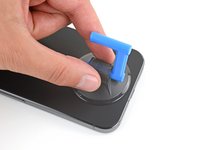
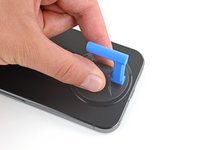
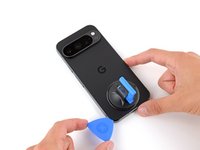
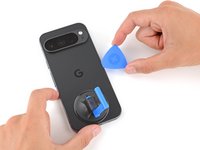
  3. Google Pixel 9 Pro XL Rear Cover Replacement, Apply a suction handle: passo 3, immagine 1 di 2 Google Pixel 9 Pro XL Rear Cover Replacement, Apply a suction handle: passo 3, immagine 2 di 2
    • Attach a suction handle to the bottom edge of the rear cover, as close to the edge as possible.

    Chiedi a FixBot

    Aggiungi Commento

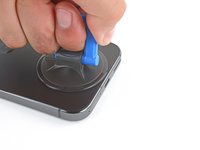
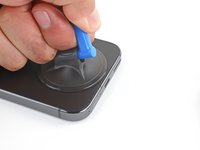
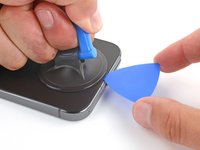
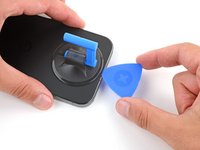
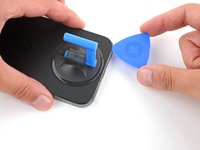
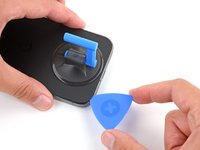
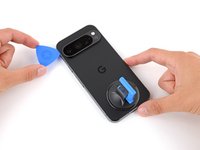
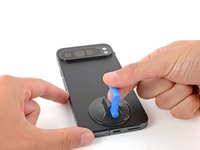
  4. Google Pixel 9 Pro XL Rear Cover Replacement, Insert an opening pick: passo 4, immagine 1 di 3 Google Pixel 9 Pro XL Rear Cover Replacement, Insert an opening pick: passo 4, immagine 2 di 3 Google Pixel 9 Pro XL Rear Cover Replacement, Insert an opening pick: passo 4, immagine 3 di 3
    • Pull up on the suction handle with strong, steady force to create a small gap under the rear cover.

    • Insert the tip of an opening pick in the gap.

    Chiedi a FixBot

    Aggiungi Commento

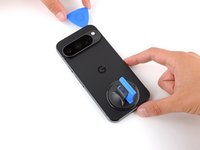
  5. Google Pixel 9 Pro XL Rear Cover Replacement, Separate the rear cover adhesive: passo 5, immagine 1 di 3 Google Pixel 9 Pro XL Rear Cover Replacement, Separate the rear cover adhesive: passo 5, immagine 2 di 3 Google Pixel 9 Pro XL Rear Cover Replacement, Separate the rear cover adhesive: passo 5, immagine 3 di 3
    • Slide your opening pick along the bottom edge to separate the adhesive securing it.

    • Remember: don't insert the opening pick deeper than 3 mm.

    Chiedi a FixBot

    Aggiungi Commento

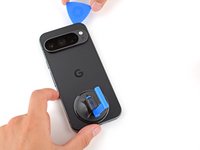
  6. Google Pixel 9 Pro XL Rear Cover Replacement: passo 6, immagine 1 di 3 Google Pixel 9 Pro XL Rear Cover Replacement: passo 6, immagine 2 di 3 Google Pixel 9 Pro XL Rear Cover Replacement: passo 6, immagine 3 di 3
    • Slide your opening pick up the left edge and along the top edge to separate the adhesive.

    Chiedi a FixBot

    Aggiungi Commento

  7. Google Pixel 9 Pro XL Rear Cover Replacement: passo 7, immagine 1 di 3 Google Pixel 9 Pro XL Rear Cover Replacement: passo 7, immagine 2 di 3 Google Pixel 9 Pro XL Rear Cover Replacement: passo 7, immagine 3 di 3
    • Slide your pick down the right edge to separate the remaining adhesive.

    Chiedi a FixBot

    Aggiungi Commento

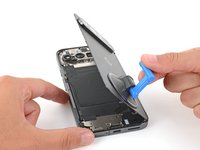
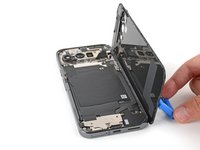
  8. Google Pixel 9 Pro XL Rear Cover Replacement, Prop up the rear cover: passo 8, immagine 1 di 3 Google Pixel 9 Pro XL Rear Cover Replacement, Prop up the rear cover: passo 8, immagine 2 di 3 Google Pixel 9 Pro XL Rear Cover Replacement, Prop up the rear cover: passo 8, immagine 3 di 3
    • Don't try to fully remove the rear cover yet, as a ribbon cable on the right edge connects it to the phone.

    • Use the suction handle to lift the left edge of the rear cover and swing it over the right edge, like opening the cover of a book.

    • If you're having trouble, check the perimeter for any remaining adhesive and use your opening pick to separate it.

    • Prop up the rear cover with the suction handle so you can access the ribbon cable near the top right corner.

    Chiedi a FixBot

    Aggiungi Commento

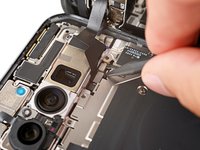
  9. Google Pixel 9 Pro XL Rear Cover Replacement, Remove the cable cover: passo 9, immagine 1 di 2 Google Pixel 9 Pro XL Rear Cover Replacement, Remove the cable cover: passo 9, immagine 2 di 2
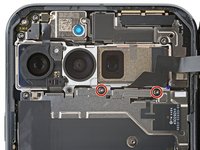
    • Use a Torx Plus 3IP screwdriver to remove the two 5.2 mm‑long screws securing the cable cover.

    Chiedi a FixBot

    Aggiungi Commento

  10. Google Pixel 9 Pro XL Rear Cover Replacement: passo 10, immagine 1 di 2 Google Pixel 9 Pro XL Rear Cover Replacement: passo 10, immagine 2 di 2
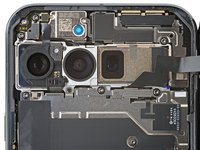
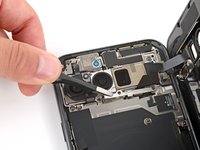
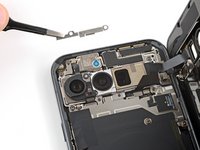
    • Use tweezers or your fingers to remove the cable cover.

    Chiedi a FixBot

    Aggiungi Commento

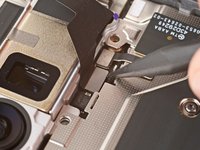
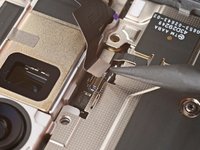
  11. Google Pixel 9 Pro XL Rear Cover Replacement, Disconnect the rear cover: passo 11, immagine 1 di 3 Google Pixel 9 Pro XL Rear Cover Replacement, Disconnect the rear cover: passo 11, immagine 2 di 3 Google Pixel 9 Pro XL Rear Cover Replacement, Disconnect the rear cover: passo 11, immagine 3 di 3
    • Use the point of a spudger to pry up and disconnect the rear cover press connector.

    Chiedi a FixBot

    Aggiungi Commento

  12. Google Pixel 9 Pro XL Rear Cover Replacement, Remove the rear cover: passo 12, immagine 1 di 1
    • Remove the rear cover.

    • During reassembly, follow this guide to apply new adhesive and install your back cover.

    Chiedi a FixBot

    Aggiungi Commento

Conclusione

To reassemble your device, follow this guide.

To run a diagnostics test with the built-in Pixel Diagnostic tool, click here.

Take your e-waste to an R2 or e-Stewards certified recycler.

Repair didn’t go as planned? Try some basic troubleshooting, or ask our Answers community for help.

Annulla: non ho completato questa guida.

Altre 9 persone hanno completato questa guida.

Spencer Day

Membro da: 09/14/22

191.211 Reputazione

1.204 guide realizzate

Team

iFixit Membro di iFixit

Staff

122 Membri

25.946 guide realizzate

5Commenti sulla guida

User Torx Plus 3IP screwdriver? I don't find the screwdriver anywhere . Can I use one screw from this toolkit? If so, which one? - Essential Electronics Toolkit
Ram A - Rispondi Condividi

Hi Ram. The Torx Plus 3IP bit (not driver) and many other bits are available here on our site. We also have drivers, in both aluminum and plastic.

Spencer Day - Rispondi Condividi

Does the rear cover come with glue? Or I have to buy the separately?

Bruno Llangostera Prats - Rispondi Condividi

ifixit's instructions that show a suction cup to remove a screen or a glass back always assume your glass is intact. I would assume most often it is shattered so forget using a suction cup. I used some thick shipping tape to cover the broken glass which gives the suction cup a chance to hold.

Scott Z - Rispondi Condividi

Easy guide to follow. I was able to replace my back glass due to the camera bar separating from the glass. Thank you!

David Z - Rispondi Condividi

Aggiungi Commento

Visualizza statistiche:

Ultime 24 ore: 21

Ultimi 7 giorni: 122

Ultimi 30 giorni: 497

Tutti i Tempi: 7,972