Wiki con Collaborazione Studenti
Un fantastico team di studenti del nostro programma educativo ha realizzato questo wiki.
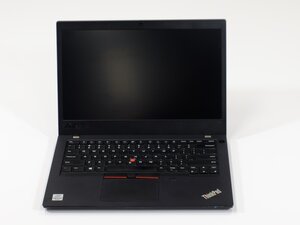
Se il tuo Lenovo Thinkpad L14 Gen 2 non si accende, segui questa pagina per trovare delle soluzioni.
Data la natura sensibile dei componenti elettronici, assicurati di indossare un braccialetto antistatico o di scaricare la tua elettricità elettrostatica toccando del metallo per evitare scariche. Una scarica elettrostatica può bruciare la scheda madre e impedire l'accensione del computer.
RAM difettosa
Poiché i portatili possono solitamente accendersi senza batteria quando sono collegati all'alimentazione, questo problema potrebbe essere legato alla memoria. Per verificare, rimuovi un modulo di memoria alla volta.
Spegni il computer. Usa un cacciavite a croce Phillips #00 per rimuovere le nove viti M2 × 7 mm, quindi fai scorrere un plettro di apertura blu lungo i bordi per sganciare e rimuovere il pannello posteriore. Per rimuovere un modulo di memoria, tira le clip metalliche verso l'esterno finché il modulo non scatta in posizione sollevata, quindi estrailo prendendolo dai bordi. Reinstalla il pannello posteriore, avvita le viti e prova ad accendere il computer.
Se ancora non si accende, reinstalla il primo modulo e ripeti la procedura con l'altro. Per reinstallare un modulo di memoria, inseriscilo a un angolo di circa 22,5° con i contatti dorati completamente inseriti, quindi premi delicatamente verso il basso finché le clip non scattano in posizione.

Team

Linn Benton Community College, Team 1-2, Karnes Fall 2025 Membro di Linn Benton Community College, Team 1-2, Karnes Fall 2025
LBCC-KARNES-F25S1G2
4 Membri
72 guide realizzate

0 Commenti