
Salta al contenuto principale
Unisciti alla Community delle riparazioni - Crea un account

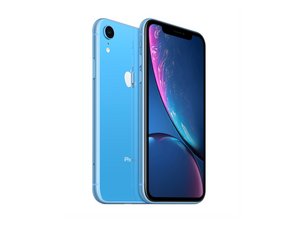
Lanciato il 26 ottobre 2018. Modelli A1984, A2105, A2106, A2108. Disponibile in versioni GSM o CDMA / eSIM, nano-SIM o dual-SIM / 64, 128 o 256 GB / Bianco, Nero, Blu, Giallo, Corallo o Rosso.

iPhone XR microphone issue

Good afternoon. I sent my XR away to have the lower microphone fixed. From what I understand it’s the same part as the charging dock. my reason for sending it for repair was that people couldn’t hear my on cellular calls. But occasionally they could. It arrived back from the repair shop. But I still have the same problem even with a new part fitted. The lower microphone does work on sound recording and Whats app and messager calls. It also works on front and rear video footage. Would anyone know what the issue is please. Thanks

Rispondi a questa domanda Anch'io ho questo problema

Questa è una buona domanda?

Punteggio 0

Aggiungi un commento

1 Risposta

Enabling Microphone Access

To adjust microphone settings for a specific app: [1]

  1. Open the Settings app on your iPhone.
  2. Scroll down and tap Privacy & Security.
  3. Tap Microphone.
  4. A list of apps that have requested access will appear. Toggle the switch to ON (green) for the apps you want to allow. [1, 2]

Alternatively, you can scroll down to the app list at the very bottom of your main Settings page, select the specific app (e.g., WhatsApp), and toggle its Microphone permission on

Questa risposta è stata utile?

Punteggio 0
Aggiungi un commento

Aggiungi la tua risposta

Leigh Scott sarà eternamente grato.
Visualizza statistiche:

Ultime 24 ore: 0

Ultimi 7 giorni: 1

Ultimi 30 giorni: 18

Tutti i Tempi: 35