Salta al contenuto principale

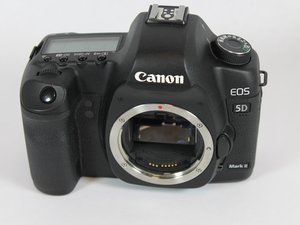
The Canon EOS 5D Mark II is a 21.1-megapixel full-frame CMOS digital single-lens reflex (DSLR) camera with video recording capabilities.

How to fix error 06

self-cleaning sensor unit malfunction

Rispondi a questa domanda Anch'io ho questo problema

Questa è una buona domanda?

Punteggio 0
Aggiungi un commento

1 Risposta

Canon EOS 5D Mark II

Error 06indicates a malfunction with the Self-Cleaning Sensor Unit, meaning the automatic sensor cleaning process failed, often due to a stuck sensor or mechanical issue with the cleaning mechanism. Basic troubleshooting involves turning the camera off and on, removing/reinserting the battery, and sometimes gently tapping the camera, but if the error persists, it likely needs servicing by a professional Canon repair center.

Troubleshooting Steps (Try in Order):

  1. Power Cycle: Turn the camera's power switch to OFF, wait a few seconds, then turn it back ON.
  2. Battery Reset: Turn the camera off, remove the battery and memory card, wait a minute, then reinsert them and power on.
  3. Gently Tap: With the camera off, try gently tapping the camera body (not too hard) to potentially dislodge the sensor unit.
  4. Disable Automatic Cleaning: If the camera turns on, try disabling the automatic sensor cleaning in the menu to prevent it from triggering the error.
  5. Check Lens Contacts: While less common for Error 06, ensure lens and camera contacts are clean, as communication issues can sometimes cause general errors.

#

This video demonstrates the basic troubleshooting steps for a Canon DSLR camera:

Questa risposta è stata utile?

Punteggio 0

1 Commento:

Note that no official Canon repair center will repair the camera as the service life of the Canon EOS 5D Mark II has ended. Repairs can only be made by third party repair shops.

da

Aggiungi un commento

Aggiungi la tua risposta

Muhammad Syah Levi sarà eternamente grato.
Visualizza Statistiche:

Ultime 24 Ore: 3

Ultimi 7 Giorni: 7

Ultimi 30 Giorni: 16

Tutti i Tempi: 16
