
How to I fix the stick drift
The stick drift is small but irritating
Questa è una buona domanda?
Punteggio
4

Rep: 49
 2
2
 1
1
The stick drift is small but irritating
Questa è una buona domanda?

Rep: 38,8k
20
16
 28
28
Hi!
Stick drift can only be repaired by replacing it!
Note, that you do need soldering skills to replace it, it won't be easy.
While you are there, I recommend to replace them for Hall-Effect joysticks straight away when one of them is defective.
Guide: DualSense Joystick Replacement - iFixit Repair Guide
If you need any more information, please let us know!
Questa risposta è stata utile?

Rep: 13
1
Contact cleaner. DeOXit is the one I use most often.
You dont need to replace or solder anything. Take the controller down to the point that you can take the sticks off. Pull them off. Blow a quick spritz of deoxit into the middle of each assembly, waggle the stick around a bit, wipe/blow off the excess, and there you go.
I have no idea why everyone seemingly forgot this around 2015 or so. Analog controllers have been the same arrangement of X/Y potentiometers since like 1950 something, they have always gotten dirty, which manifests as "drift", and contact cleaner has always fixed it.
Questa risposta è stata utile?

Rep: 207
4
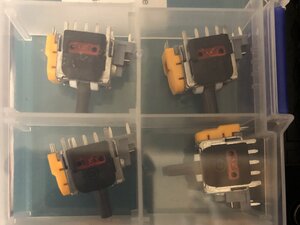
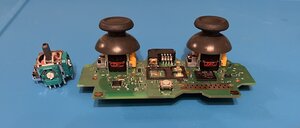
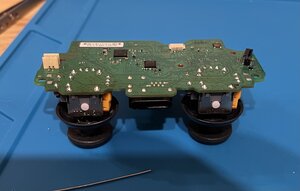
Replacing the stick modules is the only permanent answer. Fit hall sensors instead of the original mechanical ones. You can only clean the mechanical ones once or twice as it doesn’t fix the worn out parts. I just replaced the sticks in my four controllers for Hall effect ones and to be honest they’re better than the originals.
Questa risposta è stata utile?
Ultime 24 Ore: 50
Ultimi 7 Giorni: 291
Ultimi 30 Giorni: 1,576
Tutti i Tempi: 9,152

1 Commento
Before you try to fix it (like opening the controller or changing software deadzones), you need to know exactly *how bad* the drift is.
Many games hide drift, so testing in-game is unreliable. You need to check the raw hardware data.
I use a web tool for this called **controllertest.com**.
When you connect your controller, look at the 'Data Panel' numbers for the sticks. If they are moving (e.g., 0.08 or -0.12) while you are not touching them, you 100% have a hardware problem. If the numbers are 0.00000, your problem is software.
This way, you know if you need to buy a new controller or just change a setting.
da YASSINE Bounaijat