
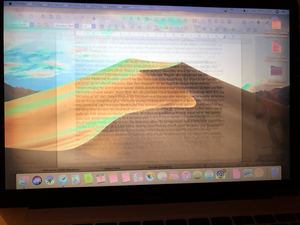
What is wrong with my retina screen? extrem ghosting in 5 min.
A few minutes after I turn on the macbook, my display ghosts very much. Does anyone know why?

Questa è una buona domanda?
Punteggio
13

Rep: 157
 2
2
 2
2
 1
1
A few minutes after I turn on the macbook, my display ghosts very much. Does anyone know why?
Questa è una buona domanda?

Rep: 331
4
2
Here’s an article about the issue: Avoiding image persistence on Apple displays. And some temporary fixes.
Most of the time a new display can fix the issue.
Questa risposta è stata utile?

Rep: 25
1
This has been fixed by a reddit user. The fix is documented here, I can confirm it worked perfectly on my 2014 27" 5K iMac with the original LG panel and severe ghosting effect, now gone:
https://www.reddit.com/r/mac/comments/bj...
“Hello,
Firstly, I know this is an old issue that most probably does not affect the majority of current Macbook users. However, I thought I would post here just in case this helps someone, as a current MBPR 2012 owner this issue has been driving me crazy but I've finally figured out a way to stop it from happening. And it's really simple:
Go to System Preferences -> Displays -> (Built-in Retina Display) Colour tab -> Calibrate...
In Calibration, drag the white point slider to the far right (most blue light). This causes the screen to become extremely blue, so to cancel this out:
Select Night shift, adjust warmth to preferred level (far right for best results), and set up the night shift schedule to always be on.
Essentially what this does is makes the display dimmer by applying two filters that counter act each other. As a result, the pixels themselves emit less 'light' or colour, and are not driven to the point at which colour retention occurs.
I hope this helps my fellow LG screen MBPR 2012 users out there. This machine is still a beast in many ways and deserves to be treated as such. Shame that Apple won't fix what is essentially their production fault on a laptop that RRPd for £2000.
Thank you for reading!”
Questa risposta è stata utile?
This does not work and if it does it's only for light ghosting.
worked for me so far, thank uuuuu
It certainly does work! I bought a replacement screen from eBay for a 12inch 2015 Retina MacBook. I was warned that the screen had a problem with strange colours at times. It was particularly bad on white (e.g. listing files in folders in Finder. Tried various things to adjust this but to no avail. I then saw this article and followed the advice. Result was near perfect. Thanks very much for publishing this.

Rep: 13
1
I’ve had this problem too on a late 2013 iMac, and I recently discovered that one thing that seems to get rid of the ghosted windows almost immediately is using f.lux to switch to darkroom mode. I tried that on a whim after restarting didn’t work and the ghosted windows vanished, even after switching back to normal mode. Maybe worth a shot!
Questa risposta è stata utile?

Rep: 843
4
Have you tried SMC and NVRAM reset if after doing this you are facing an issue then there is a logic board or display error.
Questa risposta è stata utile?
It didn‘t worked, how can i find out if it’s a logic Board or Display error or is there no other way then to ship it Apple ?

appears to be a software-hardware issue. not monitor. As I have 2 MacBooks and switches displays. one does it the other does not do this ghosting. 1 MacBook is newer and that was has the issue.
This is when for external LG 5k display only. internal laptop display is ok.
Questa risposta è stata utile?
sorry but I don't undestood your situation.
have you got a 12" macbook with ghosting problem?
have you tried to switch the monitors disassembling it?
switching the monitors the macbobbok with the original issue replicates the problem with the new monitor?
Thank for replying
Ivan

This part is between 245-500 new on Amazon.
I see it can be shipped from China for around $250 + tax to USA
I'm surprised more people don't replace their own displays, it's not that hard with the right tools!
You can find the tools on Amazon too, if they don't come shipped with the new display, which they often do come with ;-)
Look up how to do it on Youtube, simple, easy
Cheers
MacHead
Questa risposta è stata utile?

I had the exact same problem, Apple took back the laptop and provided me with a note that it was not repairable. The shop provided a new one, quickly thanks to the helpful note Apple provided.
Questa risposta è stata utile?

I have yet to try this but many claim it works. I would just add to this that you
may need to let the screen saver run at least overnight initially. Not sure if
it matters but I would go with the one they call flury.
Questa risposta è stata utile?
Ultime 24 Ore: 9
Ultimi 7 Giorni: 71
Ultimi 30 Giorni: 351
Tutti i Tempi: 53,261

35 Commenti
I have the exact same issue, but it has been developing over time (getting worst of course), first there were a very lightly vertical shadow bar, almost imperceptible that started after 9 months of use, then that bar switched places across the screen sometimes darker some lighter some none at all, then after one year and a half my screen got a bad color scheme mostly with gray and white tones which changed white to some kind of bluish gray and gray to pinky shadows, working with color schemes fixed the issue temporally in combination with night shift, then everything returned to normal after some 6 months of use, but after two hours my screen starts to behave weirdly, yesterday I used my MacBook in a conference all day and it got a very nasty color scheme and very critical image persistence, i am hoping that my Mac returns to normal after a couple of days, she’s a very sensitive and susceptible machine you know haha, by the way i have a late 2016 MacBook 12”, i think the most forward repair is to replace the screen but it is like an $600 to $800, it is just not worth it, I’ll keep dealing with my Mac feelings
da Alain de Leon
Did you get your macbook fixed? I’m facing this issue, ghosting for a month and then it returned back to normal for a week already. I fear it’ll ghost again.
da Ho Huiyi
Sorry but no, it's just not worth it, like $800 for a repair of a discontinued macbook 12! i prefer to keep dealing with it until it dies, tinkering with the color scheme help me a little bit with the image persistence, but it comes and goes randomly
da Alain de Leon
I have the same problem, and it is a late 2015 model Macbook.. Very disappointed to see the severe image persistence as I am not really a heavy user of it. Now it seems worthless, as annoying to use and expensive to replace the screen…
da Baowei Xu
I have the same problem on my macbook retina 12”
is there any kind of service program by apple for this issue?
they told me that the only way is to change the display for hundreds of €…
Crazy….
da ivanannesi
Mostra altri 30 commenti