Salta al contenuto principale
Unisciti alla Community delle riparazioni - Crea un account

L'Asus Zenbook UX31A è un portatile rilasciato nel giugno del 2012. Fa parte della linea Ultrabook di Asus. È dotato di un processore Intel Core I7 di terza generazione e di un display IPS Full HD.

Asus Zenbook CMOS problem

MODEL: UX31A NOTEBOOK PC

WINDOWS 8

Okay so the laptop cuts on by power button. System comes on but for some reason goes to Administration password screen with the blue window then me not knowing Administration password I have open the laptop took out the CMOS battery which is also bios chip, but in the process of when I opened it I couldn't find the silver coin looking CMOS battery therefore having to disconnect the KTS battery which is the CMOS and Bios in one. After doing so and cutting back it still once again is cutting on with the power power button but still automatically goes right to Adiministration password with the blue window. Hitting the power button does not turn off the laptop it seems like it's being put in sleep or hibernation mode and pressing the power button on the computer actually held the power button for 4 seconds and still again did not cut off. My question is can I fix it by taking out the ram just get a new kts battery ??

Update (03/28/2017)

Immagine

-Power button works - Soon as pressing power button once with no hesitation computer automatically comes to this screen -Never has it loaded anything besides this screen, since the problem first occurred -pushed power button once; fan turned off, but screen seems to be in sleep mode or hibernation mode -Held power button for about 4 seconds released screen just appeared back on with BLUE BOX

FORGOT PASSWORD

Immagine

MODEL # for ASUS brand

Immagine

-20MINS to unscrew the screws, this is what was presented ONCE IN ! -Carefully lifted yellow tape then detached battery chip that was connected to the motherboard

Immagine

Battery once detached from laptop

Immagine

Battery does look a little damaged ?? :( Seems very fragile

Immagine

Located this battery, wasn't too hard to find due to it being under the main battery

Immagine

#1

-Took KTS battery out, waited almost about an hour before plugging both batteries back in

#2-Took KTS battery out (never put back in) -Did replace first battery back in

Immagine

After doing so, I still once again got this %&$@#+! SCREEN !!!!

Risposto! Visualizza la risposta Anch'io ho questo problema

Questa è una buona domanda?

Punteggio 0
1 Commento

Could you please better explain what the problem is? With full punctuation​ and grammar, please?

da

Aggiungi un commento

2 Risposte

Soluzione prescelta

Post a picture of this.

However to answer your question, if this is a CMOS password it is asking for, then no. You need to search for an HP backdoor password or pay for one on Ebay.

If this is a Windows administrator password, there are ways to get in. The easiest is using a Windows 8 repair USB.

Questa risposta è stata utile?

Punteggio 2

4 Commenti:

I updated with Pictures.

da

Yes, this is a CMOS password. On modern computers, you can't simply reset by pulling out the battery.

try this video https://www.youtube.com/watch?v=oC3B-8P8...

da

Thanks for the video, but what did he enter in the "Enter Password" section to get to the settings ???

da

So he just was demonstrating a user password he set that showed an administrator password was locking the computer.

The way to get rid of it is go into Windows. Set the date exactly as the video has it. Go back to that admin password screen and hit ALT+R and enter that other password.

da

Aggiungi un commento

Hi Brianna,

You were almost there!

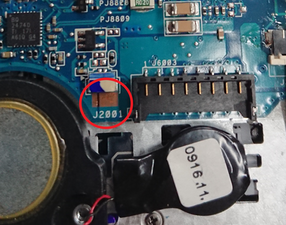
Near the connector for the battery marked "KTS" are two contact pins next to a label J2001.

What you need to do is to short them by connecting the two points. You can do this using a small flat-head screwdriver.

1. Locate the two J2001 contact points

2. Hold a flat-head screwdriver over the two points

3. Hold the screwdriver in place and connect the power

The laptop should turn on and remove the power password.

It might take you a few times to do this correctly.

Here's an illustration from a similar laptop. (As your images are already annotated)

Immagine

Questa risposta è stata utile?

Punteggio 1
Aggiungi un commento

Aggiungi la tua risposta

Brianna Bennett sarà eternamente grato.
Visualizza statistiche:

Ultime 24 ore: 0

Ultimi 7 giorni: 9

Ultimi 30 giorni: 38

Tutti i Tempi: 12,529