Introduzione
This is a guide on how to replace the battery in a Microsoft Surface Laptop Studio. You may need to replace your battery if your device is unresponsive and won't turn on after charging it, or if battery life is short. You will only need a few tools for the repair and it only takes 10-15 minutes.
Cosa ti serve
-
Strumento utilizzato in questo passaggio:Tweezers$4.99
-
Remove the rubber cosmetic strip along the outside edge of the back plate with tweezers.
 Chiedi a FixBot
-
-
-
Use a hair dryer to lightly heat the rubber feet to soften the adhesive securing them to the case.
-
Remove the two rubber feet on the lower case with an opening tool.
-
-
-
-
Remove the seven screws securing the lower case with a T3 Torx screwdriver.
-
-
-
Disconnect the battery cable by lifting the pull tab until it "clicks."
-
-
-
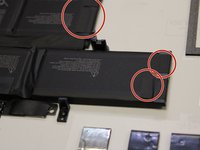
Pull the pull tabs to release the adhesive securing the battery.
-
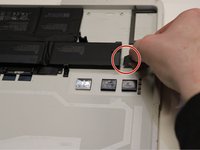
Remove the battery.
-


To reassemble your device, follow the above steps in reverse order.
For optimal performance, after completing this guide, calibrate your newly installed battery.
Take your e-waste to an R2 or e-Stewards certified recycler.
Repair didn’t go as planned? Try some basic troubleshooting or ask our Answers community for help.c
Annulla: non ho completato questa guida.
Un'altra persona ha completato questa guida.

Team

Western Carolina University, Team 1-3, Virtue Spring 2023 Membro di Western Carolina University, Team 1-3, Virtue Spring 2023
WCU-VIRTUE-S23S1G3
4 Membri
14 guide realizzate
7Commenti sulla guida
Where can I find a Surface Studio Laptop battery? Microsoft seems to have been out of stock for a while now.
Are the rubber feet re-attachable to the laptop after repairs?
Any link to buy the battery ?
The what you need section should also mention Surface Laptop Studio Cosmetic Plate - Genuine, possibly as an optional part.
Great point, Ronno! We added that to the parts list. Thanks for your comment.
