Salta al contenuto principale
Unisciti alla Community delle riparazioni - Crea un account

Microsoft Surface Pro 11 SSD Door Replacement

Cosa ti serve

  1. Microsoft Surface Pro 11 SSD Door Replacement, Open the kickstand: passo 1, immagine 1 di 3 Microsoft Surface Pro 11 SSD Door Replacement, Open the kickstand: passo 1, immagine 2 di 3 Microsoft Surface Pro 11 SSD Door Replacement, Open the kickstand: passo 1, immagine 3 di 3
    • Lay your Surface Pro screen side down and open the kickstand to about a 90‑degree angle.

    Chiedi a FixBot

    Aggiungi Commento

  2. Microsoft Surface Pro 11 SSD Door Replacement, Remove the SSD door: passo 2, immagine 1 di 3 Microsoft Surface Pro 11 SSD Door Replacement, Remove the SSD door: passo 2, immagine 2 di 3 Microsoft Surface Pro 11 SSD Door Replacement, Remove the SSD door: passo 2, immagine 3 di 3
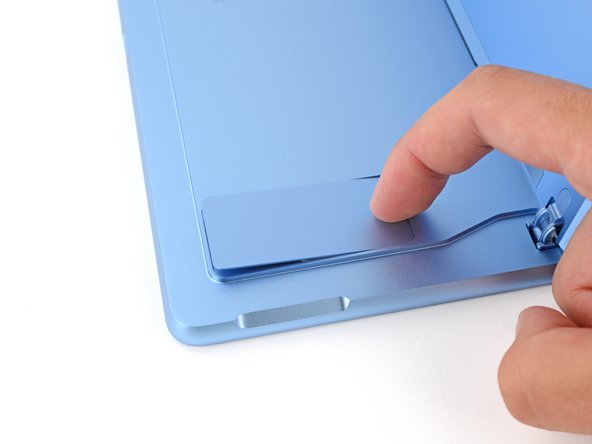
    • Use your finger to firmly press down on the SSD door indent until the door pops up.

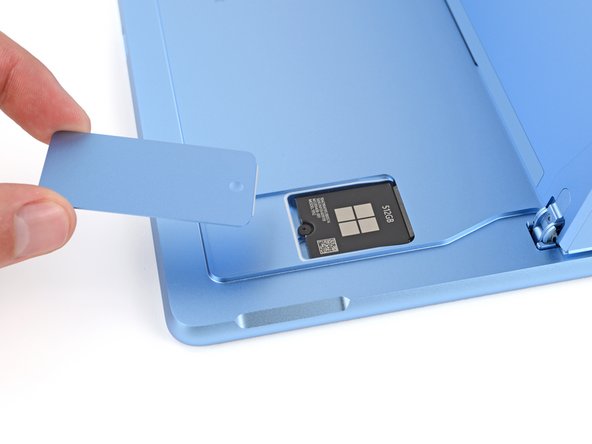
    • Remove the SSD door.

    Chiedi a FixBot

    Aggiungi Commento

Conclusione

To reassemble your device, follow these instructions in reverse order.

Repair didn’t go as planned? Try some basic troubleshooting, or ask our Answers community for help.


Annulla: non ho completato questa guida.

Spencer Day

Membro da: 09/14/22

191.211 Reputazione

1.204 guide realizzate

Team

iFixit Membro di iFixit

Staff

122 Membri

25.946 guide realizzate

0Commenti sulla guida

Aggiungi Commento

Visualizza statistiche:

Ultime 24 ore: 1

Ultimi 7 giorni: 15

Ultimi 30 giorni: 65

Tutti i Tempi: 627