Salta al contenuto principale
Unisciti alla Community delle riparazioni - Crea un account

Zeki Droid Tablet Camera Replacement

Cosa ti serve

  1. Zeki Droid Tablet Camera Replacement, Back Casing: passo 1, immagine 1 di 1
    • Remove the back casing by slowly popping each tab out with a plastic opening tool.

    Chiedi a FixBot

    Aggiungi Commento

  2. Zeki Droid Tablet Camera Replacement: passo 2, immagine 1 di 1
    Strumento utilizzato in questo passaggio:
    Tweezers
    $4.99
    • Remove the tapes one by one from the connecting wires with tweezers.

    Chiedi a FixBot

    Aggiungi Commento

  3. Zeki Droid Tablet Camera Replacement: passo 3, immagine 1 di 1
    • Remove the black clips from both sides of the casing with a plastic opening tool.

    • The clips should pop off separate from the speakers.

    Chiedi a FixBot

    Aggiungi Commento

  4. Zeki Droid Tablet Camera Replacement: passo 4, immagine 1 di 1
    • Remove the speakers from the back casing.

    • Do not tug on the speakers because they are connected to fragile wires.

    Chiedi a FixBot

    Aggiungi Commento

  5. Zeki Droid Tablet Camera Replacement: passo 5, immagine 1 di 1
    • Pull the speakers away from the back casing carefullly.

    Chiedi a FixBot

    Aggiungi Commento

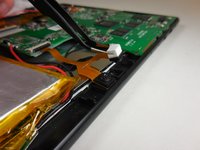
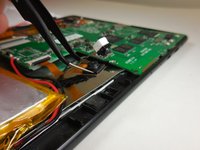
  6. Zeki Droid Tablet Camera Replacement, Camera: passo 6, immagine 1 di 2 Zeki Droid Tablet Camera Replacement, Camera: passo 6, immagine 2 di 2
    Strumento utilizzato in questo passaggio:
    Tweezers
    $4.99
    • Grip the camera on both sides using tweezers or your fingers, and carefully lift it off the board.

    • The adhesive may make it difficult to remove the cameras from the tablet.

    Chiedi a FixBot

    Aggiungi Commento

  7. Zeki Droid Tablet Camera Replacement: passo 7, immagine 1 di 1
    • Undo the ZIF connector that is connecting the cameras to the motherboard using a plastic spudger or fingernail.

    • This guide has more information on how to undo the ZIF connector

    • Do not yank the ZIF connector. It should come apart very easily with little force needed.

    Chiedi a FixBot

    Aggiungi Commento

  8. Zeki Droid Tablet Camera Replacement: passo 8, immagine 1 di 1
    • Pull the copper connection carefully away from the motherboard of the tablet to completely remove the camera.

    Chiedi a FixBot

    Aggiungi Commento

Conclusione

To reassemble your device, follow these instructions in reverse order.

Annulla: non ho completato questa guida.

Un'altra persona ha completato questa guida.

0Commenti sulla guida

Aggiungi Commento

Visualizza statistiche:

Ultime 24 ore: 3

Ultimi 7 giorni: 10

Ultimi 30 giorni: 36

Tutti i Tempi: 599