Introduzione
The Wifi-Module allows the Sony BDP-S3500 Blu Ray player to connect wirelessly to the internet. This guide will show you how to replace it safely without damaging the other components.
Be sure to review the troubleshooting guide, as most of the time the problems are due malfunctioning software rather than it being a hardware issue.
Cosa ti serve
-
-
-
Use the Phillips #2 screwdriver to remove the two 9mm screws located on the back of the device.
 Chiedi a FixBot
-
-
-
Slide the top panel off towards the back of the device.
-
Remove the top panel.
-
-
-
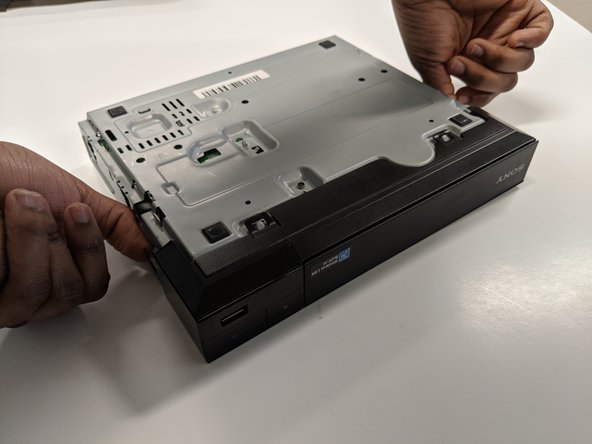
Unclip the plastic tags from the bottom of the device.
-
Unclip the plastic tags from the sides of the device.
-
Slide the front panel off.
-
-
-
-
-
-
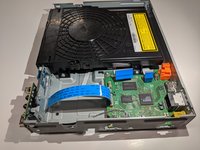
Keep the back side up and facing towards you.
-
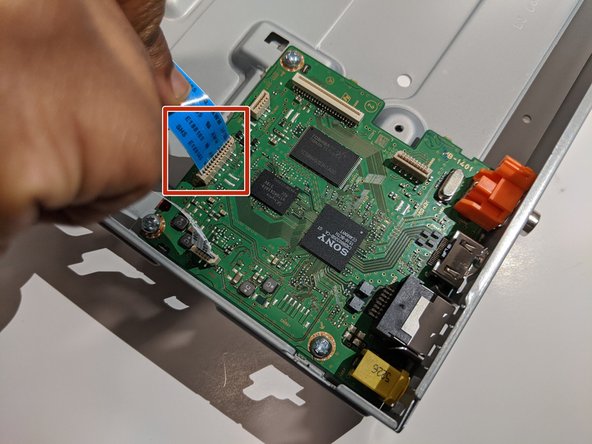
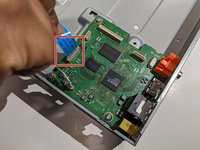
Carefully disconnect the blue ribbon connecting the port board and motherboard.
-
-
-
Use a Phillips #2 screwdriver to remove the 9mm screw from the port board.
-
-
-
-
-
Remove the white ribbon cable connecting the Wi-Fi module to the motherboard by gently pulling it out.
-
-
-
Use a Phillips #2 screwdriver to remove the 7mm screw from the Wi-Fi module.
-
-





To reassemble your device, follow these instructions in reverse order.

Team

York University, Team S8-G4, Turner Winter 2020 Membro di York University, Team S8-G4, Turner Winter 2020
YORK-TURNER-W20S8G4
4 Membri
10 guide realizzate
