Salta al contenuto principale
Unisciti alla Community delle riparazioni - Crea un account

Sony BDP-BX510 Wi-Fi Module Replacement

Cosa ti serve

    1. Sony BDP-BX510 Wi-Fi Module Replacement, Outer Cover: passo 1, immagine 1 di 1
      • Plug in the device to turn it on, then press the eject ( ⏏ ) button to open the tray.

      Chiedi a FixBot

      Aggiungi Commento

    2. Sony BDP-BX510 Wi-Fi Module Replacement: passo 2, immagine 1 di 2 Sony BDP-BX510 Wi-Fi Module Replacement: passo 2, immagine 2 di 2
      • To remove the tray cover, hold both sides of the tray cover and gently apply a downward pressure.

      • Apply slightly more pressure to the left side until it unhooks then unhook the right side.

      • Close the disk tray by pressing the eject button again, then power off the device and unplug it.

      • Do not use too much force to remove the tray cover as you may break it.

      Chiedi a FixBot

      Aggiungi Commento

    3. Sony BDP-BX510 Wi-Fi Module Replacement: passo 3, immagine 1 di 2 Sony BDP-BX510 Wi-Fi Module Replacement: passo 3, immagine 2 di 2
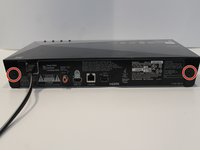
      • Turn to the back of the device.

      • Remove the two 7mm Phillips #2 screws.

      • Slide the two plastic covers on both sides of the device towards the back of the device to remove them.

      Chiedi a FixBot

      Aggiungi Commento

    4. Sony BDP-BX510 Wi-Fi Module Replacement: passo 4, immagine 1 di 3 Sony BDP-BX510 Wi-Fi Module Replacement: passo 4, immagine 2 di 3 Sony BDP-BX510 Wi-Fi Module Replacement: passo 4, immagine 3 di 3
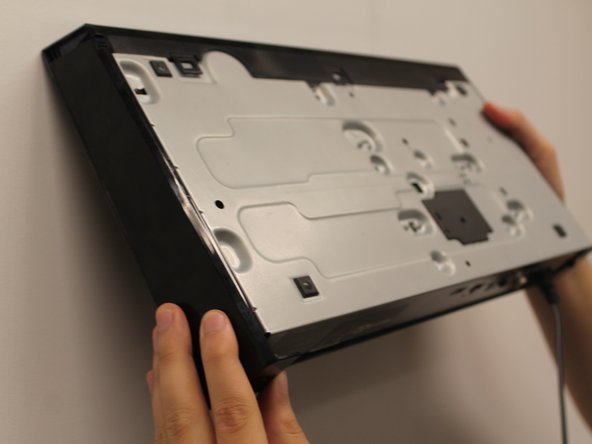
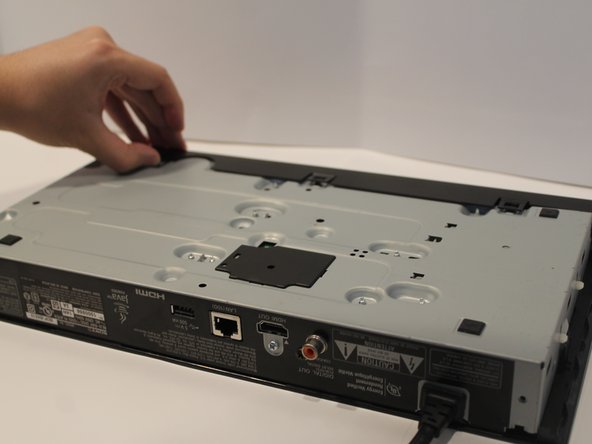
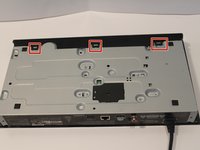
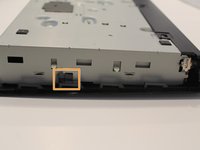
      • Turn the device so you can see the bottom.

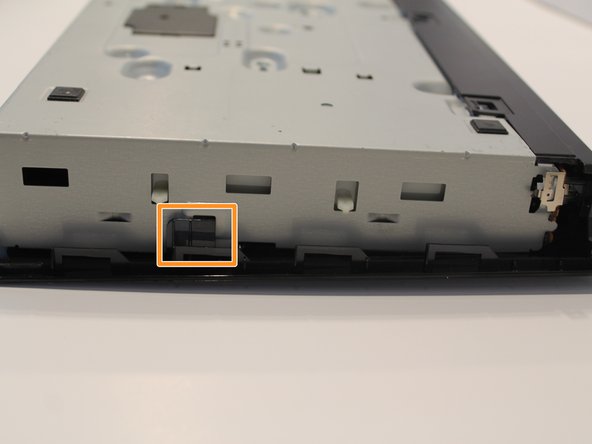
      • Unclip the three black plastic clips on the bottom of the device.

      • Unclip one clip on each side of the device.

      Chiedi a FixBot

      Aggiungi Commento

    5. Sony BDP-BX510 Wi-Fi Module Replacement: passo 5, immagine 1 di 1
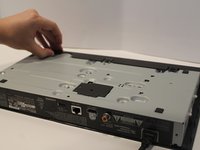
      • Slide the cover forward to remove.

      Chiedi a FixBot

      Aggiungi Commento

    1. Sony BDP-BX510 Wi-Fi Module Replacement, Port Board: passo 6, immagine 1 di 1
      • Find the large ribbon cable that connects the port board to the motherboard.

      • Carefully pull directly upwards to disconnect the cable.

      Chiedi a FixBot

      Aggiungi Commento

    2. Sony BDP-BX510 Wi-Fi Module Replacement: passo 7, immagine 1 di 1
      • Using the Phillips #1 screwdriver, remove the 5mm screwdriver attached to the port board.

      Chiedi a FixBot

      Aggiungi Commento

    3. Sony BDP-BX510 Wi-Fi Module Replacement: passo 8, immagine 1 di 1
      • Unclip the metal piece on the lower right corner by gently lifting it up.

      Chiedi a FixBot

      Aggiungi Commento

    4. Sony BDP-BX510 Wi-Fi Module Replacement: passo 9, immagine 1 di 1
      • Remove the port board by simply pulling it away from the device.

      Chiedi a FixBot

      Aggiungi Commento

    1. Sony BDP-BX510 Wi-Fi Module Replacement, Wi-Fi Module: passo 10, immagine 1 di 1
      • Pull the cable that attaches the Wi-Fi module to the motherboard.

      • The cable will be hard to remove, so pull hard but carefully.

      Chiedi a FixBot

      Aggiungi Commento

    2. Sony BDP-BX510 Wi-Fi Module Replacement: passo 11, immagine 1 di 1
      • Use a Phillips #1 screwdriver to remove the single 5mm screw that holds Wi-Fi module to the device.

      Chiedi a FixBot

      Aggiungi Commento

    3. Sony BDP-BX510 Wi-Fi Module Replacement: passo 12, immagine 1 di 1
      • Carefully remove the Wi-Fi module from the device.

      • Avoid getting fingerprints on the module.

      Chiedi a FixBot

      Aggiungi Commento

Conclusione

To reassemble your device, follow these instructions in reverse order.

Annulla: non ho completato questa guida.

0Commenti sulla guida

Aggiungi Commento

Visualizza statistiche:

Ultime 24 ore: 3

Ultimi 7 giorni: 10

Ultimi 30 giorni: 22

Tutti i Tempi: 609