Salta al contenuto principale
Unisciti alla Community delle riparazioni - Crea un account

Nintendo Wii Fan Replacement

Cosa ti serve

  1. Nintendo Wii Fan Replacement, Faceplate: passo 1, immagine 1 di 2 Nintendo Wii Fan Replacement, Faceplate: passo 1, immagine 2 di 2
    • Use a metal spudger to remove the white plastic screw covers stuck to the lower case near the front of the Wii.

    Chiedi a FixBot

    Aggiungi Commento

  2. Nintendo Wii Fan Replacement: passo 2, immagine 1 di 1
    • Remove the two 8.3 mm Tri-Point screws hidden under the covers you just removed.

    Chiedi a FixBot

    Aggiungi Commento

  3. Nintendo Wii Fan Replacement: passo 3, immagine 1 di 1
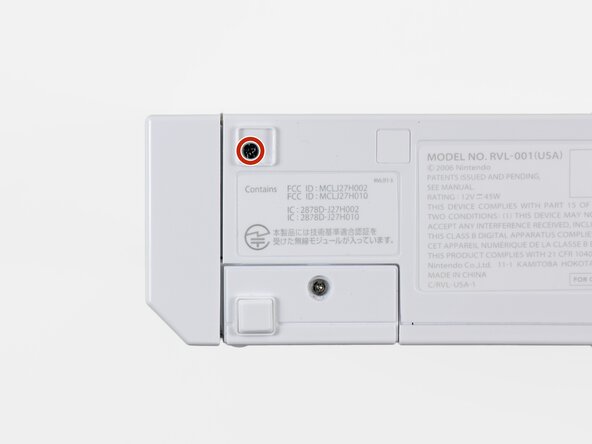
    • Remove the single 5.9 mm Phillips screw under the controller port door nearest the faceplate.

    Chiedi a FixBot

    Aggiungi Commento

  4. Nintendo Wii Fan Replacement: passo 4, immagine 1 di 1
    • Use a metal spudger to remove the rubber foot stuck to the side of the Wii near the DVD drive opening.

    Chiedi a FixBot

    Aggiungi Commento

  5. Nintendo Wii Fan Replacement: passo 5, immagine 1 di 1
    • Remove the single 5.9 mm Phillips screw hidden under the foot you just removed.

    Chiedi a FixBot

    Aggiungi Commento

  6. Nintendo Wii Fan Replacement: passo 6, immagine 1 di 2 Nintendo Wii Fan Replacement: passo 6, immagine 2 di 2
    Strumento utilizzato in questo passaggio:
    Tweezers
    $4.99
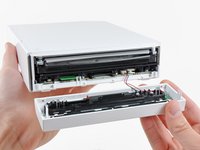
    • Carefully pull the faceplate away from the front of the Wii.

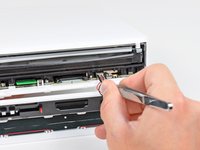
    • Use a pair of tweezers to disconnect the LED cable's plastic connector from the motherboard.

    • Remove the faceplate.

    Chiedi a FixBot

    Aggiungi Commento

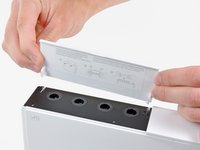
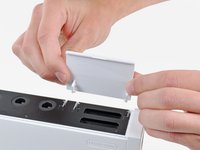
  7. Nintendo Wii Fan Replacement, Outer Case: passo 7, immagine 1 di 3 Nintendo Wii Fan Replacement, Outer Case: passo 7, immagine 2 di 3 Nintendo Wii Fan Replacement, Outer Case: passo 7, immagine 3 di 3
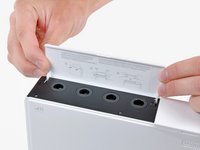
    • Open the controller port cover until it is perpendicular to the black controller port bezel.

    • Pull the controller port cover straight up to release it from the outer case.

    • Repeat this procedure for the memory card port cover.

    Chiedi a FixBot

    Aggiungi Commento

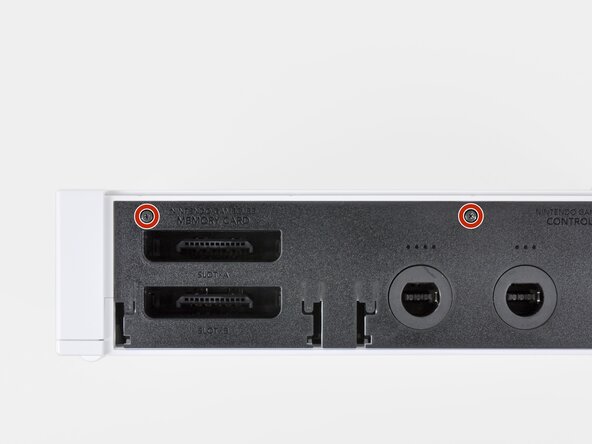
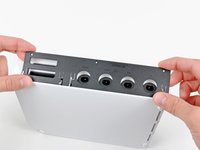
  8. Nintendo Wii Fan Replacement: passo 8, immagine 1 di 2 Nintendo Wii Fan Replacement: passo 8, immagine 2 di 2
    • Remove the two remaining 4.1 mm Phillips screws along the top edge of the black plastic controller port bezel.

    • Lift the bezel from the long edge furthest away from the controller ports and remove it from the Wii.

    Chiedi a FixBot

    Aggiungi Commento

  9. Nintendo Wii Fan Replacement: passo 9, immagine 1 di 1
    • Remove the two 5 mm Phillips screws above the controller ports.

    Chiedi a FixBot

    Aggiungi Commento

  10. Nintendo Wii Fan Replacement: passo 10, immagine 1 di 1
    • Use a metal spudger to remove the three highlighted screw covers stuck to the side of the Wii.

    Chiedi a FixBot

    Aggiungi Commento

  11. Nintendo Wii Fan Replacement: passo 11, immagine 1 di 1
    • Remove the following screws:

    • Two 5 mm Phillips screws

    • One 8.2 mm Tri-Point screw

    Chiedi a FixBot

    Aggiungi Commento

  12. Nintendo Wii Fan Replacement: passo 12, immagine 1 di 1
    • Use a metal spudger to remove the two rubber feet stuck to the bottom face of the Wii near the rear ports.

    Chiedi a FixBot

    Aggiungi Commento

  13. Nintendo Wii Fan Replacement: passo 13, immagine 1 di 1
    Strumento utilizzato in questo passaggio:
    iFixit Precision 4 mm Screwdriver Bit
    $2.99
    • Remove the two 8.2 mm Tri-Point screws hidden under the feet you just removed.

    • You may use a 4 mm hex nut driver to extend your bit into the recesses and reach the screws.

    Chiedi a FixBot

    Aggiungi Commento

  14. Nintendo Wii Fan Replacement: passo 14, immagine 1 di 1
    • Lift the outer case straight up off the body of the Wii.

    Chiedi a FixBot

    Aggiungi Commento

  15. Nintendo Wii Fan Replacement, Fan: passo 15, immagine 1 di 1
    Strumento utilizzato in questo passaggio:
    Tweezers
    $4.99
    • Grab the fan connector with a pair of tweezers and lift it straight up and out of its socket on the motherboard.

    • Be sure your tweezers are clamped down on the fan connector, not the socket attached to the motherboard.

    Chiedi a FixBot

    Aggiungi Commento

  16. Nintendo Wii Fan Replacement: passo 16, immagine 1 di 1
    • Remove the two 10 mm Phillips screws securing the fan to the fan shroud.

    Chiedi a FixBot

    Aggiungi Commento

  17. Nintendo Wii Fan Replacement: passo 17, immagine 1 di 1
    • Remove the fan from the Wii.

    Chiedi a FixBot

    Aggiungi Commento

Conclusione

To reassemble your device, follow these instructions in reverse order.

Annulla: non ho completato questa guida.

Altre 36 persone hanno completato questa guida.

10Commenti sulla guida

Awesome guide, just replaced faulty fan unit in my 9 year old wii. Should hopefully keep it going for another 9 years :)

Finlay Macrae - Rispondi Condividi

Super easy and great instructions! I feel a little guilty that my Wii sat in the garage for 4 years! Now it'll be a great birthday present for my 2 boys.

e_gayheart - Rispondi Condividi

Does anyone have a diagram for the Wii’s airflow? I’m looking to install a booster fan at the bottom to help blow air in but I want to make sure it is effective.

Jessica Parnelli Fawkes - Rispondi Condividi

nice¡¡¡¡¡¡¡¡¡¡¡¡¡¡

RIGO NOLASCO - Rispondi Condividi

Thanks! Wii Quarantine’n in 2021!

Daniel Thomas - Rispondi Condividi

Aggiungi Commento

Visualizza statistiche:

Ultime 24 ore: 11

Ultimi 7 giorni: 79

Ultimi 30 giorni: 324

Tutti i Tempi: 50,765