Questa traduzione è stata generata automaticamente e non è stata ancora revisionata da una persona. Parli questa lingua? Dai un’occhiata.
Introduzione
Ridai vita al tuo Droid RAZR con una nuova batteria.
Se la batteria è gonfia, prendi le dovute precauzioni.
Cosa ti serve
-
-
-
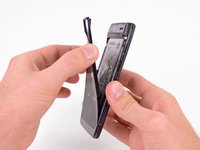
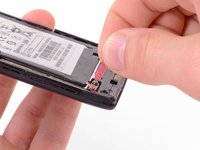
Inserisci uno strumento di apertura in plastica tra la cover posteriore e il case posteriore sul bordo inferiore sinistro della cover posteriore.
-
Fai leva verso l'alto sulla cover posteriore con lo strumento di apertura in plastica per liberare le clip in plastica.
-
Continua a fare leva lungo il bordo sinistro della cover posteriore verso la parte superiore del telefono.
 Chiedi a FixBot
-
-
-
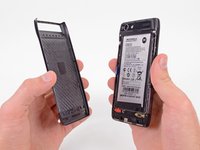
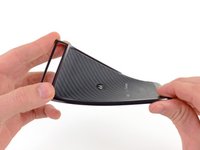
Fai scorrere lo strumento di apertura lungo la parte superiore della cover posteriore per sganciare le clip in plastica.
-
Continua a fare leva lungo il lato destro della cover posteriore per sganciare le clip rimanenti.
-
-
-
-
-
-
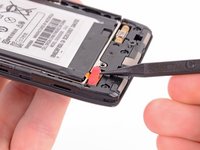
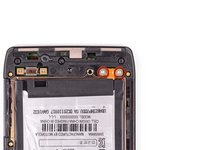
Usa la punta di uno spudger per sollevare la copertura in silicone rossa sopra le viti del terminale batteria e rimuovila.
-
-
-
Rimuovi le due viti Torx T5 da 3,3 mm del terminale batteria.
-
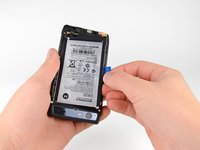
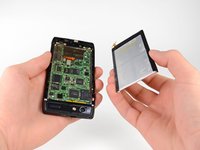
Afferra la linguetta blu di rimozione della batteria e solleva la batteria per rimuoverla.
-
-






Per rimontare il dispositivo, segui queste istruzioni in ordine inverso.
Annulla: non ho completato questa guida.
Altre 46 persone hanno completato questa guida.

8Commenti sulla guida
Great guide. Honestly the spudger tool made it soooo easy.. I even used the spuder to remove the case from the phone. gently inserting the spudger while using slight pressure on removing the case. you could hear the small cracks as the adhesive gave way.. Take your time when doing this and it will come out just fine.... Also used the spudger on removing the battery from the case..... again carefully inserting the tool while pulling up slowly with the blue tab...
You guys rock.....Thanks again.
I bought a knock off brand battery off of amazon and used it. At first i thought it wouldn't work but after a little playing around with it i got it to fit. Big thing is be delicate, SLOWLY remove the back paneling and try not to bump the bottom thing where the screws go.
Very helpful and informative article, it made it easy for me to fix my phone at home. Thank you a million!
