Introduzione
If the power button isn't responding when pushed, you may need to replace the power button board. Before you take your speaker apart, take a look at the troubleshooting guide. If you have ruled out the other issues, follow this guide to learn how to replace the power button board in your Logitech UE Megaboom 4.
Before you begin this repair, power off your speaker and unplug it from the charger.
Cosa ti serve
-
-
-
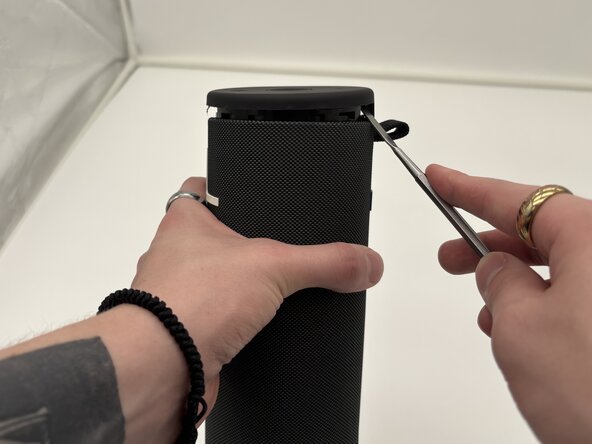
Place the end of a metal spudger in the seam between the top cover and outer case of the speaker. Work your way around the seam of the cover to loosen it.
-
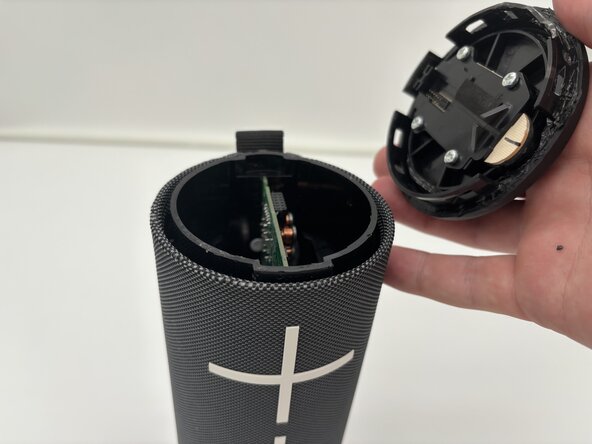
Separate the top cover of the speaker from the case.
 Chiedi a FixBot
-
-
-
-
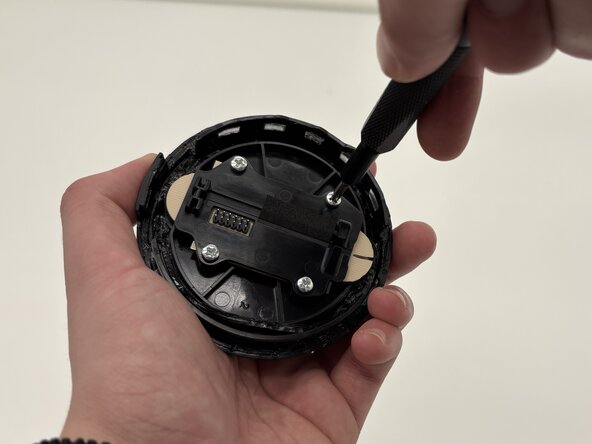
Use a Phillips #1 screwdriver to remove four screws from the underside of the top cover of the speaker.
-
Remove the black bracket covering the button board.
-
-





To reassemble your device, follow these instructions in reverse order. Take your e-waste to an R2 or e-Stewards certified recycler.
Annulla: non ho completato questa guida.
Un'altra persona ha completato questa guida.

Team

University of North Texas, Team 1-4, Kilpatrick Spring 2025 Membro di University of North Texas, Team 1-4, Kilpatrick Spring 2025
UNT-KILPATRICK-S25S1G4
4 Membri
11 guide realizzate
