Questa traduzione è stata generata automaticamente e non è stata ancora revisionata da una persona. Parli questa lingua? Dai un’occhiata.

Sostituzione del morsetto a C del Logitech G27

Daniel Louis e 2 altri collaboratori
Ultimo aggiornamento il 29 lug 2026
Visualizzazioni: 50.992
Visualizza statistiche:
- Ultime 24 ore:
- 6
- Ultimi 7 giorni:
- 44
- Ultimi 30 giorni:
- 217
- Tutti i Tempi:
- 50.992
Commenti: 32
17 commenti sui passaggi, 15 commenti sulla guida.
Vai ai commenti della guidaCompletato: 24 25
24 persone hanno contrassegnato questa guida come "completata". Sarai il prossimo?
25 persone hanno contrassegnato questa guida come "completata". Compreso te, ottimo lavoro!
Preferiti: 3 4
3 persone hanno aggiunto ai preferiti (e si sono iscritte a) questa guida. Sarai il prossimo?
4 persone hanno aggiunto ai preferiti (e si sono iscritte a) questa guida, incluso te!
Introduzione
Vai al passo 1 ↓Se i morsetti a C del tuo Logitech G27 si rompono, dovrai sostituirli prima di poter utilizzare nuovamente il volante. È un'operazione leggermente scomoda da eseguire, poiché i morsetti a C si trovano interamente all'interno dell'involucro del dispositivo. Per sostituirli, dovrai solo rimuovere alcune viti.
Cosa ti serve
Strumenti


-
-
-
Svita le sei viti grigie esagonali da 25 mm con una chiave a brugola da 4 mm.
-
Solleva attentamente il volante, ma non scollegarlo dal resto del dispositivo.
 Chiedi a FixBot
-
-
-
Solleva attentamente il volante dal mozzo, scoprendo i cavi e la scheda PCB delle due manopole del cambio.
-
-
-
Svita le due viti argento che tengono ferma la scheda PCB nel volante con un cacciavite a croce Phillips #1.
-
-
-
Schiaccia e scollega attentamente il connettore largo a 7 pin sotto la scheda PCB.
-
-
-
Puoi ora rimuovere del tutto il volante dal mozzo. Mettilo da parte finché non rimonti il volante.
-
Svita le tre viti argento da 37,5 mm più interne con un cacciavite a croce Phillips #2.
-
Rimuovi il mozzo del volante e spingi il connettore attraverso il centro del mozzo.
-
-
-
Puoi ora mettere da parte il mozzo e girare la copertura del volante per scoprire la parte inferiore.
-
Svita le otto viti argento da 15,9 mm tutto intorno sotto la copertura del volante con un cacciavite a croce Phillips #1.
-
-
-
Ruta la copertura a testa in su e rimuovine la metà superiore, svelando la maggior parte dei componenti del volante.
-
Puoi mettere da parte la copertura del volante finché non lo rimonti.
-
-
-
Svita le quattro viti argento da 7,3 mm che fissano la scheda PCB verde alla copertura del motore con un cacciavite a croce Phillips #2.
-
-
-
Scollega i tre connettori in plastica sulla parte sinistra della scheda PCB.
-
Scollega i due connettori in plastica sulla parte superiore della scheda PCB.
-
Scollega i tre connettori in plastica sulla parte destra della scheda PCB.
-
-
-
Rimuovi la scheda PCB dopo aver scollegato tutti i connettori in plastica.
-
Puoi ora metterla da parte.
-
-
-
-
Svita le due viti nere superiori da 12,3 mm con un cacciavite a croce Phillips #2.
-
Svita le due viti argento inferiori da 15,5 mm con un cacciavite a croce Phillips #1.
-
-
-
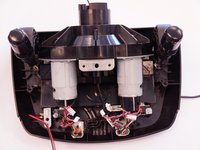
Rimuovi il supporto della scheda PCB e il pezzo in plastica trasparente sottostante.
-
Mettili da parte finché non rimonti il volante.
-
-
-
-
-
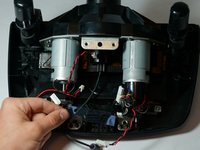
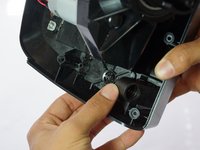
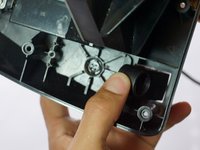
Svita a mano il pezzo che tiene in posizione il morsetto a C.
-
-
-
Spingi il pomello rimanente in avanti e poi verso l'interno attraverso la fessura.
-
-
-
Il morsetto a C può ora essere estratto facilmente dalla parte inferiore del dispositivo.
-
-






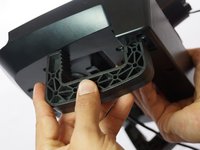
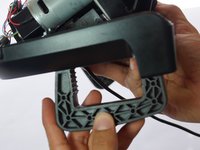
Per rimontare il dispositivo, segui queste istruzioni in ordine inverso.
Annulla: non ho completato questa guida.
Altre 24 persone hanno completato questa guida.

Team

Cal Poly, Team 15-4, Amido Spring 2015 Membro di Cal Poly, Team 15-4, Amido Spring 2015
CPSU-AMIDO-S15S15G4
4 Membri
72 guide realizzate
15Commenti sulla guida
I also need to find a place to buy replacement C-clamps from
