Introduzione
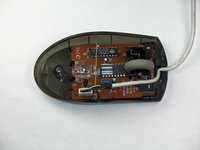
This guide shows how to disassemble and remove the scroll wheel of the Logitech MBJ58 optical scroll mouse. This might be necessary if the wheel is stuck, difficult to turn, or dislodged. If it becomes dislodged, it can cause additional damage to the mouse’s motherboard, which is located beneath the wheel.
The scroll wheel may become jammed if the support spring that holds it in place is dislodged. To see how to repair that, as well as how to deconstruct other parts of the mouse, see the Logitech MBJ58 mouse troubleshooting guide.
Cosa ti serve
-
-
Hold the mouse so that the bottom is facing up.
-
Remove the single Phillips #1 screw from the bottom half of the mouse.
 Chiedi a FixBot
-
-
-
Place the mouse so that the bottom is resting against a hard surface.
-
Lift the top cover of the mouse gently, and remove it.
-
-
-
-
Locate the scroll wheel on the mouse.
-
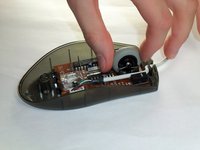
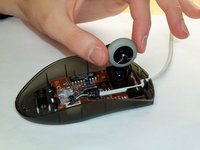
Grab the scroll wheel with your thumb and index finger.
-
Gently lift up, to remove the scroll wheel from the mouse.
-
-
-
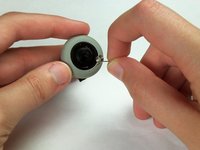
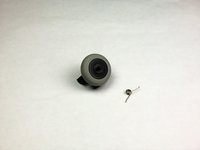
Locate the spring on the scroll wheel, and carefully remove the spring.
-
-
-
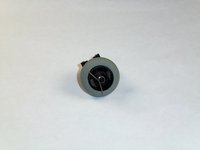
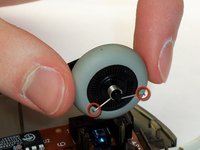
Place the replacement spring on the correct side of the wheel (shown in the images) with the prongs pointing down.
-
-
-
Use the images to locate where the resistance spring is.
-
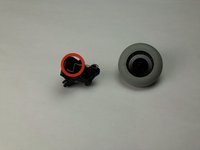
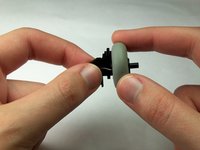
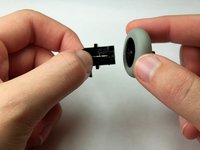
Grab the scroll wheel and its mount and gently pull them apart.
-








To reassemble your device, follow these instructions in reverse order.
Annulla: non ho completato questa guida.
Altre 14 persone hanno completato questa guida.

Team

Cal Poly, Team 5-14, Forte Winter 2013 Membro di Cal Poly, Team 5-14, Forte Winter 2013
CPSU-FORTE-W13S5G14
5 Membri
23 guide realizzate
7Commenti sulla guida
Excellent! I took an MBJ58 apart to remove accumulated gunk, and the resistance spring jumped onto my worktable before I noticed where it came from. Thanks for the help, well done!
Heh, me too. Couldn't for the life of me figure out how it went back in. Thanks for the guide!
Same thing happened to me...saved me a trip to the store for a new mouse!!
thanks for taking the time to post these photos!
huh, thank you very much, amazing guide, the only for this product in Internet , and amazingly accurate
