Introduzione
Among all the parts of your Compaq Evo N1000v, the keyboard could be one of the most utilized parts, which might have a tendency to wear out or malfunction or completely die out after some time. In many cases, the laptop keyboard does not have to be physically damaged; some keys do not work or deteriorate on the whole before you know it is time to replace it for a smooth user experience. A new keyboard will offer responsiveness and comfort while typing, adding to the overall longevity of your laptop. This guide will walk you through replacing the keyboard in your Compaq Evo N1000v, making your laptop feel like new again and reliable for everyday use.
Before you begin this repair, make sure that your laptop is off and disconnected from the charger.
Cosa ti serve
-
-
-
Using a TR8 Torx screwdriver, remove the two T8 Torx screws that secure the LED cover to the base enclosure.
-
-
-
Flip the laptop back over with the front facing forward. Open the screen.
-
-
-
-
While holding the F1 and F2 keys, insert a spudger between the keys into the notch in the LED cover. Lift up.
-
-
-
Locate the Scroll and Pause keys near the top right corner of the keyboard.
-
-
-
While holding the Scroll and Pause keys, insert a spudger between the keys into the notch in the LED cover. Lift up.
-
-
-
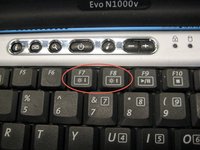
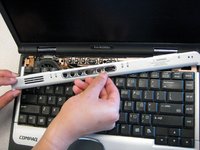
Insert a spudger between the F7 and F8 keys. Lift up to remove the LED cover.
-
-
-
-
Lift the back edge of the keyboard and pull towards the screen.
-
-

 Chiedi a FixBot




To reassemble your device, follow these instructions in reverse order. Take your e-waste to an R2 or e-Stewards certified recycler.
Annulla: non ho completato questa guida.
Un'altra persona ha completato questa guida.

Team

Cal Poly, Team 29-74, Johann Spring 2010 Membro di Cal Poly, Team 29-74, Johann Spring 2010
CPSU-JOHANN-S10S29G74
3 Membri
28 guide realizzate
