Introduzione
This guide will help you replace the RAM in an Asus A53S.
Random-Access Memory (RAM) stores the short-term data that the laptop needs to operate properly.
Before using this guide, make sure to review the troubleshooting page.
If your laptop is running slow, you may want to upgrade your RAM. The Asus A53S can be upgraded to up to 8GB of memory.
Make sure to power off your laptop completely, disconnect from any external power source, and remove the battery before beginning the process.
Cosa ti serve
-
-
-
Flip your laptop so the underside is facing up.
-
Using a Phillips #01 screwdriver, unscrew the two 6 mm screws at the indicated places.
-
Remove the back plate.
 Chiedi a FixBot
-
-
-
-
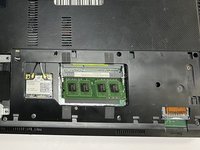
Gently push the metal clips apart, allowing the RAM to pop up.
-
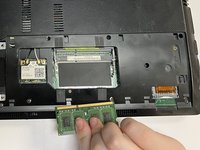
Remove the top RAM.
-
-
-
Gently push the metal clips apart, allowing the RAM to pop up.
-
Remove the bottom RAM.
-
-


To reassemble your device, follow these instructions in reverse order.
Annulla: non ho completato questa guida.
Altre 2 persone hanno completato questa guida.

Team

University of North Texas, Team 3-1, Saru Jimmy Fall 2022 Membro di University of North Texas, Team 3-1, Saru Jimmy Fall 2022
UNT-SARU JIMMY-F22S3G1
4 Membri
6 guide realizzate
