Introduzione
The battery is what gives the headset the power to run and function. This guide will show you how to remove the battery from the headset.
Cosa ti serve
-
-
-
Remove the magnetic ear pads by gently pulling them away from the headset. Be careful not to remove the left earpad, which houses the microphone, and ensure you're only removing the right earpad.
 Chiedi a FixBot
-
-
-
Squeeze the plastic opening tool between the black plastic and foam pad on non mic side and then pry upwards to remove the felt pads covering the speaker.
-
-
-
-
-
-
Remove the five 6mm PH1 screws.
-
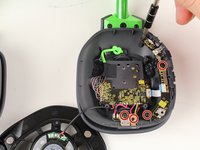
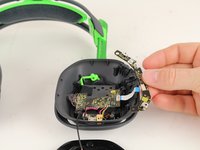
Remove the buttons panel by pulling the panel away from the white ribbon cord.
-
-
-
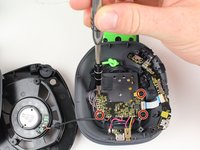
Remove the four 6mm PH1 screws.
-
Remove the tape holding the wires connected to the motherboard.
-
-
-
Remove the back panel by squeezing the two tabs together and pushing out.
-
-
-
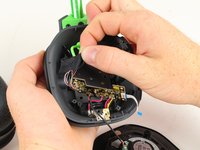
Disconnect the battery wires by desoldering them.
-
-
-
Remove the battery by using the plastic opening tool to pry it away from the headset.
-
-






To reassemble your device, follow these instructions in reverse order.
Annulla: non ho completato questa guida.
Altre 14 persone hanno completato questa guida.

Team

Cal Poly, Team S15-G1, Livingston Fall 2017 Membro di Cal Poly, Team S15-G1, Livingston Fall 2017
CPSU-LIVINGSTON-F17S15G1
3 Membri
18 guide realizzate
15Commenti sulla guida
Where do I buy a battery though….
