Domande popolari nel forum
Fai una domandaNon ci sono domande. Sii il primo a porre una domanda!
Storia
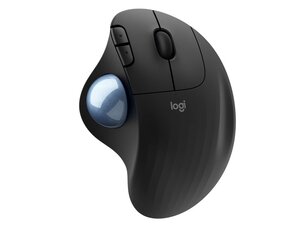
ERGO M575 è una trackball wireless progettata per ridurre al minimo i movimenti del braccio e massimizzare il comfort grazie al controllo del cursore con il pollice. È compatta e ha una trackball reattiva e scorrevole che rimane ferma, perfetta per scrivanie con poco spazio. Logitech punta sulla sostenibilità nel design, usando plastica riciclata e materiali resistenti per l'alloggiamento e i comandi. Le caratteristiche principali includono una forma ergonomica per un uso prolungato e una trackball fissa per un controllo preciso del cursore.
Identificazione
Logitech ERGO M575 può essere identificato dal numero di modello (M/N TR0006). L'etichetta del modello si trova sul lato inferiore dell'unità; il modello/identificativo del ricevitore USB wireless è stampato sull'alloggiamento del ricevitore/spina USB. Questa etichetta riporta il numero di modello (M/N), il numero di parte (P/N) e il numero di serie (S/N).
Specifiche
- Fattore di forma: trackball ergonomica fissa azionabile con il pollice (wireless)
- Produttore: Logitech
- ID prodotto: m575-ergo-wireless-trackball
- Modello / SKU: 910-005869 (nero), 910-005867 (grafite)
- Colori: Nero, grafite
- Materiali: L'alloggiamento e i componenti includono plastica riciclata e materiali polimerici resistenti (programma di sostenibilità Logitech)
- Trackball: Trackball fluida e reattiva azionabile con il pollice per un controllo preciso del cursore (dispositivo fisso)
- Connettività: Wireless (ricevitore USB e accoppiamento wireless supportati)
- Software: compatibile con il software Logitech (si consiglia Logi Options+)
- Condizioni dell'articolo: nuovo
Soluzione problemi
La maggior parte dei guasti rilevanti per la riparazione sono l'esitazione della sfera o il tremolio del cursore causati da detriti nella camera del sensore: diagnosticare rimuovendo il trackball e effettuando un'ispezione visiva/una pulizia dei sensori e della sfera.
La connettività wireless o l'input intermittente sono spesso causati da batterie scariche o problemi di accoppiamento: controlla il contatto della batteria, sostituisci la batteria e riprova l'accoppiamento o esegui un test con il ricevitore USB. Gli switch difettosi o l'alloggiamento incrinato richiedono l'apertura del case per effettuare l'ispezione delle leghe di saldatura e dei moduli degli switch per la sostituzione.
Per ulteriore assistenza nella risoluzione dei problemi, visita: https://support.logi.com
Ulteriori informazioni
Informazioni sulla garanzia
Per i termini di garanzia specifici per la propria regione, consultare la pagina della garanzia Logitech; per i reclami, contattare l'assistenza Logitech.
Un ringraziamento speciale a questi traduttori:
100%

Sara Balestra ci sta aiutando ad aggiustare il mondo! Vuoi partecipare?
Inizia a tradurre ›
