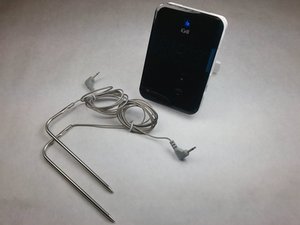
L'iGrill non si accende
Sostituisci le batterie
Controlla se le batterie sono sufficientemente cariche. Se le batterie non funzionano, dovrai sostituirle.
Controlla l'orientamento delle batterie
Se le batterie sono sufficientemente cariche, controlla che siano inserite con l'orientamento corretto nel dispositivo.
Possibile malfunzionamento del software o dell'hardware
Al momento non esiste una soluzione a questo problema tramite le normali procedure.
I numeri lampeggiano sullo schermo
Le sonde 1 o 2 non sono collegate al dispositivo
Una o entrambe le sonde non vengono riconosciute dal dispositivo. Se i contatti metallici non toccano le sonde, potrebbe essere necessario sistemarli.
Sullo schermo lampeggiano numeri diversi da 1 e 2
Le batterie potrebbero essere quasi scariche o si è verificato un problema software. Prova a risolvere il problema sostituendo le batterie; in caso contrario, il problema potrebbe non essere risolvibile con le normali procedure.
L'iGrill lampeggia 8.8.8 o le luci LED continuano a lampeggiare
Le batterie sono troppo scariche
Le batterie non funzionano correttamente o sono quasi scariche. Sostituisci tutte e 4 le batterie AA usate e riprova.
Impossibile connettersi al Bluetooth
Ripristina le impostazioni Bluetooth
Se il dispositivo non viene rilevato da quello a cui vuoi collegarti o se il logo Bluetooth blu non appare sullo schermo, devi ripristinare le configurazioni Bluetooth. Tieni premuti i pulsanti più e meno, premi il pulsante di accensione, quindi ripeti. Infine, tieni premuti tutti e tre i pulsanti finché non senti un segnale acustico lungo e costante; dopo il segnale, rilascia i pulsanti.
Potrebbero esserci problemi con il tuo dispositivo
Prova ad associare il dispositivo che vuoi collegare all'iGrill a un altro apparecchio. I problemi di connettività potrebbero dipendere dal dispositivo che avvia l'associazione.
Non esce alcun audio dal mio iGrill
Controlla il componente audio
Assicurati che il pezzo audio interno sia saldato correttamente.

Team

IUPUI, Team 3-4, Harley Spring 2016 Membro di IUPUI, Team 3-4, Harley Spring 2016
IUPUI-HARLEY-S16S3G4
4 Membri
48 guide realizzate

14 Commenti
IGrill2 paired with my iPad but won't show up on my iPhone. Both have the Weber App. I initially paired with iPad and installed new firmware. When trying to pair with Iphone, the pairing icon flashes for about a second in the upper right of the app, then goes away. In Bluetooth settings, it shows up on my ipad but not on iPhone. I also have the mini, which shows up on both devices no problem. What do I need to do?
Steve - Rispondi Condividi
They can only pair with one device at a time.
Greg Millar - Rispondi Condividi
I've always had trouble getting mine to pair reliably. Here is is, Thanksgiving, and it refuses to pair.
fiedlerh - Rispondi Condividi
So what does
"Software or Hardware Problem
Acurrent solution to this problem [not turning on] is not available by normal measures" mean, exactly?
My iGrill does. It turn on. Batteries are good and are correctly oriented. What are the abnormal means I can try?
This is very frustrating...
andreraiche - Rispondi Condividi
i think its just a bit temperamental, mine constantly said bluetooth stopped working, i just kept trying to turn off the app and turn it on again - I could see that my phone (android) was pairing in the device settings, so i unpaired it to see if the app would pair it - eventually after about 10 times turning on and off various things it worked. frustrating. also why does the app have a sales pitch for a device i already have? just makes the app more confusing and less intuitive.
Mathew Williams - Rispondi Condividi