Wiki con Collaborazione Studenti
Un fantastico team di studenti del nostro programma educativo ha realizzato questo wiki.
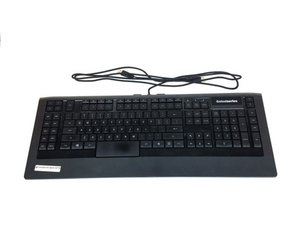
Questa pagina di soluzione problemi ti aiuterà a diagnosticare i problemi con la tua SteelSeries Apex 64145.
I tasti non rispondono
Alcuni o tutti i tasti non rispondono quando premuti.
Porta USB difettosa
Passa a un'altra porta USB del computer quando colleghi la tastiera. È possibile che la porta del computer sia rotta o non riconosca correttamente il dispositivo. Nel caso sia rotta, consulta questa guida alla sostituzione Sostituzione connettore porta USB SteelSeries Apex 64145
Driver errato
Se il computer non rileva la tastiera non appena viene collegata, prova a installare la versione aggiornata del driver o una versione precedente funzionante dal sito web di SteelSeries usando questo link.
Tasti rotti
Se i tasti sono stati danneggiati fisicamente (crepe, graffi, posizione spostata), consulta la nostra guida alla sostituzione su come sostituire i tasti rotti. Sostituzione tasto SteelSeries Apex 64145
Le luci LED non sono accese
Non appaiono luci sulla tastiera quando è collegata.
Il LED è bruciato
Dovrai acquistare nuove luci LED ed eseguire la sostituzione. Consulta la nostra guida su come sostituire i LED bruciati e quale tipo di LED acquistare. Sostituzione LED SteelSeries Apex 64145
La tastiera sembra traballante e sbilanciata
I piedini in gomma mancano o sono danneggiati.
I piedini attuali sono troppo usurati/danneggiati
Sostituisci i piedini attualmente usurati con quelli forniti nella confezione della tastiera. Consulta la nostra guida su come sostituire i piedini. Sostituzione piedino in gomma SteelSeries Apex 64145
Uno dei miei tasti è bloccato
I tasti non tornano nella loro posizione originale dopo essere stati premuti.
Il tasto è sporco
Fai leva delicatamente sul tasto verso l'alto finché non si sgancia, quindi lava accuratamente il tasto con acqua a temperatura ambiente. Lascia asciugare il tasto, poi spingilo delicatamente per rimetterlo in posizione sulla tastiera.
La tastiera non viene riconosciuta dal mio computer
La tastiera non appare tra i dispositivi sul computer o non viene visualizzata in SteelSeries Engine.
Collegata alla porta USB sbagliata
La tastiera potrebbe essere collegata a un tipo di porta USB che ha difficoltà a riconoscerla. Ad esempio, se la tastiera è attualmente collegata a una porta USB 2.0, prova a collegarla a una porta USB 3.0. Assicurati che entrambi i connettori USB della tastiera siano collegati allo stesso tipo di porta USB.
Driver errato o mancante
Assicurati che il driver corrente sia aggiornato e installato correttamente sul tuo computer. Vai sul sito web di SteelSeries per le indicazioni su come scaricare il loro software usando questo link.

Team

USF Tampa, Team S1-G1, Nance Spring 2017 Membro di USF Tampa, Team S1-G1, Nance Spring 2017
USFT-NANCE-S17S1G1
4 Membri
60 guide realizzate

4 Commenti
PART-1
The problem I am having is that a few keys are not triggering anymore
the keys are as follows:
(the period key, greater-than key, question mark key, right shift key & finally the quotation mark key) I might have to get the plastic circuit sheets to replace the ones I have. because it seems that part of the plastic circuit sheets might be damaged some how. I was playing a video game and then poof out of no where all the lights on the keyboard went out and keyboard stopped responding
I unplugged the keyboard and even tested it on another computer and it didnt want to go back on
so i opened the keyboard to check if something burnt out, I cleaned everything with rubbing alcohol and let it dry. put everything back together and boom keyboard started to function only to have the keys mentioned above not working I re-opened the keyboard several times to make sure nothing was pinching anything.
Twsted - Rispondi Condividi
PART-2
i even tested it by just pressing the circuit allocated connections from the 3 plastic circuits sheets under the membrain sheet within the within the keyboard and it would not type those keys out,
but it does it for all the other keys. So im sure the plastic circuit sheets are damaged for some odd reason hoping that if I call or email Steelseries, that I can purchased a new set of circuit sheets from them.
This is my favorite keyboard as I do LOVE chiclets keyboards
I wish Steelseries would make a newer version of this APEX-350 without taking away ANY of the sets of keys or layout it already has , but rather improve on it. and have every key lit up individually colored - I can only wish
If Steelseries could make a Chiclet `mechanical` keyboard that would be insane :)
like a APEX-350 MARK-II mechanical keyboard, I would be first in line to buy it.
Twsted - Rispondi Condividi
I have a problem so I left on holiday 3 weeks ago my keyboard apex pro tkl 2023 wireless was fine but when I came home it would not work at all . The plugs are in everything is in but won’t work at all. The led wouldn’t turn on , it doesn’t even show the menu pad . Won’t show anything when I’m charging it either . Can somebody help ?
Geek - Rispondi Condividi
some of my keys f9-f12 light up orange and my keyboard just stops working
Kayston Phillips - Rispondi Condividi