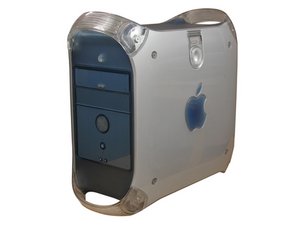
Il PowerMac G4 M5183 è un modello della serie AGP Graphic. Tutti i computer della serie AGP Graphic, inclusi i modelli M6921, M7232, M7824, M7825 e M7827, presentano problemi simili con soluzioni analoghe.
Nota: Questa guida alla soluzione problemi copre il PowerMac G4 (serie AGP Graphic).
Il PowerMac G4 non si accende
Il computer non si avvia.
Se il computer non si accende, non vedi luci e non senti le ventole girare, verifica innanzitutto che sia collegato a una presa di corrente funzionante. Controlla anche che l'interruttore rosso sul pannello posteriore del computer sia impostato sull'impostazione di alimentazione corretta. Se il computer continua a non accendersi, la batteria PMU potrebbe essere esaurita, l'alimentatore potrebbe essere difettoso o la scheda logica potrebbe dover essere sostituita.
Batteria PMU esaurita
L'unità di gestione dell'alimentazione (PMU, Power Management Unit) gestisce tutti i consumi energetici del computer. Quando la batteria PMU si esaurisce, deve essere sostituita e la scheda PMU deve essere resettata. Per sostituire la PMU, consulta la nostra guida di riparazione PMU.
Alimentatore difettoso
Se il computer non si avvia ancora dopo aver sostituito la batteria PMU e resettato la PMU, potrebbe essere necessario sostituire l'alimentatore del computer.
Scheda logica difettosa
Se la sostituzione dell'alimentatore non ha risolto il problema di avvio del tuo PowerMac, dovrai sostituire la scheda logica del computer.
Il display non funziona
Il display è nero.
Scheda grafica difettosa
Verifica innanzitutto che il monitor sia funzionante. Ad esempio: dovresti vedere una spia di accensione sul display. Dovresti sentire un normale suono di avvio quando accendi il computer, a indicare che il computer si sta avviando ma non invia un segnale video al monitor. Se il display è funzionante e il computer si avvia, ma vedi solo uno schermo nero, dovrai sostituire la scheda grafica.
Scheda logica difettosa
Se la sostituzione della scheda grafica non ha risolto il problema di avvio del tuo PowerMac, dovrai sostituire la scheda logica del computer.
La tastiera e/o il mouse non funzionano
Se hai accesso a un altro computer, prova a collegare la tastiera o il mouse a quel computer per vedere se funzionano. Se non funzionano, sostituisci il mouse e la tastiera. In caso contrario, dovrai sostituire la scheda logica del tuo PowerMac.
Problemi con l'unità CD-DVD ROM
Il disco non viene letto.
Disco danneggiato
Se il disco non viene letto o se ci sono difficoltà nella lettura, potrebbe essere graffiato. Controlla la parte inferiore del disco per individuare eventuali graffi visibili.
Unità CD-DVD ROM difettosa
Se il disco non è graffiato e continui ad avere problemi, dovrai sostituire l'unità CD-DVD ROM. Tali problemi includono l'impossibilità di aprire l'unità, la lettura errata dei dischi, rumori forti di clic e/o ronzii.
Problemi audio
Se l'audio del computer non funziona, verifica innanzitutto che gli altoparlanti in uso siano funzionanti (ad esempio, collegati e accesi). Prova gli altoparlanti su un sistema che sai essere funzionante. Se gli altoparlanti funzionano e il computer non invia semplicemente un segnale audio, dovrai sostituire la scheda logica del computer.
Punto interrogativo lampeggiante all'avvio
Il computer visualizza un punto interrogativo lampeggiante quando non riesce a trovare un sistema operativo avviabile. Ciò potrebbe essere dovuto al fatto che il sistema operativo è danneggiato, che il computer non ha abbastanza RAM o che il disco rigido è guasto.
Sistema operativo danneggiato
Prova ad avviare il computer da un CD del sistema operativo. Esegui Utility Disco di Apple e prova a riparare il disco. Potresti anche provare DiskWarrior di Alsoft. Se questo non funziona, reinstalla il sistema operativo. Se possibile, formatta il disco rigido prima di reinstallare il sistema operativo.
RAM insufficiente
È un caso piuttosto raro. Se non hai RAM sufficiente per avviare il sistema operativo, potresti visualizzare il punto interrogativo lampeggiante. Installare più RAM o passare a un sistema operativo più vecchio risolverà il problema. Sono necessari 64 MB di RAM per eseguire OS 9, 128 MB di RAM per eseguire OS X 10.0-10.4 e OS X 10.5 richiede 512 MB di RAM.
Disco rigido guasto
Il disco rigido potrebbe essere stato cancellato, danneggiato o corrotto. Se il disco rigido è stato cancellato, formattalo come HFS+ e reinstalla il sistema operativo. Se è corrotto o danneggiato, devi sostituirlo. I dischi rigidi guasti possono mostrare una corruzione intermittente dei dati prima di guastarsi completamente. Spesso diventano gradualmente più rumorosi e iniziano a fare clic. Se il disco rigido emette rumori di clic anomali ma funziona ancora, esegui immediatamente il backup dei dati e sostituisci il disco rigido.
La ventola è rumorosa
Se la ventola del computer è rumorosa, prova innanzitutto a pulirla. Se la pulizia della ventola non riduce il rumore a un livello accettabile, dovresti sostituire la ventola.
Le porte USB, FireWire, Ethernet e/o audio non funzionano
Tutte le porte sul retro del tuo PowerMac (ad eccezione delle porte del display) sono collegate direttamente alla scheda logica. Se una di queste porte non funziona, controlla innanzitutto che non vi siano detriti o contaminanti nella porta pulendola. Se la porta continua a non funzionare, è necessario sostituire la scheda logica del computer.
Il computer perde la cognizione del tempo
Se il computer perde la cognizione del tempo, la batteria PMU è esaurita e deve essere sostituita. L'unità di gestione dell'alimentazione (PMU) gestisce tutti i consumi energetici del computer e tiene traccia del tempo quando il computer è scollegato. Quando la batteria PMU si esaurisce, la batteria deve essere sostituita e la scheda PMU deve essere resettata.

Team

Cal Poly, Team 13-24, Maness Winter 2010 Membro di Cal Poly, Team 13-24, Maness Winter 2010
CPSU-MANESS-W10S13G24
4 Membri
156 guide realizzate

9 Commenti
I turned my power Mac G4 on for the first time in 5 years. The computer started just fine, the mouse and keyboard were working just fine. After a few minutes the mouse and keyboard stopped functioning, I tried different USB ports and a different mouse with no luck. I restarted the computer and although the computer turns on, the display won’t startup and the computer starts to sound like the fan is working extra hard. I’ve restarted the computer at least three times now with similar results: no display, no start-up, and fan whirling loudly. Diagnosis?
Austin - Rispondi Condividi
I
Well I'm a ten year old tech kid and my dad's g4 just stopped working. He hasn't used it for about a half a year and we just got a power outage about 2 weeks ago. I don't know if the power outage has anything to do with it but it was on sleep when that happend. I don't know if it needs a new PMU battery or what. maybe it just blew a fuse. I don't know. Tried unplugging and plugging back in. Tried holding down for 20 secs. It won't indicate power on the button board . He doesn't have a Apple studio display. Just a view sonic. Apple pro keyboard and Apple ball mouse. any ideas ?
Tristan - Rispondi Condividi
my problem is where it turns on, makes the startup chime, and tries to look for any startup files, but it doesn’t find any, the keyboard and mouse work, but it makes a VERY high pitched noise, any thoughts on what is causing that? i think its the psu, but i don’t have a working spare to test it, great forum btw.
Mikah Andony - Rispondi Condividi
My problem is on a Power Mac G4 Model M5183 after I replaced the battery and pressed the PSU button. The computer started up normally and I reset the time and clock. Everything worked normally. I restarted the computer from the menu and it came back normally without any problems. However after shutting the computer down from the menu and press the ON button, the computer starts to boot up for 7sec and stops. Nothing appears on the screen. So, I open the computer side panel and pressed the PSU button and pressed the ON button and the computer boots up normally. Shutting down the system from the menu results in no boot up, again. The only way to get to the start up screen is to press the reset PSU button. Using the RESTART from the drop down menu is fine. I tried to use the First Aid on the HD and everything comes back OK. Any comments on how the fix my problem, other than pressing the reset PSU button each time before boot up would be appreciated. Thanks!!
GNOK
Wendell - Rispondi Condividi
I run a Protools mix system on my G4 .As of lately it is booting up saying extensions are off and i can not open anything. Mouse moves but nothing will open up. what do i do ???
oneil gray - Rispondi Condividi