Wiki con Collaborazione Studenti
Un fantastico team di studenti del nostro programma educativo ha realizzato questo wiki.
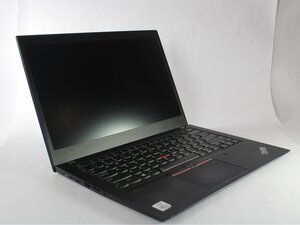
Se il tuo laptop Lenovo ThinkPad T14s si spegne o si riavvia senza preavviso, consulta questa pagina di soluzione problemi per le possibili soluzioni.
Driver non aggiornati
I sintomi comuni dei driver non aggiornati includono prestazioni ridotte, malfunzionamenti dell'hardware o arresti anomali del sistema.
Apri le impostazioni per creare un backup del sistema e garantire la protezione dei dati, quindi controlla la gestione dispositivi per aggiornare i driver. Consulta questa guida per aiutarti ad aggiornare i driver.
Unità a stato solido (SSD) difettosa
I sintomi comuni di un guasto dell'SSD includono blocchi o arresti anomali del sistema, velocità di lettura e scrittura lente e file inaccessibili o danneggiati.
Esegui il backup di tutti i dati possibili, quindi prova a installare un nuovo SSD (fai riferimento alla guida di riparazione sulla pagina del dispositivo e reinstalla i file necessari).
Puoi seguire la guida di riparazione "Sostituzione dell'unità a stato solido (SSD)" per le riparazioni
RAM difettosa
I sintomi comuni di una RAM difettosa in un Lenovo ThinkPad possono includere spegnimenti improvvisi, frequenti arresti anomali e prestazioni lente.
Sfortunatamente, in questo modello di ThinkPad, la RAM è integrata nella scheda madre. Prova a eseguire gli strumenti di diagnostica di sistema per verificare la presenza di errori di memoria. Puoi sostituire la scheda madre, ma potrebbe essere più conveniente in termini di costi e tempi acquistare un modello nuovo o ricondizionato.
Ventola difettosa
I sintomi comuni di una ventola del Lenovo ThinkPad rotta includono rumori insoliti, come stridii o tintinnii, surriscaldamento del laptop e spegnimenti improvvisi dovuti a problemi termici.
Consulta le guide alla sostituzione della "ventola di raffreddamento" e della "pasta termica": dovrebbero risolvere eventuali problemi di arresto anomalo/blocco legati al surriscaldamento.

Team

UMass Dartmouth, Team 2-1, Bowman Fall 2025 Membro di UMass Dartmouth, Team 2-1, Bowman Fall 2025
UMASSD-BOWMAN-F25S2G1
5 Membri
60 guide realizzate

0 Commenti