
 1
1 Battery not recognized after replacing swollen battery MacBook Air
Hi,
I have a Macbook Air 13" (2019) that was not keeping a charge and eventually would just turn off when unplugged. I thought it would just need a new battery. So ordered the replacement Ifixit battery for the model. When I opened up the macbook, the original battery was slightly swollen so I took extra care removing it. I performed the surgery on the laptop, swapped batteries and re-assembled. On boot, everything is working (screen, trackpad, speakers, etc.) except that the battery is not showing up as recognized (an X on the battery icon on login screen) and the macbook requires staying plugged in. It also feels very slow. Its my girlfriends laptop, so I don't ever use it, but it stills feels sluggish. Besides the swollen battery, I did not see any damage on the logic board, though I wasn't really looking out for any. Did a SMC reset and a system update (laptop had been sitting for a month or two waiting for the repair). Still no luck.
Not sure where to go from here, open back up and remove logic board to inspect for damage? Would the swollen battery have affected the logic board?
Any help would be great thanks!
EDIT:
CoconutBattery main screen showing no battery detected.

EDIT 2:
Here are the pictures of battery connector with the new battery. It's as connected as the old one was, no damage visible on the mainboard.


As requested, I managed to connect the old swollen battery without removing the newly installed one (just got creative with some electrical tape to hold things in place). Wildly enough, the old swollen battery is recognized by Coconut Battery and was trying to charge. The laptop ran smoother and the fan wasn't going full tilt while I had the macbook running to get the pictures. Could the new Ifixit battery be faulty/bad connectors? Where to look?


EDIT 3
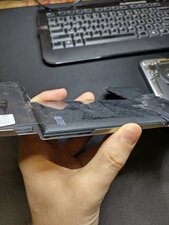
Last question before I reach out to IFixIt. As I was cleaning up the macbook and giving the new battery one last try (no luck). I noticed the control boards on each battery are quite different in layout and modules. I'm no expert, but would this difference in control boards be the source of my issues? Left is old recognized battery and right is new troubled battery.

Questa è una buona domanda?

 17
17  8
8 


A swollen battery can damage the battery connector or surrounding components, causing the system to ignore the new battery. First, reopen the MacBook and re-seat the battery cable firmly—this is the most common cause of the “X” icon. Inspect the connector and board for corrosion, bent pins, or pressure damage. Also ensure the replacement battery’s flex cable isn’t kinked. If reseating doesn’t help, try an SMC reset again. Persistent issues usually mean a damaged battery connector or logic-board power IC, which requires board-level repair. The sluggish performance happens because macOS throttles when no battery is detected.
da Rashmi Kandhil