
Salta al contenuto principale
Unisciti alla Community delle riparazioni - Crea un account

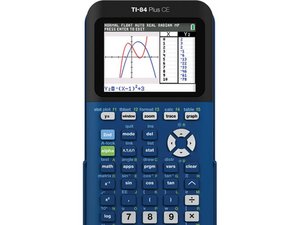
The TI-84 Plus CE is a graphing calculator released in Spring 2015 by Texas Instruments. It includes a 2.8 inch color screen, USB port, apps, storage, and a 1200 mAh battery.

Why won't my Ti84 Plus CE turn on?

My calculator will not turn on despite being at full battery (when it charges it has a green light). The screen does not turn on when I press the on button, instead it stays black. I have even bought a replacement battery online, but this did not seem to help. Before, my calculator would often not turn from time to time, but still turned on occasionally, and it always turned on after a few seconds of charging it, but now it does not.

Risposto! Visualizza la risposta Anch'io ho questo problema

Questa è una buona domanda?

Punteggio 3
1 Commento

@codyrhodes Do not post AI generated responses. This question already has an accepted answer.

I can tell it's AI generated by the em—dash, the broken formatting, the confidence, and the inaccuracy. Let me debunk your response:

1. "try a reset with the reset button". This is unnecessary, replacing the battery already triggers a full ram reset. The screen getting "stuck off" has never been a thing in the 11 years I've been working with these devices.

2. "adjust contrast". The 2nd+on key combination just turns off the calculator. You can't adjust the contrast on a TI-84 Plus CE, only the brightness. The brightness does not get low enough to look like it's off. The AI is confusing the TI-84 Plus CE's backlit display with the TI-84 Plus's monochrome display.

3. "resintall the OS" this was already in the accepted answer

4. "repair usually isn't worth it". Repair is often not feasible, but successful repair saves over hundred dollars in a new calculator.

da

Aggiungi un commento

3 Risposte

Soluzione prescelta

Does your calculator actually turn on but the screen is broken? You can test this out by installing TI Connect CE and connecting your calculator to your computer. If TI Connect CE doesn’t recognize the calculator is connected, I’m sorry, but you’ll have to call TI support and try to get a new calculator.

If TI Connect CE recognizes that a calculator is connected, that means you have a broken screen. Unfortunately, I don’t think you can buy a replacement screen, however if you take the calculator apart, you may be able to finagle the ribbon cable which (in only the best circumstances) may make it work again.

You can try reinstalling the OS, however I don’t believe that would help in this case. If you ever get your calculator working again, you can test if it’s because of defective RAM or ROM by running a self test. You can see how to use it here; read the description for time-stamps and run tests 6 and 7.

Questa risposta è stata utile?

Punteggio 7
Aggiungi un commento

there is a cercuit malfuction when the calculator has reached it recromeened charge it is at its lowest charge till it goes to unstable amps this means you will have to replace the batterys located in the back of the calculator or you will have to get a new one if you are not a electrion if you are then take it apart and put a new circut in it

Questa risposta è stata utile?

Punteggio 0

7 Commenti:

You need to specify exactly which circuit is broken for your answer to make sense. Also, Kingston has already tried replacing the battery.

da

@thelastmill It's one thing for you to downvote an answer you feel isn't very good but to mark these as SPAM is going too far. Moderating an answer or comment as SPAM is for when people are trying to link or sell something unrelated. This is just a poor quality answer (and probably not in the contributors native language). This is not the first time you try to do this.

You offer great answers on all things calculator, let the quality of your answers speak for themselves and stop trying to suppress other people's honest, if not always good, contributions.

I'll add the other mods to this comment to see if they have a differing point of view. @mayer @oldturkey03 @jayeff @danj

da

@refectio - I agree!

da

@refectio the diction of this answer speaks volumes about its quality. It certainly isn't SPAM, just tastes like it.

da

@mayer more like bad oatmeal :>)...

da

Mostra 2 altri commenti

Aggiungi un commento

I had this same problem. Green light was on, I believed it had a full charge but nothing. I tried the reset button. I then plugged it into my computer (hoping my computer recognizes my calculator)and at that time I noticed that the mini usb was not inserted fully into the calculator. So, pushed it in a bit more and the light changed from green to orange and it powered up. I read in other troubleshooting forums that the light operates separately from the rest of its calculator bits.

So, maybe it had enough charge to power up the “on” light but not enough for the calculator to charge itself.

Questa risposta è stata utile?

Punteggio 0
Aggiungi un commento

Aggiungi la tua risposta

Kingston Nguyen sarà eternamente grato.
Visualizza statistiche:

Ultime 24 ore: 1

Ultimi 7 giorni: 4

Ultimi 30 giorni: 48

Tutti i Tempi: 7,992

