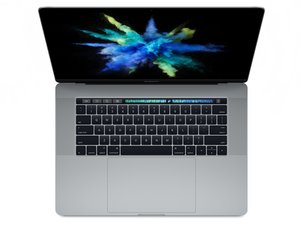
Numero modello A1707. Rilasciato a giugno 2017, questo MacBook Pro adotta processori Kaby Lake fino a Intel Core i7 quad core da 2,8 GHz con Turbo boost fino a 3,8 GHz.
I have the macbook pro with the new butterfly 2 keyboard, and trying to clean the "S" key i broke the butterfly hinge. I bought a new piece online but i don´t know if it is possible at all to replace since the plastic dome seems to be glued to the chasis.
What would be the best way to replace it without disassembling the whole laptop?
Can i pop off the dome by brute force and "glue" the new one?
Would you mind giving us your source for the key? They have been hard to locate.
Apple A1707 Keyboard Keys Replacement
These Apple A1707 keyboard key replacements features the new designed keyboard with TouchBar,
these keyboard key replacements has the second generation of the "butterfly" hinge clip, meaning you will get a smooth and precise key stroke, these laptop keys are 100% Apple OEM so you are sure to get perfect fit and finish, and fully compatible with the 13" and 15" models.
Please take a look at the difference between the Butterfly 1st Gen vs 2nd Gen, there are major
changes, and the fitment is different, we are selling 100% OEM 2nd Gen butterfly
keyboard keys with the rubber cup included, while others are selling you the 1st Gen.
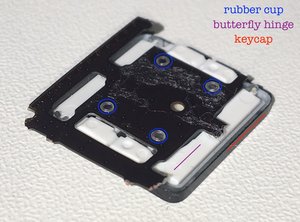
the 2nd gen butterfly key cap is taller 2nd gen butterfly hinge clip has longer pegs
2nd gen key cap is slightly taller 2nd gen key cap kit will come with hinge clip.
Go down on this page past the video to see the images:
@lglossman Hi since your chosen solution actually doesn't show the keyboard your question asked. Do you think you could be a pal and choose the correct answer which @yvan27 provided. Not saying your chosen answer isn't good it just completely missed answering your question and led me on the wrong path. No offense to Mr. Mayer his technical knowledge is bar none but I wanted to see how to remove them just like your question.
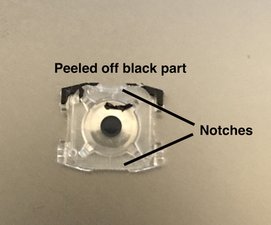
It's doable. The black area at the top of the cup is just paper-ish, and peels off.
Using my precision screwdriver set, I grabbed the thinnest flat head and started by peeling back the black part. That exposes a small notch at the top of the cup piece, there's also one at the bottom.
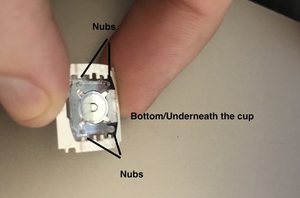
You can start by gently prying upwards at those 2 spots. Once I thought I had loosened it enough I started prying from underneath the butterfly and the cup at the corners. Basically just slowly prying and jiggering the plastic nubs out of the board. There's also small layer of adhesive on the cup but mine came off and I wasn't able to reuse it, try to salvage it if you can.
When putting the new one on, the butterfly goes down on the board first. Then the cup fits in the middle through the butterfly and secures to the board through those 4 nubs.
Any idea what kind of adhesive was used? As einstein mentioned, it doesn't look like the switch will stay put without it (at least on the left shift key that I'm replacing)
Scorri questo thread per trovare il posto appropriato per questo commento. Quindi, fai clic su "Allega commento a questo post" per spostarlo.
3 Commenti:
Just a heads up, while they say you're eligible for a free repair, they might come back and make you pay. I recently went in to an apple store to talk to them about replacing a broken key (it was broken before I popped it out but wanted to check it out to make sure it wasn't just dirt lodged in there) and the worker told me after they ship it out and examine it, they could come back and say the damage was my fault and not theirs and then the repair would cost $475. Just a warning for those who have a broken key like mine and wanted to get it fixed!
I wanted to add to this, I went into the apple store today because I saw their keyboard program covered my laptop model and one of my keys were being faulty. When I got there they told me that the program covers the keyboard four years after your purchase of the laptop, of course, I didn't know this. I did buy apple care for my laptop so I wasn't aware they had this program. They did tell me that the cost of it would be around 400$ but I highly highly recommend seeing if you fall under the battery program because they'll end up replacing the top cover with the keyboard when they fix the battery and it ends up costing half of the actual keyboard replacement (199$ ) much better deal but still on the pricier end. You end up killing two birds with one stone this way.
It might not. Apple told me that they'd send my laptop out for examination and then call me on their verdict. They told me that because the key is broken (the bottom hinges were broken when I popped it off) they could say its my fault then charge me $475 for repairs. But they can't tell you what their verdict is till you ship it out and they call you
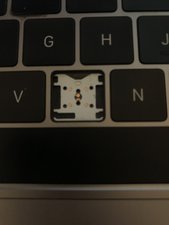
So... by accident the rubber dome came off. And it just looks like it is just held in place by some sticky residue. A very thin layer of it. I wouldn't just put glue on the board since you have to apply a thin layer only on the dome and none on the switch and contact points.
guys, you will need the get the rubber cup (its just glued) off and then you will be able to put the hing in its right way. but to do this you need a special glue. otherwise happens this: https://youtu.be/ryRVWBrG8i0?t=2m32s. btw: your 2017 device should be still under apples warranty. so why dont use it?
It's not impossible, it's quite simple really. Don't be afraid when you hear something click when you attempt to take out pieces, once you take it out ALL pieces should be cleared out, leaving the space empty, the only thing you really need to worry about is the sticky residue in the empty space, that holds everything together DO NOT wipe off this residue
I have the same problem with my 15' MBP w/ touchbar: I need to replace both, the hinge and the cup and can't figure out how to do it. Can anybody help? A video on how to do it would be greatly appreciated (I think also by others). Thanks!
I just replaced the butterfly-mechanism without removing the cup. It seems to be possible by stretching the new mechanism over from one side to the other (just like the video referred to earlier describes). However, the key travel appears to be less than with the original mechanism. I noticed that the original mechanism had 'G018' stated on the upper-left corner, whereas the replacement part has 'G019' on the same spot. I really hope that this worthless mechanism isn't applied in future MBs/MBPs.
I have the same issue. My button was stuck, and I tried to clean it. Suddenly the white hinge part broke one small pin, and not I cant attach button back on it. So technically I have broke the button. Does it still allows me to apply for this program of exchanging the butterfly keyboards?
And also, do I need to have officially bill receipt or warranty paper for my Mac book to apply for repair?