
Salta al contenuto principale
Unisciti alla Community delle riparazioni - Crea un account

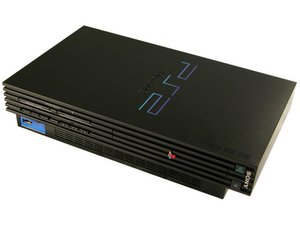
Conosciuta come ''PS2'', è una console per videogiochi di sesta generazione rilasciata per la prima volta da Sony in Giappone nel marzo 2000. Negli Stati Uniti è stata introdotta nel 2000 con il modello SCPH-30000. La riparazione di questo dispositivo richiede solo strumenti comuni, ma può essere complicata.

Why has my screen changed to black and white

For some reason the playstation 2 is in black and white only. We tried to plug something else into the connection on the TV and it was fine but the playstation is still only black and white.

Risposto! Visualizza la risposta Anch'io ho questo problema

Questa è una buona domanda?

Punteggio 11

8 Commenti

i have a similar problem with my ps2, however I bought a aftermarket cable, would this cause it to show black and white?

da Condividi

after playing game for sometime by pendrive graphics become un-understandable why???

da Condividi

Thanks a bunch, it works!

da Condividi

I have this problem, but I have the slim version, is there a difference? and I have a weird tv, that does not have the normal yellow, white and red holes for the cables, but video works, and sound just fine, but no color.

da Condividi

Everytime i play f1 2006, richard burns rally, and a few other game on my ps2 my tv screen just black and white but if i play other games like gran turismo 4 original japan, and nfs underground 2 it has colours.

da Condividi

Mostra 3 altri commenti

Aggiungi un commento

4 Risposte

Soluzione prescelta

Tara, depends on how you have your PS2 connected. If you are using the component cables, check in the system settings and check if its in regular RGB. If you use the regular Yellow, Red and White cables, it should be in RGB mode.

Questa risposta è stata utile?

Punteggio 4

9 Commenti:

this didnt help me but my PS2 is in RGB mode already

da Condividi

Is ur ps2 modded

da Condividi

Now it won't let me view system settings it will only play movies n is still in black and white now I can't change it back from RGB that what's it normally was

da Condividi

i needed to change my tv to the AV channel instead of the component channel also to fully fix this issue

da Condividi

Thank you halo117ish

da Condividi

Mostra 4 altri commenti

Aggiungi un commento
Risposta più utile

I was having the same problem but I changed my input from component to AV and that worked.

Questa risposta è stata utile?

Punteggio 13

15 Commenti:

I did exactly what you said and it works! Tq tq tq

da Condividi

Me too!!! Thanks a bunch! Putting on AV worked :D

da Condividi

Thanks a bunch, it worked!

da Condividi

How can i change my input to av ?

da Condividi

Just go to input it should be right on your remote for the TV and then you should see AV as one of the options then push the up or down arrow to go to the AV option the once you are on it the push select that's the button that says select on it yeah you just push that button.Thats it.

da Condividi

Mostra 10 altri commenti

Aggiungi un commento

This one is problem on the HDTV with tons of features in it. First go to your TV's settings and open option (in my case I'm using 50" Sharp Aquos 1080p), if you don't find it check something similar to above. Then, you want to change the "Input Select" from "Component" to "Video." This will change the color system automatically as "Component" label are for newer devices and sometimes can't cope with older devices such as PS2. After you've done it you might see the "Colour System" option and that's where colour calibration option exist. My TV sets itself to NTSC 3.58 where as the component shows 480i(with monochrome color).

Questa risposta è stata utile?

Punteggio 3

3 Commenti:

Thank you this helped a lot

da Condividi

That was exactly what fixed my issue.

thank you!!

da Condividi

Omg thanks so much

da Condividi

Aggiungi un commento

My tv is LG and it’s showing black and white for my PS2

Questa risposta è stata utile?

Punteggio 0

2 Commenti:

@faousyjami27127 have you followed any steps in the given answers?What have you tried?

da Condividi

I had the same issue. You need to use a different input on your tv.

• Check the system settings: Make sure your PS2 is in RGB mode

• Check the cables: If you're using the yellow, red, and white cables, make sure they are in RGB mode

• Check the composite cables: Make sure they are not plugged into the component input

• Check the TV inputs: Different inputs will provide different levels of image quality

• Check the HDTV's operations manual:

Look for a game mode setting or instructions to turn off digital picture enhancements

• Adjust the contrast or sharpness settings:

This may help reduce jaggies

da Condividi

Aggiungi un commento

Aggiungi la tua risposta

Tara sarà eternamente grato.
Visualizza statistiche:

Ultime 24 ore: 6

Ultimi 7 giorni: 67

Ultimi 30 giorni: 221

Tutti i Tempi: 270,261