Salta al contenuto principale
Unisciti alla Community delle riparazioni - Crea un account

Dell Precision 5510 Battery Replacement

Cosa ti serve

  1. Dell Precision 5510 Battery Replacement, Base Cover: passo 1, immagine 1 di 1
    • Open the system badge flap over to reveal the screws underneath (marked 1 on the image).

    • Remove the 12 screws that secure the base cover to the computer.

    Chiedi a FixBot

    Aggiungi Commento

  2. Dell Precision 5510 Battery Replacement: passo 2, immagine 1 di 1
    • Pry the edges base cover and lift it to remove it from computer.

    Chiedi a FixBot

    Aggiungi Commento

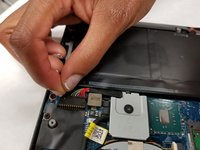
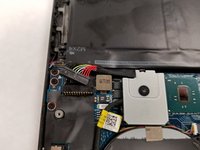
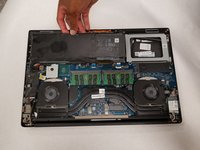
  3. Dell Precision 5510 Battery Replacement, Battery: passo 3, immagine 1 di 2 Dell Precision 5510 Battery Replacement, Battery: passo 3, immagine 2 di 2
    • Unplug the connection that links the battery to the computer.

    Chiedi a FixBot

    Aggiungi Commento

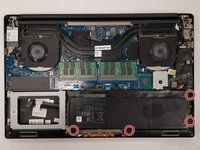
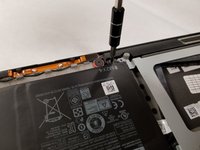
  4. Dell Precision 5510 Battery Replacement: passo 4, immagine 1 di 2 Dell Precision 5510 Battery Replacement: passo 4, immagine 2 di 2
    • Remove the four 4.0 mm JIS #0 screws surrounding the battery.

    Chiedi a FixBot

    Aggiungi Commento

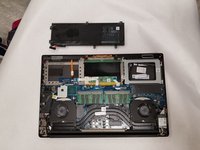
  5. Dell Precision 5510 Battery Replacement: passo 5, immagine 1 di 2 Dell Precision 5510 Battery Replacement: passo 5, immagine 2 di 2
    • Carefully remove the battery from the computer.

    Chiedi a FixBot

    Aggiungi Commento

Conclusione

To reassemble your device, follow these instructions in reverse order.

Annulla: non ho completato questa guida.

Altre 4 persone hanno completato questa guida.

Team

IUPUI, Team S1-G5, Arle Fall 2018 Membro di IUPUI, Team S1-G5, Arle Fall 2018

IUPUI-ARLE-F18S1G5

3 Membri

6 guide realizzate

1Commento della guida

Thanks for the post!

KCMax - Rispondi Condividi

Aggiungi Commento

Visualizza statistiche:

Ultime 24 ore: 2

Ultimi 7 giorni: 18

Ultimi 30 giorni: 81

Tutti i Tempi: 9,293