Introduzione
Use this guide to change the battery on your Acer Predator Helios 300 (2020).
Model Number: PH3-15-53
The laptop battery is essential to provide portable usage since it keeps the laptop powered on.
You might want to replace your laptop battery if it is slow to charge or overheating. If the laptop is not charging, you might want to check if the power adapter for the battery is plugged in correctly before you replace the battery.
Before you begin the repair, power off your laptop and unplug the device from the charger.
Cosa ti serve
-
-
Turn off the laptop by holding the power button for 7 seconds.
 Chiedi a FixBot
-
-
-
Remove the eleven black 7.0 mm screws using a Phillips #00 screwdriver.
-
-
-
-
Put your hands on the silver part of the chassis and pull up until you hear a snap.
-
Lift up the back panel and remove it from the device.
-
-
-
Remove the two 4.0 mm golden screws using the Phillips #00 screwdriver.
-


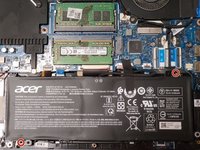


To reassemble your device, follow these instructions in reverse order.
For optimal performance, after completing this guide, calibrate your newly installed battery.
Take your e-waste to an R2 or e-Stewards certified recycler.
Annulla: non ho completato questa guida.
Altre 8 persone hanno completato questa guida.

Team

CSU Los Angeles, Team 11-27, Grodsky Fall 2021 Membro di CSU Los Angeles, Team 11-27, Grodsky Fall 2021
CSULA-GRODSKY-F21S11G27
Membro di 1
2 guide realizzate
