Salta al contenuto principale
Unisciti alla Community delle riparazioni - Crea un account

iPhone 3G Display Replacement

Cosa ti serve

  1. iPhone 3G Display Replacement, Broken Glass: passo 1, immagine 1 di 3 iPhone 3G Display Replacement, Broken Glass: passo 1, immagine 2 di 3 iPhone 3G Display Replacement, Broken Glass: passo 1, immagine 3 di 3
    • If your display glass is cracked, keep further breakage contained and prevent bodily harm during your repair by taping the glass.

    • Lay overlapping strips of clear packing tape over the iPhone's display until the whole face is covered.

    • This will keep glass shards contained and provide structural integrity when prying and lifting the display.

    • Wear safety glasses to protect your eyes from any glass shaken free during the repair.

    Chiedi a FixBot

    Aggiungi Commento

  2. iPhone 3G Display Replacement, Display: passo 2, immagine 1 di 1
    • Remove the two Phillips #00 screws from the dock-connector end of the iPhone.

    • Make sure to keep all the screws organized as you are taking the phone apart. They are different sizes.

    Chiedi a FixBot

    Aggiungi Commento

  3. iPhone 3G Display Replacement: passo 3, immagine 1 di 1
    • Remove the metal handle from the suction cup. It's easier and safer to grip the suction cup's base instead of the metal handle.

    • Be very careful when opening the iPhone so that the cables under the display are not severed.

    • There is a rubber gasket between the silver front bezel and black display assembly. A bit of force is required in this step to separate the iPhone's display assembly.

    • Use a small suction cup near the Home button to gently pull up the lower portion of the iPhone's display assembly.

    • If the display assembly is too damaged to allow the suction cup to adhere, tape with a strong adhesive such as duct tape may be used.

    Chiedi a FixBot

    Aggiungi Commento

  4. iPhone 3G Display Replacement: passo 4, immagine 1 di 1
    • The display assembly is still connected to the iPhone by several cables, so don't try to remove it entirely just yet.

    • Rotate the display assembly up until it is at an angle of approximately 45 degrees.

    Chiedi a FixBot

    Aggiungi Commento

  5. iPhone 3G Display Replacement: passo 5, immagine 1 di 1
    • Continue to hold the display assembly with one hand, and use your other hand and a spudger to disconnect the black ribbon cable labeled "1."

    • Ribbon cable "1" is connected with a plug style connector. The block at the end of the cable is the plug which is simply pushed into a socket on the circuit board. No other locking mechanism is used.

    Chiedi a FixBot

    Aggiungi Commento

  6. iPhone 3G Display Replacement: passo 6, immagine 1 di 1
    • Rotate the display assembly up until it is roughly vertical. This will allow easier access for disconnecting the remaining cables.

    • Use a spudger to disconnect the black ribbon cable labeled "2."

    Chiedi a FixBot

    Aggiungi Commento

  7. iPhone 3G Display Replacement: passo 7, immagine 1 di 2 iPhone 3G Display Replacement: passo 7, immagine 2 di 2
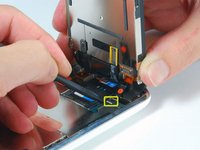
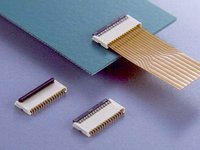
    • Ribbon cable "3" is held in place by a FPC style connector. You must unlock this connector before sliding the ribbon cable out. The locking mechanism is on the opposite side of where the cable is inserted - it swivels upwards 90 degrees. Use a plastic spudger to lift the locking mechanism.

    • The FPC locking latch is very delicate and is typically a different color than the body of the connector. (see the detail image of FPC connector open and closed)

    • Slide the ribbon cable out of the connector, and remove the display assembly from the iPhone.

    • It's impossible to properly reinsert a ribbon into an FPC connector unless the lock is disengaged. Make sure the locking latch is open when attaching/detaching the cable.

    Chiedi a FixBot

    Aggiungi Commento

  8. iPhone 3G Display Replacement: passo 8, immagine 1 di 1
    • Remove the single Phillips #00 screw from the corner of the display assembly.

    Chiedi a FixBot

    Aggiungi Commento

  9. iPhone 3G Display Replacement: passo 9, immagine 1 di 1
    • Remove the two Phillips #00 screws from the right side of the display assembly.

    Chiedi a FixBot

    Aggiungi Commento

  10. iPhone 3G Display Replacement: passo 10, immagine 1 di 1
    • Turn the display around, and if there is a thin strip of black tape on the edge of the display assembly, carefully peel it up.

    • Keeping the tape from sticking to itself can be tricky. We recommend placing the tape on a wax-coated piece of paper (any sticker backing will do).

    Chiedi a FixBot

    Aggiungi Commento

  11. iPhone 3G Display Replacement: passo 11, immagine 1 di 1
    • Remove the three Phillips #00 screws from the left side of the display assembly.

    Chiedi a FixBot

    Aggiungi Commento

  12. iPhone 3G Display Replacement: passo 12, immagine 1 di 1
    • Turn the display assembly over and again carefully insert a metal spudger between the two metal rails along the edge of the display assembly. Gently rotate the spudger to lift the LCD up from the glass.

    Chiedi a FixBot

    Aggiungi Commento

  13. iPhone 3G Display Replacement: passo 13, immagine 1 di 1
    • Separate the LCD and glass by sliding the LCD panel away from the ribbon cables on the glass.

    Chiedi a FixBot

    Aggiungi Commento

Conclusione

To reassemble your device, follow these instructions in reverse order.

Annulla: non ho completato questa guida.

Altre 381 persone hanno completato questa guida.

iRobot

Membro da: 09/24/09

1 Reputazione

636 guide realizzate

9Commenti sulla guida

does this void the warranty?

loganm - Rispondi Condividi

I did all this and my screen is completely white, from memory i can unlock it and when i connect to my pc i can hear that it connects i just can't see anything. please help i'm freaking out!

Tiffunny - Rispondi Condividi

Citazione da loganm:

does this void the warranty?

Duh!

Pepper - Rispondi Condividi

Hi there, Just been reading these a lot and I think that people should not use a metal spudger inside the phone as this will potentially short out the phone inside as it is still connected to the battery pack. I also recommend that people observe some basic ESD precautions. Like earthing yourselves etc.

Dave G - Rispondi Condividi

I wrote up my notes, including the critical (missing) PFC lock directions in a separate blog post:

http://tech.kateva.org/2011/01/repair-of...

jfaughnan - Rispondi Condividi

Aggiungi Commento

Visualizza statistiche:

Ultime 24 ore: 7

Ultimi 7 giorni: 53

Ultimi 30 giorni: 220

Tutti i Tempi: 571,675