Salta al contenuto principale
Unisciti alla Community delle riparazioni - Crea un account

iHome iPL8 Battery Replacement

Cosa ti serve

    1. iHome iPL8 Battery Replacement, Battery: passo 1, immagine 1 di 1
      • Turn the device over to access the bottom panel.

      • Locate the 6mm Phillips #2 screw under the label "unscrew to open door."

      Chiedi a FixBot

      Aggiungi Commento

    2. iHome iPL8 Battery Replacement: passo 2, immagine 1 di 1
      • Using a Phillips #2 screwdriver, unscrew the captive screw.

      • Keep turning until the screw and the door are loose.

      Chiedi a FixBot

      Aggiungi Commento

    3. iHome iPL8 Battery Replacement: passo 3, immagine 1 di 1
      • Lift and remove the battery access panel.

      • The captive screw will remain attached to the panel.

      Chiedi a FixBot

      Aggiungi Commento

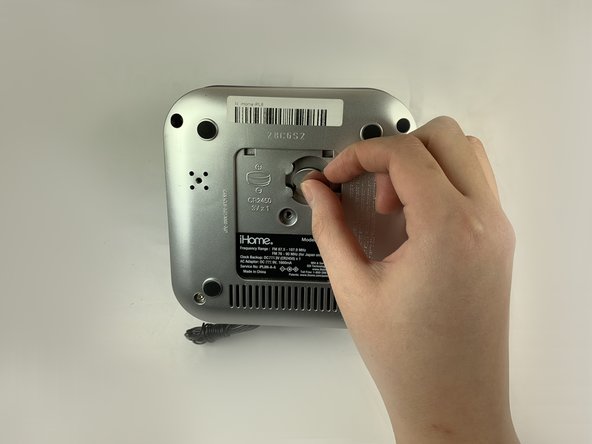
    4. iHome iPL8 Battery Replacement: passo 4, immagine 1 di 2 iHome iPL8 Battery Replacement: passo 4, immagine 2 di 2
      • Gently press on the rim of the 3V battery.

      • Remove the 3V battery.

      Chiedi a FixBot

      Aggiungi Commento

Conclusione

To reassemble your device, follow these instructions in reverse order.

Annulla: non ho completato questa guida.

Un'altra persona ha completato questa guida.

Chen Zhong

Membro da: 02/05/19

569 Reputazione

4 guide realizzate

Team

UC Davis, Team S18-G5, Lore Winter 2019 Membro di UC Davis, Team S18-G5, Lore Winter 2019

UCD-LORE-W19S18G5

3 Membri

8 guide realizzate

0Commenti sulla guida

Aggiungi Commento

Visualizza statistiche:

Ultime 24 ore: 0

Ultimi 7 giorni: 5

Ultimi 30 giorni: 12

Tutti i Tempi: 369