Salta al contenuto principale
Unisciti alla Community delle riparazioni - Crea un account

Xiaomi Redmi Note Front-Facing Camera Replacement

Cosa ti serve

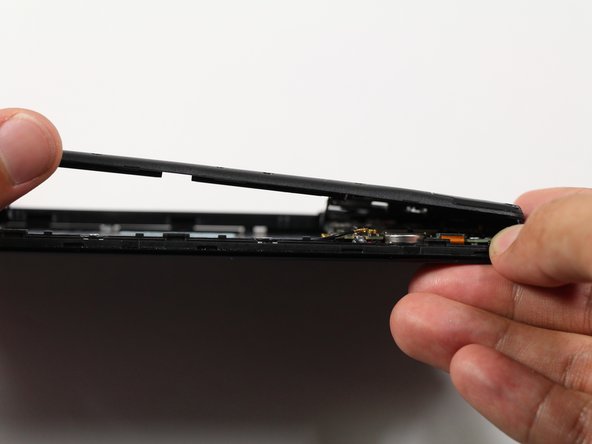
    1. Xiaomi Redmi Note Front-Facing Camera Replacement, Battery: passo 1, immagine 1 di 1
      • Make sure the Xiaomi Redmi Note is powered off before removing the battery.

      • Insert the plastic opening tool between the charging port and the rear case.

      • Pry the end of the rear case up from the charging port.

      Chiedi a FixBot

      Aggiungi Commento

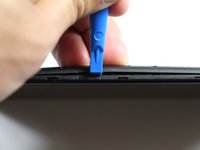
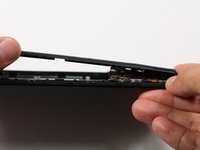
    2. Xiaomi Redmi Note Front-Facing Camera Replacement: passo 2, immagine 1 di 2 Xiaomi Redmi Note Front-Facing Camera Replacement: passo 2, immagine 2 di 2
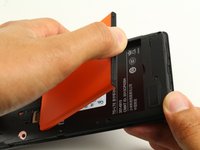
      • Run the plastic opening tool along the seam on the side of the phone to remove the rear casing.

      Chiedi a FixBot

      Aggiungi Commento

    3. Xiaomi Redmi Note Front-Facing Camera Replacement: passo 3, immagine 1 di 2 Xiaomi Redmi Note Front-Facing Camera Replacement: passo 3, immagine 2 di 2
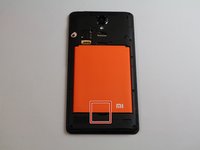
      • Locate the indentation at the bottom of the battery.

      • Place a finger in the indentation and lift up to remove the battery.

      Chiedi a FixBot

      Aggiungi Commento

    1. Xiaomi Redmi Note Front-Facing Camera Replacement, Midframe: passo 4, immagine 1 di 2 Xiaomi Redmi Note Front-Facing Camera Replacement, Midframe: passo 4, immagine 2 di 2
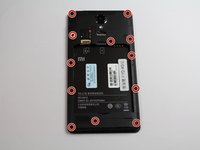
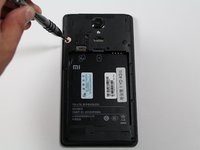
      • Remove twelve 3.5mm Phillips #00 screws from the midframe.

      Chiedi a FixBot

      Aggiungi Commento

    2. Xiaomi Redmi Note Front-Facing Camera Replacement: passo 5, immagine 1 di 2 Xiaomi Redmi Note Front-Facing Camera Replacement: passo 5, immagine 2 di 2
      • Insert a plastic opening into the seam between the midframe and the bottom frame of the phone.

      • Run the plastic opening tool along the seam.

      • Pry up the midframe with the plastic opening tool.

      • Once the midframe has been sufficiently lifted with the tool, place a hand underneath the edge to lift the entire component out of the frame.

      • There will be snapping sounds as the clips on the midframe disconnect from the phone.

      Chiedi a FixBot

      Aggiungi Commento

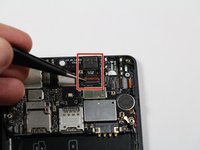
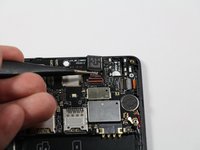
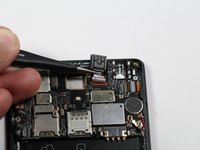
    1. Xiaomi Redmi Note Front-Facing Camera Replacement, Front-Facing Camera: passo 6, immagine 1 di 3 Xiaomi Redmi Note Front-Facing Camera Replacement, Front-Facing Camera: passo 6, immagine 2 di 3 Xiaomi Redmi Note Front-Facing Camera Replacement, Front-Facing Camera: passo 6, immagine 3 di 3
      Strumento utilizzato in questo passaggio:
      Tweezers
      $4.99
      • Use tweezers to lift the retaining flap of the zero insertion force (ZIF) connector to the upright position.

      • Use tweezers to pull the ribbon cable out of the ZIF connector.

      • Remove the front-facing camera from the motherboard.

      Chiedi a FixBot

      Aggiungi Commento

Conclusione

To reassemble your device, follow these instructions in reverse order.

Annulla: non ho completato questa guida.

Altre 2 persone hanno completato questa guida.

Team

Cal Poly, Team S22-G4, Livingston Spring 2017 Membro di Cal Poly, Team S22-G4, Livingston Spring 2017

CPSU-LIVINGSTON-S17S22G4

4 Membri

32 guide realizzate

0Commenti sulla guida

Aggiungi Commento

Visualizza statistiche:

Ultime 24 ore: 2

Ultimi 7 giorni: 7

Ultimi 30 giorni: 37

Tutti i Tempi: 2,042