Salta al contenuto principale
Unisciti alla Community delle riparazioni - Crea un account

Wen 2307 Front Panel Replacement

Cosa ti serve

    1. Wen 2307 Front Panel Replacement, Front Panel: passo 1, immagine 1 di 1
      • Unscrew the locking sleeve.

      Chiedi a FixBot

      Aggiungi Commento

    2. Wen 2307 Front Panel Replacement: passo 2, immagine 1 di 1
      • Remove the hanging clip.

      Chiedi a FixBot

      Aggiungi Commento

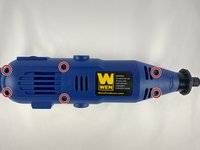
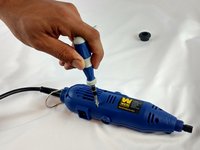
    3. Wen 2307 Front Panel Replacement: passo 3, immagine 1 di 2 Wen 2307 Front Panel Replacement: passo 3, immagine 2 di 2
      • Unscrew the six 8mm PH2 screws.

      Chiedi a FixBot

      Aggiungi Commento

    4. Wen 2307 Front Panel Replacement: passo 4, immagine 1 di 1
      • While pressing the spindle lock button, unscrew the collet nut and remove it along with the brass collet.

      Chiedi a FixBot

      Aggiungi Commento

    5. Wen 2307 Front Panel Replacement: passo 5, immagine 1 di 1
      • To remove the front panel, pry the device apart while holding the device with the other hand.

      • The front panel should come out easily.

      Chiedi a FixBot

      Aggiungi Commento

Conclusione

To reassemble your device, follow these instructions in reverse order.

Annulla: non ho completato questa guida.

Altre 2 persone hanno completato questa guida.

Team

USF Tampa, Team 12-1, Eyestone Spring 2016 Membro di USF Tampa, Team 12-1, Eyestone Spring 2016

USFT-EYESTONE-S16S12G1

4 Membri

6 guide realizzate

0Commenti sulla guida

Aggiungi Commento

Visualizza statistiche:

Ultime 24 ore: 0

Ultimi 7 giorni: 5

Ultimi 30 giorni: 31

Tutti i Tempi: 1,258