Salta al contenuto principale
Unisciti alla Community delle riparazioni - Crea un account

VTech InnoTab Max Battery Replacement

Cosa ti serve

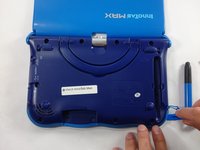
  1. VTech InnoTab Max Battery Replacement, Cover: passo 1, immagine 1 di 3 VTech InnoTab Max Battery Replacement, Cover: passo 1, immagine 2 di 3 VTech InnoTab Max Battery Replacement, Cover: passo 1, immagine 3 di 3
    • Remove all screw caps from the back panel using a metal spudger.

    Chiedi a FixBot
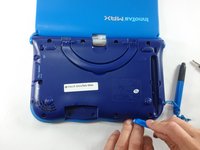
  2. VTech InnoTab Max Battery Replacement: passo 2, immagine 1 di 3 VTech InnoTab Max Battery Replacement: passo 2, immagine 2 di 3 VTech InnoTab Max Battery Replacement: passo 2, immagine 3 di 3
    • Next remove all of the now uncovered screws.

    • If there is a cartridge in the device make sure to remove it.

    Chiedi a FixBot
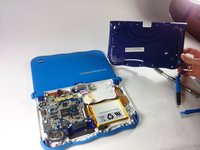
  3. VTech InnoTab Max Battery Replacement: passo 3, immagine 1 di 2 VTech InnoTab Max Battery Replacement: passo 3, immagine 2 di 2
    • Now that all of the screws have been removed, pry the back cover off using a plastic opening tool.

    Chiedi a FixBot
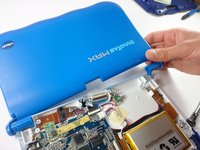
  4. VTech InnoTab Max Battery Replacement: passo 4, immagine 1 di 2 VTech InnoTab Max Battery Replacement: passo 4, immagine 2 di 2
    • Here you can see the back cover has been fully removed and you can now access the front cover.

    • To remove the front cover, remove the springs holding the pictured brackets in place, then pull it away.

    Chiedi a FixBot
  5. VTech InnoTab Max Battery Replacement, Battery: passo 5, immagine 1 di 1
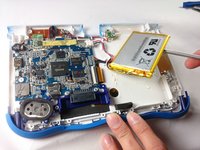
    • Once the back cover is removed the battery will be located in the bottom right as you can see in the image to the right.

    Chiedi a FixBot
  6. VTech InnoTab Max Battery Replacement: passo 6, immagine 1 di 3 VTech InnoTab Max Battery Replacement: passo 6, immagine 2 di 3 VTech InnoTab Max Battery Replacement: passo 6, immagine 3 di 3
    Strumento utilizzato in questo passaggio:
    Plastic Cards
    $2.99
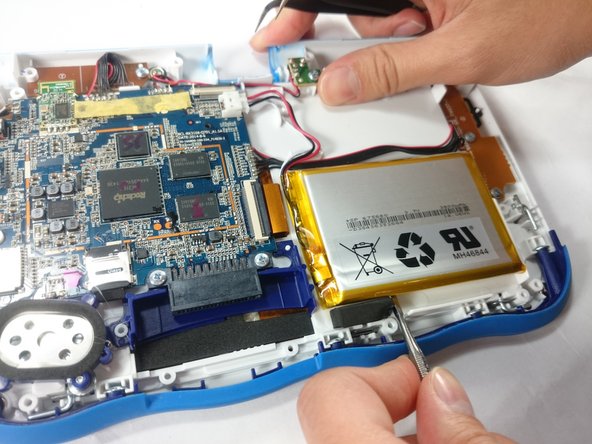
    • Remove the tape holding down the wires, and carefully pry the battery off of the base of the device.

    • Pry carefully to avoid damaging the battery. The battery may start to bend slightly, this is normal and not a cause for concern.

    • It is best to use a plastic card or nylon spudger to remove the battery. Metal tools can puncture a battery, potentially causing a fire.

    Chiedi a FixBot
  7. VTech InnoTab Max Battery Replacement: passo 7, immagine 1 di 3 VTech InnoTab Max Battery Replacement: passo 7, immagine 2 di 3 VTech InnoTab Max Battery Replacement: passo 7, immagine 3 di 3
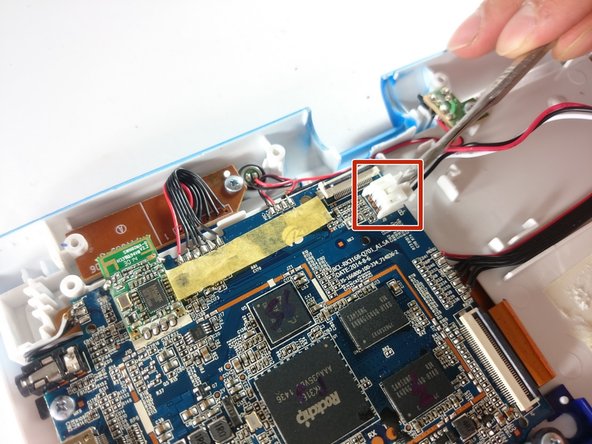
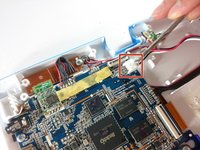
    • Now that the battery is free to be moved, unplug the wire connecting the battery to the motherboard.

    Chiedi a FixBot
  8. VTech InnoTab Max Battery Replacement: passo 8, immagine 1 di 1
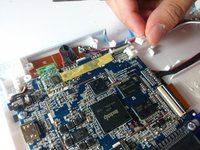
    • The battery is now fully disconnected.

    Chiedi a FixBot
Conclusione

To reassemble your device, follow these instructions in reverse order.

Altre 8 persone hanno completato questa guida.

Team

USF Tampa, Team S5-G5, Lacy Spring 2017 Membro di USF Tampa, Team S5-G5, Lacy Spring 2017

USFT-LACY-S17S5G5

3 Membri

10 guide realizzate

10Commenti sulla guida

Thank you for the useful guide!

Which battery (exact specs) can be used as a replacement?

kermit - Rispondi Condividi

Where can we purchase a replacement battery

Frank Godon - Rispondi Condividi

Where can we buy a replacement battery

Frank Godon - Rispondi Condividi

Nice of you to show this, but I can not find that particular battery anywhere. Not even the China website.

Let us know where we can get the battery.

Donald Josefczyk - Rispondi Condividi

Since it seems like a replacement battery cannot be purchased anywhere, can the battery be bypassed to still use it plugged in? I know it defeats the purpose of a tablet, but it would be nice to still use it. Anyone have suggestions?

ktmm - Rispondi Condividi

Aggiungi Commento

Visualizza Statistiche:

Ultime 24 Ore: 0

Ultimi 7 Giorni: 8

Ultimi 30 Giorni: 46

Tutti i Tempi: 15,705