Introduzione
This guide will provide step by step instructions to show how to fix a button that is no longer clicking properly.
Cosa ti serve
-
Strumento utilizzato in questo passaggio:Tweezers$4.99
-
Remove the plastic cover and pack of weights.
-
Remove the two 1.0 mm foam covers with tweezers.
-
Peel away the plastic screw cover with tweezers.
 Chiedi a FixBot
-
-
-
-
Remove the four 1.0 mm screws with a Ph #1 screwdriver.
-
Gently remove the top of the mouse.
-
-
-
Flip the cover of the mouse over.
-
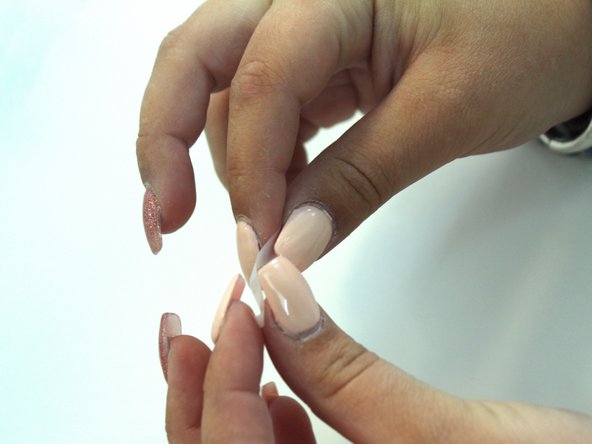
Fold a piece of tape over on itself. This should make both sides sticky.
-
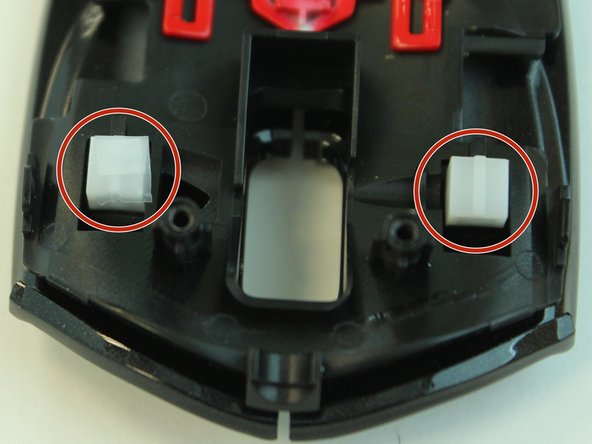
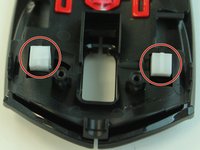
Cover both buttons with tape to increase the surface area of each click.
-


To reassemble your device, follow these instructions in reverse order.

Team

Linn Benton Community College, Team S2-G3, Johnson Spring 2018 Membro di Linn Benton Community College, Team S2-G3, Johnson Spring 2018
LBCC-JOHNSON-S18S2G3
4 Membri
5 guide realizzate
