Questa traduzione è stata generata automaticamente e non è stata ancora revisionata da una persona. Parli questa lingua? Dai un’occhiata.
Introduzione
Questa guida alla sostituzione fornisce istruzioni passo dopo passo con immagini per aiutarti a sostituire la batteria del tuo Sony Vaio PCG-3C2L. Potrebbe essere necessario sostituire la batteria se il tuo portatile non si accende o se non mantiene la carica. Per completare questa sostituzione è possibile utilizzare uno strumento di apertura iFixit, ma è facoltativo.
Controlla sempre di avere la batteria corretta. Puoi trovare una batteria sostitutiva qui.
Cosa ti serve
-
-
-
Capovolgi il computer in modo che il fondo sia rivolto verso l'alto.
-
La batteria dovrebbe trovarsi nella parte superiore sul retro del computer.
 Chiedi a FixBot
-
-
-
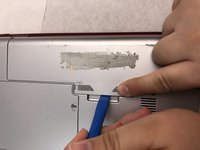
Inizialmente, il pulsante di blocco deve essere spinto completamente verso sinistra. Per sbloccare la batteria, sposta il pulsante di blocco da sinistra verso destra.
-
-
-
-
Dopo aver sbloccato la batteria, tieni premuto il pulsante "release" e spingi verso sinistra.
-
-
-
Tieni premuto il pulsante di "rilascio".
-
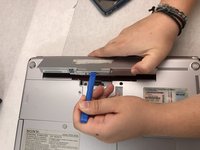
Usa lo strumento di apertura iFixit (o le tue mani) per sollevare la batteria.
-
-


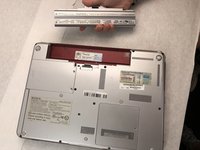
Per rimontare il dispositivo, segui queste istruzioni in ordine inverso.

Team

Embry-Riddle Aeronautical University, Team S8-G3, Salas Fall 2019 Membro di Embry-Riddle Aeronautical University, Team S8-G3, Salas Fall 2019
ERAU-SALAS-F19S8G3
4 Membri
54 guide realizzate
