Salta al contenuto principale
Unisciti alla Community delle riparazioni - Crea un account

Sony Alpha NEX-C3 Control Wheel Replacement

Cosa ti serve

  1. Sony Alpha NEX-C3 Control Wheel Replacement, Top Panel: passo 1, immagine 1 di 1
    • Turn the camera off by sliding the power switch.

    Chiedi a FixBot
  2. Sony Alpha NEX-C3 Control Wheel Replacement: passo 2, immagine 1 di 1
    • Use a Phillips head 000 screwdriver to remove the 4.0mm screw inside the USB port.

    Chiedi a FixBot
  3. Sony Alpha NEX-C3 Control Wheel Replacement: passo 3, immagine 1 di 1
    • Use a Phillips head 000 screwdriver to remove the one 4.0mm screw on the side opposite of the USB port near the shutter button.

    Chiedi a FixBot
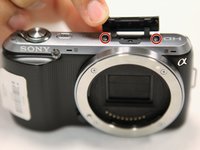
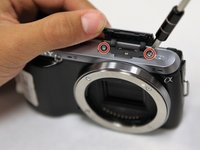
  4. Sony Alpha NEX-C3 Control Wheel Replacement: passo 4, immagine 1 di 2 Sony Alpha NEX-C3 Control Wheel Replacement: passo 4, immagine 2 di 2
    • Open the flap at the top of the camera.

    • Use a Phillips head 000 screwdriver to remove the two 4.0mm screws inside.

    Chiedi a FixBot
  5. Sony Alpha NEX-C3 Control Wheel Replacement: passo 5, immagine 1 di 1
    • Gently lift off the top panel with your hands.

    Chiedi a FixBot
  6. Sony Alpha NEX-C3 Control Wheel Replacement, Back Panel: passo 6, immagine 1 di 1
    • Use a Phillips head 000 screwdriver to remove the 4.0mm screw at the side opposite of the USB port.

    Chiedi a FixBot
  7. Sony Alpha NEX-C3 Control Wheel Replacement: passo 7, immagine 1 di 2 Sony Alpha NEX-C3 Control Wheel Replacement: passo 7, immagine 2 di 2
    • Use a Phillips head 000 screwdriver to remove the three 4.0mm screws on the bottom of the camera.

    Chiedi a FixBot
  8. Sony Alpha NEX-C3 Control Wheel Replacement: passo 8, immagine 1 di 1
    • Tilt up the LCD screen.

    • Use a Phillips head 000 screwdriver to remove the two coarse 4.0mm screws near the bottom of the camera.

    Chiedi a FixBot
  9. Sony Alpha NEX-C3 Control Wheel Replacement: passo 9, immagine 1 di 1
    • Gently pry off the back panel, by wiggling it around the LCD screen.

    Chiedi a FixBot
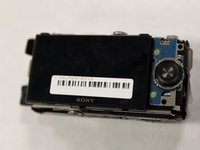
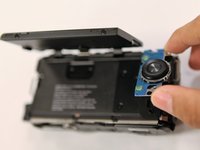
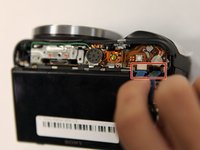
  10. Sony Alpha NEX-C3 Control Wheel Replacement, Control Wheel: passo 10, immagine 1 di 2 Sony Alpha NEX-C3 Control Wheel Replacement, Control Wheel: passo 10, immagine 2 di 2
    • Tilt up the LCD screen.

    • Grab the silver plate, and gently pry it up.

    Chiedi a FixBot
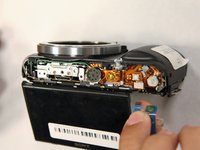
  11. Sony Alpha NEX-C3 Control Wheel Replacement: passo 11, immagine 1 di 2 Sony Alpha NEX-C3 Control Wheel Replacement: passo 11, immagine 2 di 2
    • Gently pinch blue ribbon cable, and pull it out of the port.

    Chiedi a FixBot
Conclusione

To reassemble your device, follow these instructions in reverse order.

Altre 3 persone hanno completato questa guida.

0Commenti sulla guida

Aggiungi Commento

Visualizza statistiche:

Ultime 24 ore: 2

Ultimi 7 giorni: 19

Ultimi 30 giorni: 75

Tutti i Tempi: 4,303