Introduzione
Questa guida mostra come aprire il KORG Volca Sample e spiega come funzionano i componenti interni.
Cosa ti serve
-
-
-
Rimuovi sette viti.
-
Poi gira il Volca. Ora puoi rimuovere i due circuiti stampati. Fai attenzione al cavo dell'altoparlante e al cavo della batteria. Nella mia foto, il cavo nero è già staccato.
 Chiedi a FixBot
-
-
-
Questo è il processore principale. Si tratta di un Cypress FM4-Series MB9BF164L.
-
25Q03213
-
Il DAC. AKM4384FT.
-
MV3241 / 49AG3 / P220
-
-
-
-
Ecco come dovrebbero apparire i pulsanti funzionanti.
-
Se così non fosse, pulisci questi componenti con un cotton fioc imbevuto di isopropanolo.
-
Pulisci anche questi componenti.
-
-
-
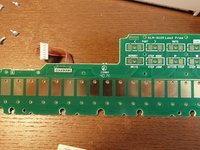
Ecco una panoramica completa del circuito stampato contenente i pulsanti Step Touch e i pulsanti FUNC e WRITE
-
-



27Commenti sulla guida
Hello, thanks for this post. I have an issue with my volca sample, only sound left is outputting. can you show me where the audio jack output circuit is ? Would be much appreciated. I think it’s a spike made by my soundcard while turnung it on that caused this issue.
Hi,
My Volca Sample LCD is dimmed (knob lights are not working too, however button lights works) after accidentally liquid spill. Everything else is fine. Can you give me some tip about dimmed LCD? Tnx
Hello!! I have an issue with my VS. The Button 7 keeps triggering without no reason and is a pain in the ass. I opened the VS and cleaned all the pads ans circuits but doesn´t seem to do anything. :(
