Cosa ti serve
-
-
-
Questa è la parte anteriore e posteriore della PSP E1000
 Chiedi a FixBot
-
-
-
Inizieremo rimuovendo il pannello posteriore.
-
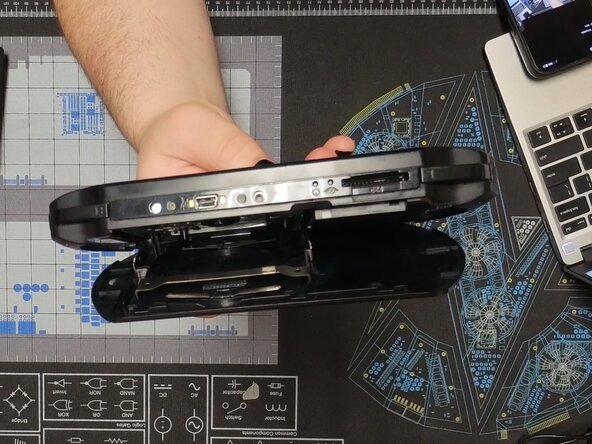
Per farlo, apri il pannello e premi delicatamente verso l'interno sul vano UMD finché non scatta verso l'alto.
-
Se l'operazione è stata eseguita correttamente, dovrebbe rimanere piatto contro il pannello posteriore una volta aperto
-
-
-
Piega delicatamente il pannello posteriore per liberare la cerniera sulla sinistra.
-
Una volta estratto, dovrebbe apparire come nella seconda foto
-
-
-
Rimuovi la vite con un cacciavite Phillips #00 e fai scorrere verso l'alto la copertura della batteria.
-
A questo punto, la batteria può essere rimossa estraendola.
-
Durante il rimontaggio, è utile usare uno spudger per spingere nuovamente in sede il cavo.
-
-
-
-
Rimuovi tutte e quattro le viti sul retro utilizzando la stessa punta di prima.
-
Quindi, rimuovi le due viti superiori.
-
-
-
Quindi, inserisci uno spudger tra il tasto L e la mascherina frontale e separali. Fai lo stesso sul lato destro.
-
Poi fai scorrere la mascherina frontale verso il basso in direzione della parte inferiore dello schermo per sganciare le clip inferiori.
-
Assicurati di sorreggere la mascherina frontale, poiché i tasti anteriori sono ancora collegati tramite un fragile cavo a nastro.
-
-
-
Fai scorrere uno spudger sotto entrambe le clip per sbloccare il display
-
Quindi ruota delicatamente il display verso il lato sinistro del dispositivo in modo da poter vedere la scheda madre.
-
-
-
Sgancia delicatamente il cavo a nastro dello schermo e rimuovilo
-
Quindi metti da parte lo schermo
-
Stacca il nastro adesivo dal cavo a nastro del pannello anteriore, sgancialo, quindi rimuovilo.
-
-
-
Rimuovi il cavo a nastro e il cavo di alimentazione
-
Solleva delicatamente il gruppo pulsanti e la porta di ricarica
-
Il pulsante dorsale è fissato con del nastro adesivo, quindi fai scorrere uno spudger sotto il pulsante e staccalo delicatamente
-
-
-
Sgancia e rimuovi i due cavi a nastro contrassegnati
-
Rimuovi la vite contrassegnata ed estrai lo stick analogico
-
Solleva con attenzione il cuscinetto dei pulsanti e stacca il pulsante dorsale
-
Durante il rimontaggio, installa lo stick prima dei pulsanti.
-
-
-
Sgancia entrambi i cavi a nastro e rimuovili
-
Rimuovi la vite contrassegnata sulla scheda madre
-
Solleva la parte inferiore della scheda madre e falla scorrere verso l'esterno
-
Per il rimontaggio, assicurati che la copertura dell'interruttore di accensione sia installata prima di avvitarla. Deve essere svitata per eseguire l'installazione
-
-
-
Capovolgi il dispositivo e rimuovi le viti contrassegnate
-
Senza toccare la lente, solleva il lettore UMD dal dispositivo
-
-
-
Congratulazioni, hai smontato la tua PSP E1000. Buon divertimento con il rimontaggio!
-
-





4Commenti sulla guida
My aim was to clean the inside, so I only disassembled it up to the screen, but I accidentally pulled the socket where the volume button is connected hard.So that black thing broke but the part that goes into the socket is intact. Finally, after cleaning it, I plugged it into the socket, then I put the LCD screen into its socket and placed it. Finally, after putting the device back into its parts, I pressed the power button but the screen did not come on.
What black thing are you referring to?
When you turned it on did the top LEDs come on or did they stay off?
Same thing for me. Got to the LCD part to clean the dust, plugged everything back but the green Led didn't show up when i tried to turn it on. The charging light does come on though.
The door won't close . I think I messed up when I took out the white piece under the umd piece
