Introduzione
Il mouse Logitech, modello 205, non è così facile da smontare come i modelli successivi. Tuttavia, una volta noti i passaggi, lo smontaggio di questo dispositivo è semplice e richiede solo strumenti comuni. Questa guida istruirà l'utente su come smontare questo particolare modello.
Cosa ti serve
-
-
-
Per rimuovere la batteria, gira il mouse sul retro e premi il pulsante quadrato sotto l'icona della batteria.
-
Premendo questo pulsante, la copertura sulla parte superiore del mouse dovrebbe sbloccarsi, permettendoti di rimuovere la batteria.
 Chiedi a FixBot
-
-
-
Capovolgi il mouse sul dorso.
-
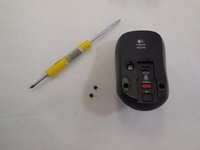
Utilizzando uno spudger in metallo, raschia via l'imbottitura dai due cuscinetti inferiori come mostrato.
-
Questo rivelerà due fori, con una vite all'interno di ciascuno.
-
-
-
-
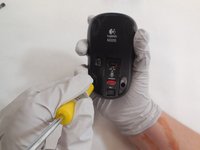
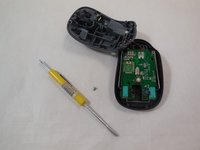
Usando un cacciavite a croce Phillips (J000 nel kit attrezzi iFixit), svita le viti che fissano la base.
-
-
-
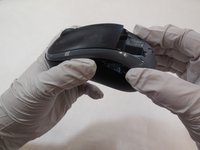
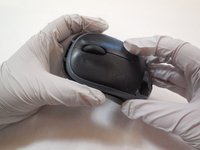
Solleva la parte posteriore del mouse, quindi fai scorrere delicatamente la parte anteriore verso il retro.
-
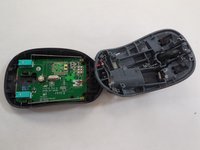
Dopo aver fatto scorrere, il mouse si aprirà come mostrato.
-
-
-
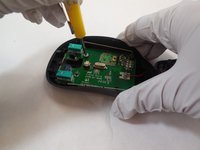
Usa un cacciavite a stella (punta J000 nel kit attrezzi iFixit) per svitare il circuito stampato dal telaio del mouse.
-
-
Strumento utilizzato in questo passaggio:Tweezers$4.99
-
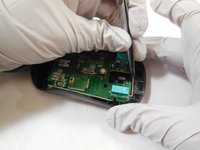
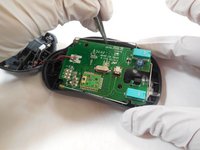
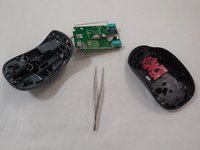
Usando le pinzette, estrai delicatamente il circuito stampato dal mouse. Afferra il circuito stampato dal telaio metallico che lo circonda, come mostrato.
-
-









6Commenti sulla guida
I don’t quite understand the point of this. The mice fail occasionally but are inexpensive (~$15). It would be nice to be able to repair them but merely disassembling them doesn’t serve any purpose as far as I can see.
I would like to be able to open my mouse to see why it's not working all the time and I suspect it's because some kind of liquid or goo got in there. Maybe I can clean it.
If you can open it, you can explore the problem, look for a fix - but these days it's very likely you will break the plastics in trying to open it. THAT is the value of this page, it reduces the risk of broken plastic tabs etc. because someone has already "been there". I've just rescued my (otherwise perfectly good) M180 by cleaning out the gunk that had collected inside the wheel - which was interrupting the optics that count wheel rotation. I didn't need a guide for that part...
